Use the provided rack mounting kit to install the Trellix DLP Capture Storage Array (DLP-CSA-B or DLP-CSA-A) in a four-post 19-inch rack.
Note
Use only the rack-mounting kit provided with the Trellix DLP Capture Storage Array package for proper installation.
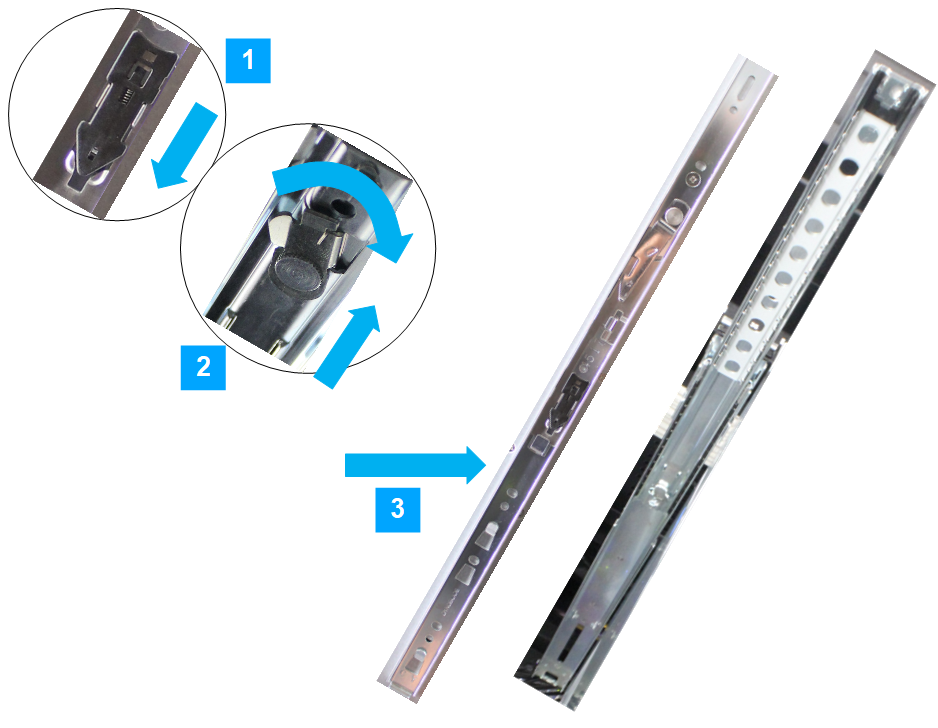
Separate the channels.
Callout
Description
1
Pull the release tab and slide the inner channel from the rail assembly.
2
Push the detent lock to slide the middle channel back into the outer rail.
3
Separated channels.
For each mounting rail, follow these steps:
At the front of the rack, position the right or left mounting rail on the corresponding side so that the mounting bracket clips into the rack aligning with the rack holes.
Callout
Description
1
Position the mounting bracket clips.
2
Align with the rack hole.
At the back of the rack, pull the back mounting-bracket (extending the mounting rail) so that it aligns with the rack holes and clip it into the rack in the same way as the front brackets.
On each side of the rack, ensure that the mounting rails are at the same level.
.png)
Fit the rail inner channel to the side of the chassis; hook the rail into the metal work at the front, and then fix two screws on each side near the rear.
Callout
Description
1
Hook the slide into the chassis metal work.
2
Secure the screws near the rear of the chassis.
Note
Use the Phillips #2 screwdriver. Using an incorrect-sized screwdriver damages the screw heads.
.png)
Slide both rails so they are fully extended.
Take assistance and lift Trellix DLP Capture Storage Array and slide the chassis rail inner channel into the rail on both the sides.
Pull the release-tab forward to permit the chassis to slide back into the rack.
Caution
Trellix DLP Capture Storage Array turns on when the power is applied. Don't connect the power supplies until the DLP Network appliance is set up with the RAID controller unit.
.png)