The Email Security — Cloud Administration Guide describes how to access the Email Security - Cloud Web portal and manage the defense of your organization's inbound and outbound email traffic. The presumed user of this document is an IAM admin or IAM user with an Email Security — Cloud admin role assigned to them. For more information about features available to non-admin users within your organization, see the Email Security - Cloud User Guide. Email Security — Cloud also provides RESTful APIs for custom integration. The APIs are provided for Alerts, Email Trace, and Quarantine functionalities. For more information, see the Email Security - Cloud API Reference.
Important
There are two versions of IAM. If the URL you use to access the IAM UI ends with
fireeye.com, this document pertains to you. If the URL you use to access the IAM UI ends withtrellix.com, see the Trellix IAM Guide for information regarding IAM.
In this document, "user", "administrative user", "admin user", and "administrator" refer to IAM admins and IAM users who have been assigned Email Security — Cloud admin roles. For more information, see IAM user types and roles or the Trellix IAM Guide. A "non-administrative user" or "non-admin user" always refers to a protected member of your organization without an IAM admin or user account.
Note
Some screenshots in this guide may differ slightly from the current Web UI.
The Trellix Email Security - Cloud platform provides real-time, dynamic threat protection without the use of signatures to protect your organization across the primary threat vectors, including Web, email, and files, and across the different stages of an attack life cycle. It incorporates an end-user portal that allows quarantine management, as well as review of malicious email and statistics. Email Security — Cloud has three different modes of service that include features specific to your organization's needs. For more information, see Configuring your mail transfer agent (MTA).
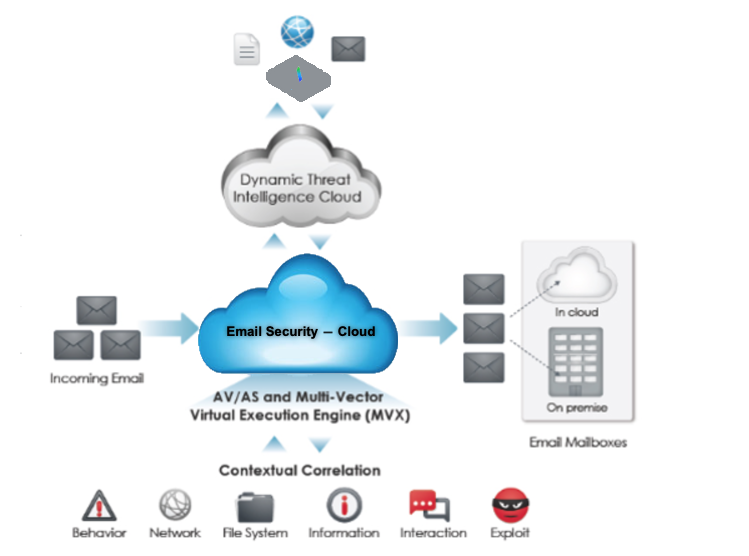
Inbound and outbound support
Email Security — Cloud protects your organization through inbound and outbound email security support.
Important
Outbound support is available for all Email Security — Cloud service regions.
Trellix Email Security - Cloud protects your organization's email system from potential threat actors by scanning emails sent from external domains for malicious activity. You can customize Email Security — Cloud Inbound protection through the Web UI.
Trellix Email Security - Cloud also authorizes and scans outbound email messages sent from your organization's mailboxes to external entities. Email Security — Cloud authorizes messages sent by your organization based on the sender IP address and the unique domain identification keys embedded into email headers. For more information, see Configuring outbound mail flow.