Last Updated: September 17, 2023
Server command line interface
You can access the command line interface (CLI) on the SVM virtual machine to perform basic maintenance tasks.
The CLI is a series of commands that you can issue to the mvadm utility. Each command has arguments and parameters that can be added to the command to change the command's behavior. This reference lists each command in mvadm, and all argument variations.
Access the CLI
During installation, a shortcut to the command line interface (CLI) for the SVM is added to the Windows Start menu.
From the Start menu, select Programs → McAfee → MOVE AV Server Command Prompt.
NOTE
Make sure you run this command as an administrator.
RESULTS
At this command prompt, you can type commands to perform administration tasks on the SVM.
NOTE
If you cannot find the shortcut to the Server CLI, then launch Command Prompt with administrative privileges and execute the commands for administrative tasks.
cache
Perform operations on the SVM scan cache.
mvadm cache save cfilename
mvadm cache load cfilename
mvadm cache list
mvadm cache flush
mvadm cache infoArguments | Description |
|---|---|
| Save the current set of checksums from the trusted checksum cache to the file |
| Load the checksums from file |
Server command line interface
Arguments | Description |
|---|---|
| List the checksums available in the trusted checksum cache. |
| Remove all checksums from the trusted checksum cache. |
| Print details of the trusted checksum cache. |
config
Display and edit the configuration settings that are applied to the current installation.
mvadm config set NAME=VALUE
mvadm config showArguments | Description |
|---|---|
| Sets the value of the configuration argument NAME to VALUE. |
| Lists the configuration settings. |
Parameters | Value | Description |
|---|---|---|
ComputeCksum | 0 (server) or 1 (client). Default = 1. | Determines whether to use the server-computed checksum of the file or the checksum sent by the client. |
ConnTimeout | A positive integer value. Default = 0 (no timeout). | Sets the connection timeout in milliseconds. |
GTILevel | Between 0 (disabled) and 5 (Very High). Default = 1 (Very Low). | Sets the Global Threat Intelligence level. |
IntegrityEnabled | 0 (off) or 1 (on). Default = 1. | Enables or disables the Self-Protection feature. |
LogFileNum | A positive integer value. Default = 4. | Limits the number of log files allowed before they are overwritten. |
LogFileSize | An integer greater than 1024. Default = 2048. | Limits the size (in KB) of an individual log file. |
MaxCacheItems | A positive integer value. Default = 1,000,000. | Limits the number of items that can exist in the cache. |
NumThreads | Between 0 and 500. Default = 300. | Limits the number of available scan request threads. |
ScanArchiveFiles | 0 (off) or 1 (on). Default = 0. | Enables or disables scanning inside archive files. |
ScanPUPS | 0 (off) or 1 (on). Default = 0. | Enables or disables checking for potentially unwanted programs (PUPs). Scan behavior is determined by VirusScan Enterprise settings. |
ServerPort1 | Between 1024 and 65535. Default = 9053. | Determines the port where the server listens for client requests. |
SVMManagerAddress | An IPv4 address or FQDN. No default. | Specifies the IPv4 address or FQDN of the SVM Manager. |
SVMManagerPort | Between 1024 and 65535. Default = 8080. | Specifies the port used to communicate with SVM Manager. |
RAMDiskEnabled | 1 (0x1) | Enables or disables the RAM disk option. |
MaxNumClients | 250 (0xf4240) | Maximum number of clients that can be connected to the SVM. |
OSSGUID |
| Unique GUID required to register SVM to SVM Manager. |
help
Display usage information for the mvadm utility.
mvadm help
mvadm help commandArguments | Description |
|---|---|
default | Lists the summary description for the SVM CLI commands. |
command | Lists the detailed Help for the provided command. |
loglevel
View and edit the log level of the SVM modules.
mvadm loglevel
mvadm loglevel enable {MODULE_NAME | ALL} {TYPES... | ALL}
mvadm loglevel disable {MODULE_NAME | ALL} {TYPES... | ALL}Arguments | Description |
|---|---|
default | Lists the current log level of each module in the SVM. Use this form to get a full list of modules for use with the other forms of the loglevel command. |
enable {MODULE_NAME | ALL} {TYPES... | ALL} | Sets the log level for module MODULE_NAME or all modules to the specified log level types or to all types. |
disable {MODULE_NAME | ALL} {TYPES... | ALL} | Clears the specified log level types or all types for MODULE_NAME or for all modules. |
These are the supported log level types:
Error
Warning
Info
Debug
Warning
System
Info
Detail
Fnentry
Fnexit
stats
Display the current statistics of the SVM.
mvadm statsArguments | Description |
|---|---|
| Displays current usage and performance statistics for the SVM. The statistics are collected in real time, and the displayed data is a snapshot of the information at the time the command was invoked. The full list of reported statistics is shown in the example output. |
Example 1. Example output
C:\>mvadm stats
Total number of cksum req: 13125
Total number of file transfer req: 11825
Total number of smart file req: 14
Total number of scans on RAM disk: 11825
Cksum cache hit: 1300
Total av scan req: 11825
Total av scan failure: 0
Data recv failure: 0
Resp send failure: 0
Total scan threads: 300
Total heart beat threads: 0
Total idle threads: 300
Number of requests in queue: 0
Number of items in cache: 0
Avg request process time: 0.045183 sec
Avg request wait time: 0.000000 sec
Number of frequently modified files scanned: 848
Data saved for frequently modified files: 98%
Maximum entries for frequently modified files: 25
Total Tie Requests: 95486
Total Tie File Reputation Requests: 90622
Total Tie Cert Reputation Requests: 36
Total ATD candidates: 851
Total ATD successful submissions: 76
Total Tie Cache Hits: 4712
Total Tie Certificate Cache Hits: 116
Total Tie File Reputation change events: 140
Total Tie Certificate reputation change events: 0
Total Tie Certificate hashes in Global cache: 34
Total Tie File hashes in Global cache: 46827
Tie Avg Response Time per Request: 0.370643 secOn-demand scan stats
Display the information related to On-demand scan on SVM.
mvadm stats odsArguments | Description |
|---|---|
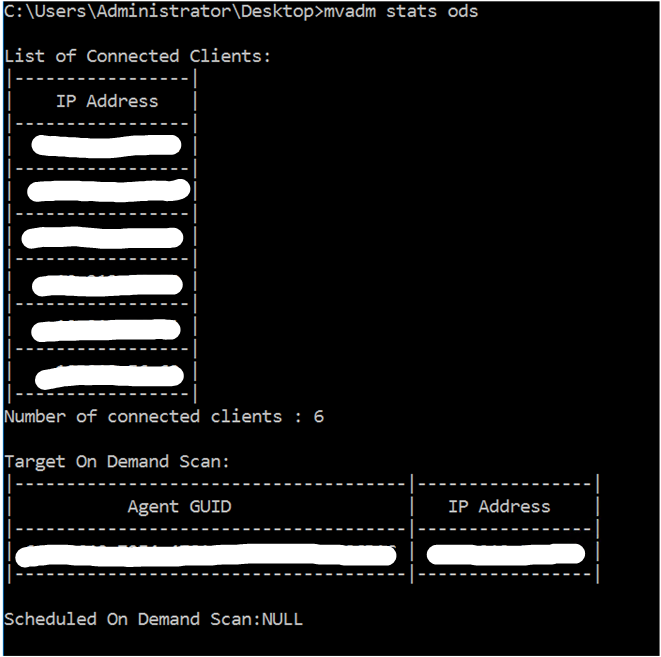
List of Connected Clients | IP address list of connected Multi-platform clients . |
Number of connected Clients | Number of connected Multi-platform clients. |
Target On Demand Scan | Multi-platform client GUID and IP address of system currently running TODS. |
Scheduled On Demand Scan | Multi-platform client GUID and IP address of system currently running Scheduled on demand. |
Example 2. Example
The output of the mvadm stats ods command from one SVM where 6 clients are connected and on one of client TODS is running:
version
Display the version of the SVM application installed on the server VM.
mvadm versionArguments | Description |
|---|---|
| Displays the version number of the SVM. This is useful for verifying if an update has completed successfully, or checking if an update is needed. |
cert
Using the cert command, you can view, add, or remove certificates from the Certificate policy.
Arguments | Description |
|---|---|
| View the existing certificates |
| Add certificate name to the Certificates policy. |
| Remove certificate from the Certificates policy. |
On-demand scan for individual folders
Use this command to run on-demand scan for individual folders.
Argument | Description |
|---|---|
| Run on-demand scan on the specific folder. |
Example: To run on-demand scan on the folder C:\Windows, run the command mvadm tods path C:\Windows\