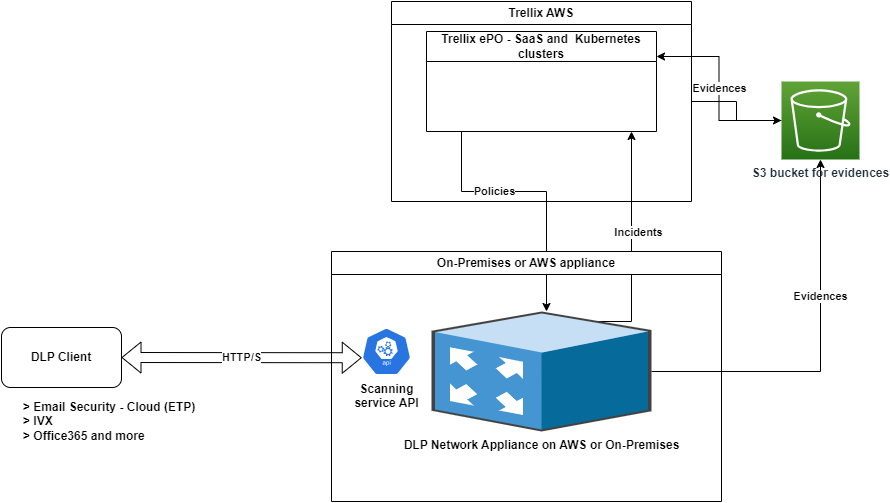
The integration of cloud gateways with Trellix DLP Network Prevent – SaaS allows the cloud gateway administrators to use Trellix DLP Network Prevent – SaaS API to scan outbound messages. The Cloud gateway connects to Trellix DLP through the Trellix DLP Network Prevent – SaaS API to fetch the Trellix DLP rule match information and then take the action based on the defined Trellix Data Loss Prevention – SaaS policies.
Trellix Data Loss Prevention – SaaS receives the traffic via HTTPS on port 941. You can allow the traffic to port 941 on your network firewalls. Third-party applications can send HTTPS requests to Trellix Data Loss Prevention – SaaS according to the specifications provided in the API call to get responses.
Advantages of enabling this integration
This integration provides seamless native integration with Trellix Email Security - Cloud and other cloud gateways without requiring to backhaul the traffic to on-prem appliances for inspection.
This API integration is also supported with other third-party cloud gateway integration.
Prerequisite
When you deploy Trellix DLP Network Prevent – SaaS, its firewall must be opened to allow Email Security - Cloud IPs to access the appliance port 941.
Trellix DLP Network Prevent – SaaS must be registered with Trellix ePO - On-prem or Trellix ePO - SaaS.
Only an approved list of Email Security - Cloud or other third-party cloud gateways public IPs can send requests to this port. You must also configure a firewall to be accessible only through the approved IPs. Trellix DLP Network Prevent – SaaS continues to upload evidences and incidents to Trellix ePO - On-prem or Trellix ePO - SaaS.
Note
It is recommended to use a separate instance of the appliance if configuring to receive requests from cloud gateways.
Trellix DLP REST API integration with Email Security - Cloud gateway
With this integration, it is not required to manage Trellix DLP Network Prevent – SaaS separately for SMTP routing and instead achieve the same results using minimal configuration in Email Security - Cloud. You can continue to configure the Trellix Data Loss Prevention – SaaS rules in the Trellix ePO - On-prem or Trellix ePO - SaaS platform, provide details of the Trellix DLP deployment in Email Security - Cloud - Trellix Data Loss Prevention – SaaS policy and then assign it to domains in Email Security - Cloud.
You can deploy Trellix DLP Network Prevent – SaaS on your on-prem hardware or ESX, or your AWS account. It is recommended to deploy Trellix DLP Network Prevent – SaaS close to Email Security - Cloud to minimize network latency.
Configure Trellix Data Loss Prevention – SaaS network settings for Email Security - Cloud to access the needed API
Expose the required Trellix DLP Network Prevent – SaaS API outside of the appliance for Email Security - Cloud to access DLP policies. To access the API, make a small configuration change at the backend of the appliance as detailed in the article 000013799.
For information about how to configure the Trellix Data Loss Prevention – SaaS policy in Email Security - Cloud, see DLP Policy.