In the Alerts page of the Email Security - Server appliance, you can identify the matched URLs in email message bodies that link to files detected as malicious, grouped by recipient, sender, or alert. From the Alerts page, you can drill down to identify the individual URLs that are detected as malicious for a malware event. The total number of malicious URLs are categorized and tracked on the Alerts page.
The following example displays the drill-down details of the malware on the Alert Details page for an email that contains malicious attachments.
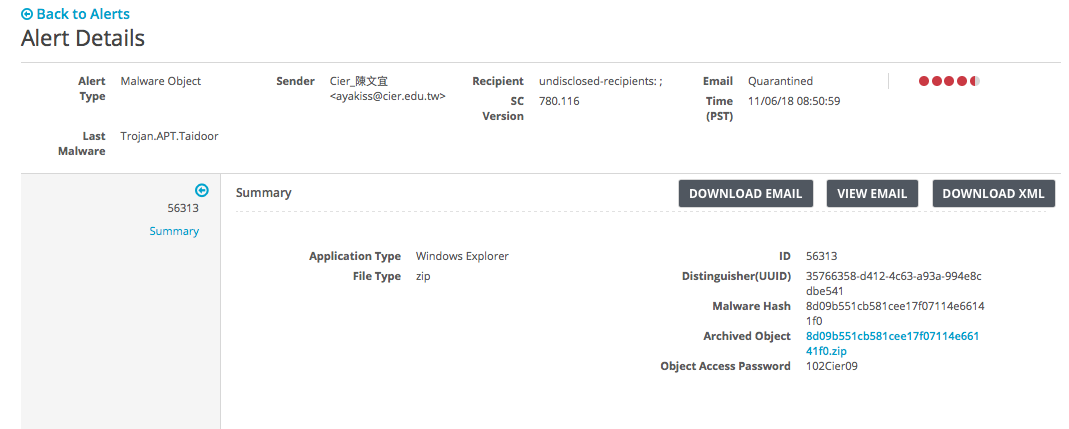
Drill-down details are displayed on the Alert Details page for emails that contain malicious URLs. If a URL is on the blocked list, Block-List-Match-Url is included as the name of the malware type. If the email is identified as a credential phishing attack, Phish.Live.DTI.URL is included as the name of the malware type.
For details about the malicious URLs that include Block-List-Match-Url as the name of the malware type for a blocked list, see About custom allowed and blocked lists.
For details about the malicious URLs that include LIVE.DTI.URL as the name of the malware type (malicious, exploit, or phish) for Advanced URL Defense, see About advanced URL defense.
Prerequisites
Administrator, Monitor, or Analyst, access to the Email Security - Server appliance