You can use the data exported from existing queries to create valid web URL queries and S-Expressions.
The following example is the exported data from the preconfigured VSE: DAT Deployment query. This exported file is used to describe the steps and processes to create a web URL queries.
<list> <query> <dictionary/> <name>VSE: DAT Deployment</name> <description>Displays the three highest DAT versions, and a slice for all the other versions.</description> <target>EPOLeafNode</target> <table-uri>query:table?orion.table.columns=EPOComputerProperties.ComputerName%3AEPOComputerProperties.DomainName%3AEPOLeafNode.os%3AEPOComputerProperties.Description%3AEPOLeafNode.Tags%3AEPOProdPropsView_VIRUSCAN.productversion%3AEPOProdPropsView_VIRUSCAN.hotfix%3AEPOProdPropsView_VIRUSCAN.servicepack%3AEPOProdPropsView_VIRUSCAN.enginever%3AEPOProdPropsView_VIRUSCAN.enginever64%3AEPOProdPropsView_VIRUSCAN.datver%3AEPOLeafNode.LastUpdate&orion.table.order.by=EPOComputerProperties.ComputerName%3AEPOComputerProperties.DomainName%3AEPOLeafNode.os%3AEPOComputerProperties.Description%3AEPOLeafNode.Tags%3AEPOProdPropsView_VIRUSCAN.productversion%3AEPOProdPropsView_VIRUSCAN.hotfix%3AEPOProdPropsView_VIRUSCAN.servicepack%3AEPOProdPropsView_VIRUSCAN.enginever%3AEPOProdPropsView_VIRUSCAN.enginever64%3AEPOProdPropsView_VIRUSCAN.datver%3AEPOLeafNode.LastUpdate&orion.table.order=az</table-uri> <condition-uri>query:condition?orion.condition.sexp=%28+where+%28+version_ge+EPOProdPropsView_VIRUSCAN.productversion+%228%22+%29+%29</condition-uri> <summary-uri>query:summary?pie.slice.title=EPOProdPropsView_VIRUSCAN.datver&pie.count.title=EPOLeafNode&orion.query.type=pie.pie&orion.sum.query=true&orion.sum.group.by=EPOProdPropsView_VIRUSCAN.datver&orion.sum.order=desc&orion.show.other=true&orion.sum.aggregation=count&orion.sum.aggregation.showTotal=true</summary-uri> </query> </list>
The exported query contains strings that are URL-encoded. Use this table to convert the URL-encoded characters to valid web URL query characters.
URL-encoded characters | Web URL query characters |
|---|---|
%22 | quotation marks ""..."" |
"+" | space " " |
%28 | opening parenthesis "(" |
%29 | closing parenthesis ")" |
& | ampersand "&" |
az (in an order command) | "asc" = ascending order |
za (in an order command) | "desc" = descending order |
XML query data file structure
The XML query export data file is separated into sections of data. Some sections aren't used in your final web URL query, and some sections can be used almost as they appear.
Note
The commands in the
<summary-uri>query:code creates the pie chart and are not used to create the web URL query output. Theorder=descparameter is shown as a sorting and grouping example in the final web URL query.
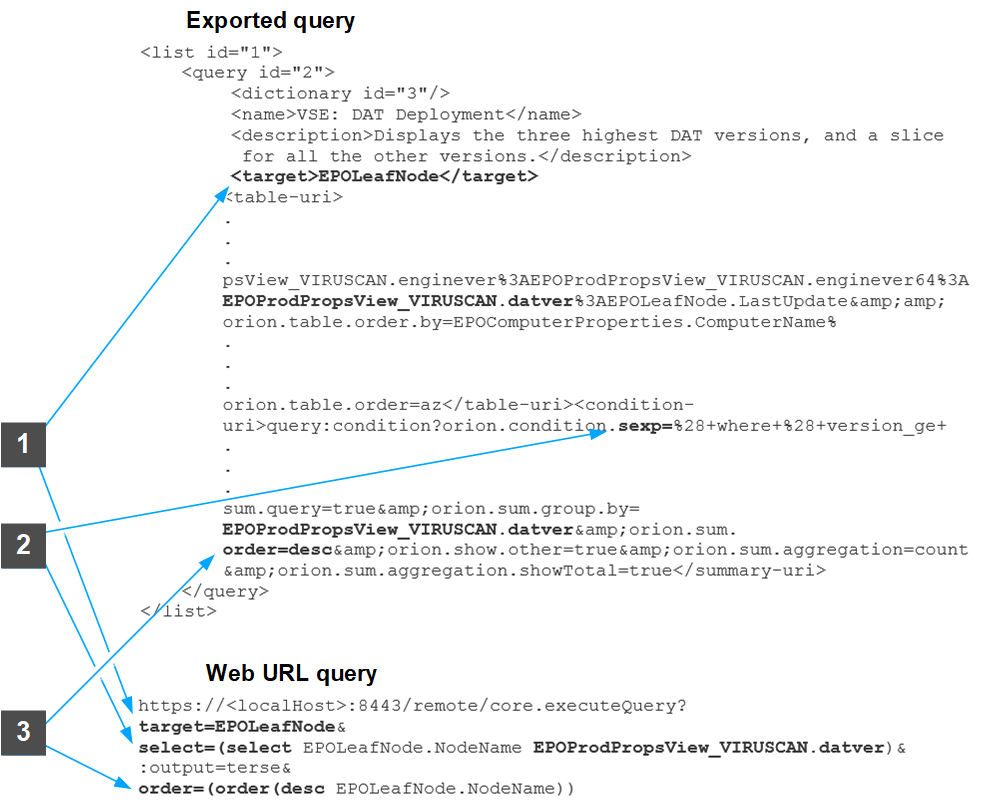
This table lists the numbers shown in the figure, the major sections of the exported query and the final web URL query, and how they are used.
Number | Exported query | Web URL query | Description |
|---|---|---|---|
1 | <target>...</target> | target=... | Lists the table parsed in the query. |
2 | sexp=... | select=(select... | Lists the S-Expressions command objects, their parameters, and joint tables. |
3 | order=... | order=(order(... | Lists the sort order used in the output. |
Web URL query separated into parts
Using the information from the existing query exported XML file, you can create this file, with line breaks for clarity:
https://<localHost>8443/remote/core.executeQuery? target=EPOLeafNode& select=(select EPOLeafNode.NodeName EPOProdPropsView_VIRUSCAN.datver)& :output=terse& order=(order(desc EPOLeafNode.NodeName))
Note
The
?and&s indicate the different parts of the web URL query.
When you remove the line breaks, this example is final web URL query.
https://<localHost>:8443/remote/core.executeQuery?target=EPOLeafNode&select=(select EPOLeafNode.NodeName EPOProdPropsView_VIRUSCAN.datver)&:output=terse& order=(order(desc EPOLeafNode.NodeName))
Following is the output of the web URL query.
OK: System Name DAT Version (VirusScan Enterprise) --------------- ---------------------------------- DP-W7PIP-3 7465.0000 DP-W7PIP-2 7429.0000 DP-W7PIP-1 7437.0000 DP-EN-W7E1XP-2 DP-2K8ER2EPO510 7465.0000 DP-2K8AGTHDLR 7437.0000 DP-2K12R2S-SRVR