You can use S-Expressions (Symbolic Expressions) in your ePO - On-prem web URL commands to select specific command objects and their parameters to join tables, then group, sort, and order the output.
Use the core.executeQuery command with the [select=<>] option to create S-Expressions.
This diagram shows the basic requirements for a fully qualified S-Expression query.
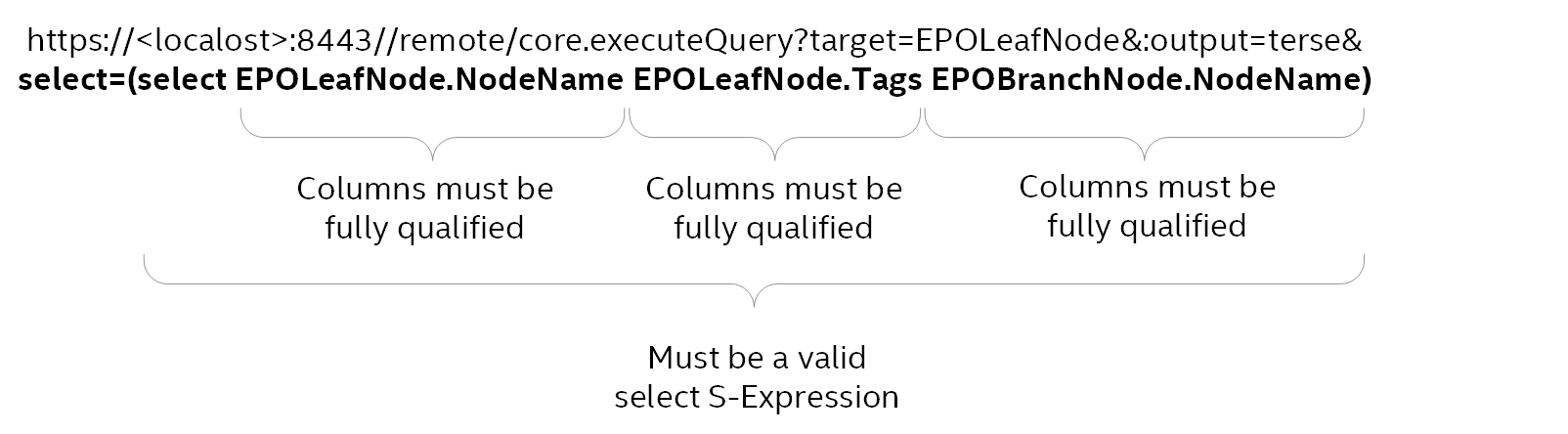
A fully qualified S-Expression has these parts:
select=(select ...)— S-Expression function format.<tableName>.<argumentName>— The names of the SQL table columns you want to display and manipulate. For example, EPOLeafNode.NodeName is a managed system name and EPOBranchNode.NodeName is a System Tree group name.
In this example web URL query, the EPOLeafNode and EPOBranchNode tables are automatically joined to fulfill the query.
Note
The two tables in this example must be fully qualified, or related, for the automatic join to work.
Find the valid parameters for the target tables and confirm the table relationships.
Group, sort, order, and filter web URL query output
Within your web URL query S-Expressions, you can group, sort, order, and filter web URL query using the arguments listed for the core.executeQuery command.
Ordering the output
Before you can configure a sort order for your web URL query output, you must determine if the data in a table column can be sorted. Use this command to confirm the column data can be sort ordered.
https://<localHost>:8443/remote/core.listTables?table=<tableName>
This example confirms you can sort the EPOBranchNode table NodeName column data. In the NodeName row, True is listed in the Order ? column.
https://<localHost>:8443/remote/core.listTables?table=EPOBranchNode
This command displays this Help.
OK: Name: Groups Target: EPOBranchNode Type: join Database Type: Description: null Columns: Name Type Select? Condition? GroupBy? Order? Number? ------------- ------------- ------- ---------- -------- ------ ------- AutoID group False True False True True NodeName string True False True True False L1ParentID group False False True True True L2ParentID group False False True True True Type int False False False True True BranchState int False False False True True Notes string True True False True False NodePath string False False False True False NodeTextPath string_lookup True True True True False NodeTextPath2 string_lookup True True True True False Related Tables: Name ---- Foreign Keys: None
This Order command is used to sort the ePO - On-prem branch nodes, or System Tree Group Names, in descending order.
https://<localHost>:8443//remote/core.executeQuery?target=EPOLeafNode&:output=terse&select=(select EPOLeafNode.NodeName EPOLeafNode.Tags EPOBranchNode.NodeName&order=(order(desc EPOBranchNode.NodeName)
This is the command output.
OK: System Name Tags Group Name --------------- ------------ -------------- DP-2K12R2S-SRVR Server SuperAgents DP-2K8ER2EPO510 Server Servers DP-W7PIP-1 Workstation NAT Systems DP-W7PIP-2 Workstation NAT Systems DP-W7PIP-3 Workstation NAT Systems DP-EN-W7E1XP-2 Lost&Found DP-2K8AGTHDLR Server, test Agent handlers
Grouping the output
This command groups, or counts, the System Tree system names, and groups them by ePO - On-prem branch nodes, or System Tree Group Names.
https://<localHost>:8443/remote/core.executeQuery?target=EPOLeafNode&:output=terse&select=(select EPOBranchNode.NodeName (count))&group=(group EPOBranchNode.NodeName)
This is the command output.
OK: Group Name count -------------- ----- Agent handlers 1 Lost&Found 1 NAT Systems 3 Servers 1 SuperAgents 1
Filtering the output using a string
This command filters the System Tree system names to display only the names with the string "2k8" in the name.
https://<localHost>:8443/remote/core.executeQuery?target=EPOLeafNode&:output=terse&select=(select EPOLeafNode.NodeName EPOLeafNode.Tags EPOBranchNode.NodeName)&where=(contains EPOLeafNode.NodeName "2k8")
This is the command output displaying only the names with the string "2k8" in the name.
OK: System Name Tags Group Name --------------- ------------ -------------- DP-2K8ER2EPO510 Server Servers DP-2K8AGTHDLR Server, test Agent handlers
Filtering the output using the top <number> of the list
This command filters the System Tree system names to only display the top 3 names in the list.
https://<localHost>:8443/remote/core.executeQuery?target=EPOLeafNode&:output=terse&select=(select (top 3) EPOLeafNode.NodeName EPOLeafNode.Tags EPOBranchNode.NodeName)
This is the command output displaying the top 3 names in the list.
OK: System Name Tags Group Name --------------- ------ ----------- DP-2K8ER2EPO510 Server Servers DP-2K12R2S-SRVR Server SuperAgents DP-EN-W7E1XP-2 Lost&Found
Filtering the output using common attributes
This command filters the System Tree systems to display only a specific number of common attributes.
https://<localHost>:8443/remote/core.executeQuery?target=EPOLeafNode&:output=terse&select=(select EPOLeafNode.NodeName EPOLeafNode.Tags EPOBranchNode.NodeName)&where=(hasTag EPOLeafNode.AppliedTags 4)
This is the command output with 4 common attributes.
OK: System Name Tags Group Name ----------- -------------- ----------- DP-W7PIP-1 7, Workstation Workstation DP-W7PIP-2 7, Workstation Workstation DP-W7PIP-3 7, Workstation Workstation
You can combine filters
You can use the most common filters AND and OR. For example:
(AND <expression> <expression> …)(OR <expression> <expression> …)They can be combined in any combination. For example:
(AND (hasTag EPOLeafNode.AppliedTags 3) (contains EPOLeafNode.NodeName “100”))Note
Parentheses must be matched.
You can also use filters that can’t be constructed in the ePO - On-prem user interface. For example:
(OR (AND (hasTag EPOLeafNode.AppliedTags 3) (contains EPOLeafNode.NodeName “100”)) (AND (hasTag EPOLeafNode.AppliedTags 4) (contains EPOLeafNode.NodeName “100”)) )