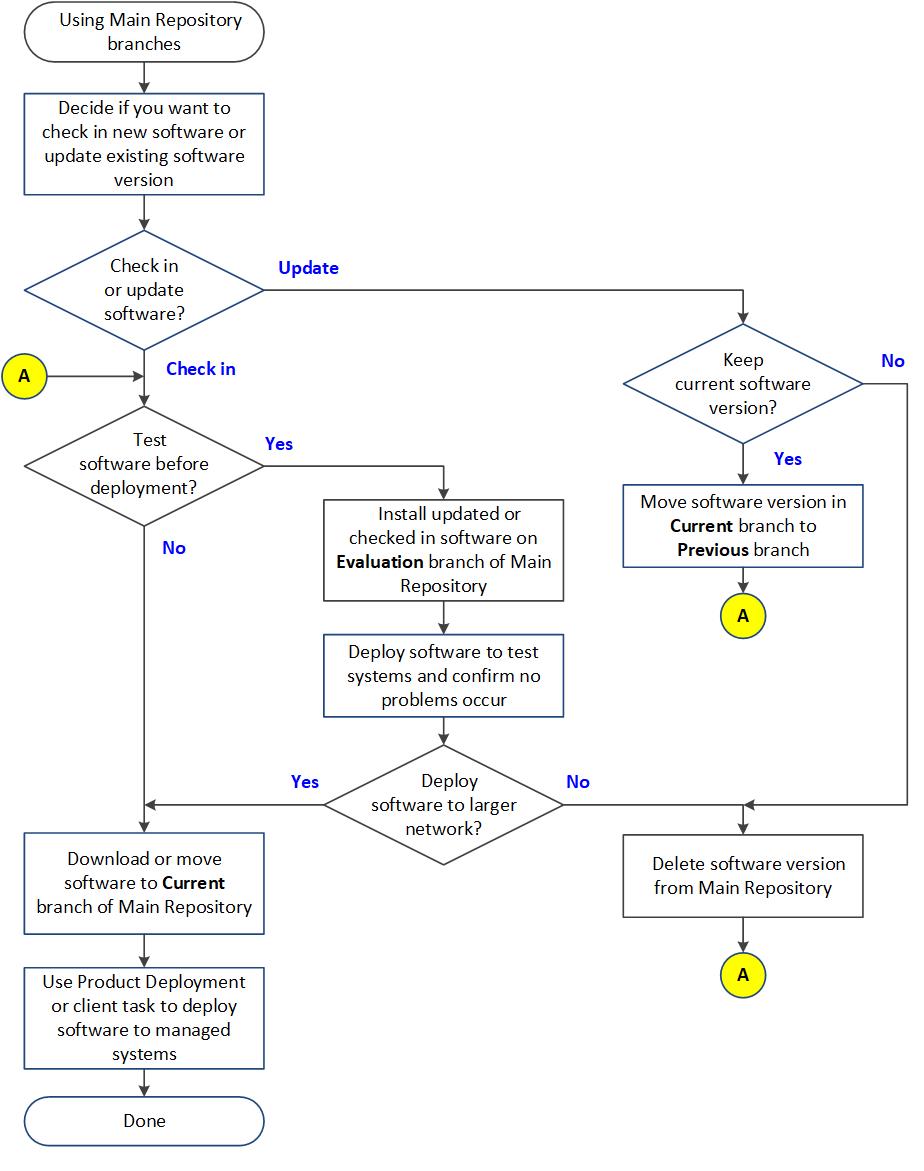
You can use the three ePO - On-prem repository branches to maintain up to three versions of the packages in your main and distributed repositories.
The repository branches are Current, Previous, and Evaluation. By default, ePO - On-prem uses only the Current branch. You can specify branches when adding packages to your Main Repository. You can also specify branches when running or scheduling update and deployment tasks, to distribute different versions to different parts of your network.
Update tasks can retrieve updates from any branch of the repository, but you must select a branch other than the Current branch when checking in packages to the Main Repository. If a non-Current branch is not configured, the option to select a branch other than Current does not appear.
To use the Evaluation and Previous branches for packages other than updates, you must configure this in the Repository Packages server settings.
Current branch
The Current branch is the main repository branch for the latest packages and updates. Product deployment packages can be added only to the Current branch, unless support for the other branches has been enabled.
Evaluation branch
You might want to test new DAT and engine updates with a few network segments or systems before deploying them to your entire organization. Specify the Evaluation branch when checking in new DATs and engines to the Main Repository, then deploy them to a few test systems. After monitoring the test systems for several hours, you can add the new DATs to your Current branch and deploy them to your entire organization.
Previous branch
Use the Previous branch to save and store prior DAT and engine files before adding the new ones to the Current branch. If you experience an issue with new DAT or engine files in your environment, you have a copy of a previous version that you can redeploy to your systems if necessary. ePO - On-prem saves only the most immediate previous version of each file type.
You can populate the Previous branch by selecting Move existing packages to Previous branch when you add new packages to your Main Repository. The option is available when you pull updates from a source site and, when you manually check in packages to the Current branch.
This flowchart describes when to use these three different branches of the Main Repository.