To deliver products and updates throughout your network, ePO - On-prem software offers several types of repositories that create a strong infrastructure for updating.
How repository components work together
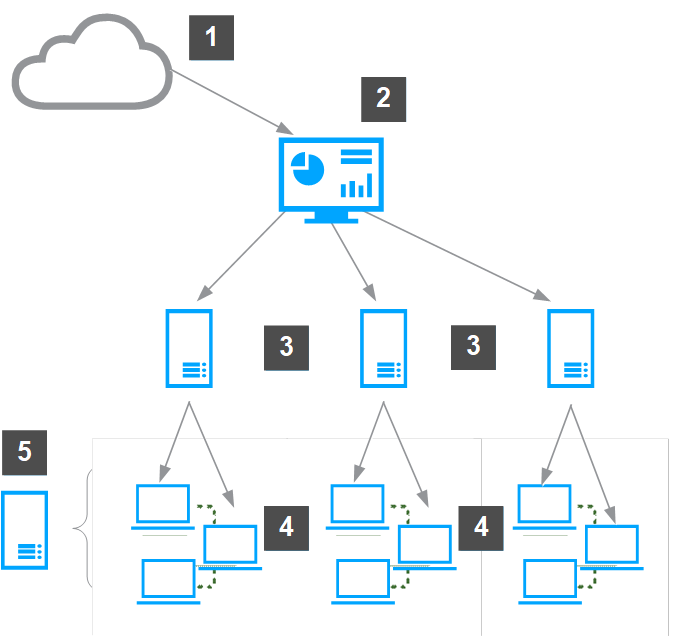
The repositories work together in your environment to deliver updates and software to managed systems. Depending on the size and geographic distribution of your network, you might need distributed repositories.
Source site — The source site is updated daily by Trellix.
Main Repository — The Main Repository regularly pulls DAT and engine update files from the source site.
Distributed repositories — The Main Repository replicates the packages to distributed repositories in the network.
Managed systems — The managed systems in the network retrieve updates from a main or distributed repository.
Fallback site — If managed systems can’t access the distributed repositories or the Main Repository, they retrieve updates from the fallback site.
These components give you the flexibility to develop an updating strategy so that your systems are always current.
Source site
The source site provides all updates for your Main Repository. The default source site is the Trellix http update site, but you can change the source site or create multiple source sites.
We recommend using the Trellix http or Trellix ftp update sites as your source site.
Note
Source sites are not required. You can download updates manually and check them into your Main Repository. But, using a source site automates this process.
Trellix posts software updates to these sites regularly. For example, DAT files are posted daily. Update your Main Repository with updates as they are available.
Use pull tasks to copy source site contents to the Main Repository.
Trellix update sites provide updates to detection definition (DAT) and scanning engine files, and some language packs. Manually check in all other packages and updates, including service packs and patches, to the Main Repository.
Main Repository
The Main Repository maintains the latest versions of security software and updates for your environment. This repository is the source for the rest of your environment.
Note
By default, ePO - On-prem uses Microsoft Internet Explorer proxy settings.
Distributed repositories
Distributed repositories host copies of your Main Repository. Consider using distributed repositories and placing them throughout your network. This configuration ensures that managed systems are updated while network traffic is minimized, especially across slow connections.
As you update your Main Repository, ePO - On-prem replicates the contents to the distributed repositories.
Replication can occur:
Automatically when specified package types are checked in to the Main Repository, as long as global updating is enabled.
On a recurring schedule with Replication tasks.
Manually, by running a Replicate Now task.
Caution
Do not configure distributed repositories to reference the same directory as your Main Repository. This locks the files on the Main Repository. This can cause failure for pulls and package check-ins, and can leave the Main Repository in an unusable state.
A large organization can have multiple locations with limited bandwidth connections between them. Distributed repositories help reduce updating traffic across low-bandwidth connections, or at remote sites with many endpoints. If you create a distributed repository in the remote location and configure the systems in that location to update from this distributed repository, the updates are copied across the slow connection only once — to the distributed repository — instead of once to each system in the remote location.
If global updating is enabled, distributed repositories update managed systems automatically, when selected updates and packages are checked in to the Main Repository. Update tasks are not needed. But, if you want automatic updating, create SuperAgents in your environment. Create and configure repositories and the update tasks.
Caution
If distributed repositories are set up to replicate only selected packages, your newly checked-in package is replicated by default. To avoid replicating a newly checked-in package, deselect it from each distributed repository or disable the replication task before checking in the package.
Fallback site
The fallback site is a source site enabled as the backup site. Managed systems can retrieve updates when their usual repositories are inaccessible. For example, when network outages or virus outbreaks occur, accessing the established location might be hard. Managed systems can remain up-to-date using a fallback site. The default fallback site is the Trellix http update site. You can enable only one fallback site.
If managed systems use a proxy server to access the Internet, configure agent policy settings to use proxy servers when accessing the fallback site.