After upgrading Endpoint Security (HX) policies to EDRF, deploy the EDRF Client package to the endpoints. This step automatically uninstalls xAgent and installs EDRF Client.
Deploy EDRF Client
Log in to ePO - SaaS.
Navigate to Menu → Software → Advanced Deployment, then click New Deployment.
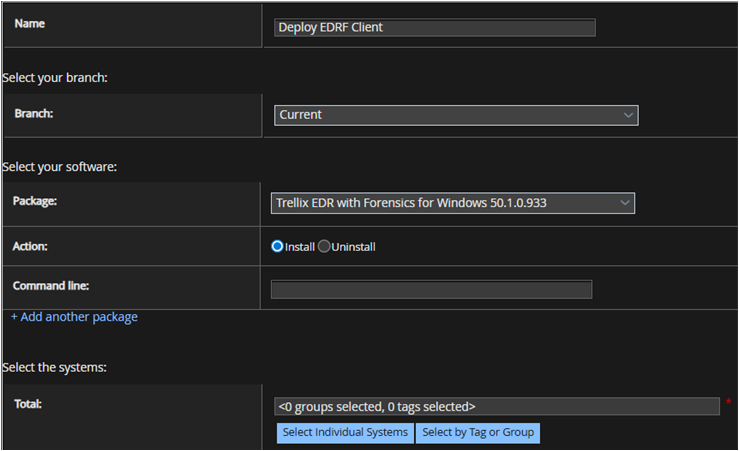
Enter the name of the deployment task and select Current Branch.
In the Select your software section, select the applicable version of the EDRF Client for Windows, Linux, or macOS and choose the Install Action.
Select the target endpoints to deploy the package using the Select Individual Systems or Select by Tag or Group option.
From the System Tree, on the System Selection page, select the target endpoints, then click OK.
In the Auto Update section, enable the Automatically deploy latest version of the products to auto update to the latest version of the EDRF Client.
To postpone deployment, select the Allow end users to postpone this deployment (Windows only) checkbox and set parameters as needed.
Select the Schedule Type as Run Immediately to start the deployment task. You can change the Schedule Type as applicable using the drop-down menu.
Click Save.
View the status of the deployment task on the Advanced Deployment home page.
Click 'Start' or 'Windows' button, search for Task Manager, and verify that XClient processes are running on the Windows endpoints.
To view the current status of XClient processes on Mac and Linux endpoints, use Activity Monitor and Status Monitor respectively
