Large enterprise customers often use separate networks where each network is managed by a separate Central Management System appliance and a separate team within the enterprise. For instance, one enterprise might configure their network into email and Web networks, where the email team manages all Email Security — Server appliances, and the Web team manages all Network Security appliances. Another enterprise might use geographically distributed Central Management System networks (for example, US, EU, APAC).
Customers can benefit from using the CM Peer Service when they have multiple Central Management System appliances that are managing multiple appliances as independent groups within the same environment. The CM Peer Service enables two Central Management System appliances to communicate with each other to share local detection information, such as Network Security and Email Security — Server URL correlation and locally generated signatures.
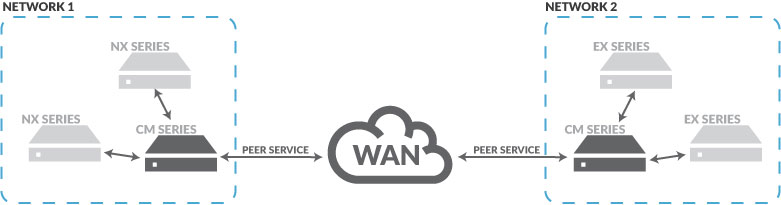
The CM Peer Service provides a backbone to connect distributed Central Management System networks. It enables two-way (CM-to-CM) interactions that allow enterprises to share vital information, such as alerts and signatures, between two or more separate Central Management System networks. The CM Peer Service is used when one or more Central Management System appliances are managing different appliances.
The following diagram shows how the CM Peer Service is configured for two separate Central Management System networks on a WAN. The CM Peer Service supports both LANs and WANs.
When the CM Peer Service is enabled, you can access the following features:
CM Peer Distributed Correlation—Enables CM peers in one network to correlate email events detected by their Email Security — Server appliance with malicious URLs detected by the Network Security appliance that is managed by CM peers in a different network. For details about the CM Peer Distributed Correlation feature, see CM Peer Distributed Correlation .
CM Peer Signature Sharing— Allows CM peers to share locally generated signatures with remote CM peers. For details about the CM Peer Signature Sharing feature, see CM Peer Signature Sharing .
CM Peer Update—Sends the new primary node's address information to the original primary node's peer after a failover. This feature allows seamless routing to the new primary node peer, and it is used in a Central Management System High Availability (HA) configuration.
Important
The CM Peer Distributed Correlation and CM Peer Signature Sharing features must both be enabled when one Central Management System platform manages both the Network Security and Email Security — Server appliances. Otherwise, you need to enable only CM Peer Signature Sharing.
For information on how the CM Peer Service (and associated features) works in a Central Management System HA configuration, refer to the Central Management System High Availability Guide.
Task list for configuring the CM peer service
Complete the steps for configuring the CM Peer Service in the following order:
Log in to the CLI.
Enable the CM Peer Service on each of the participating Central Management System appliances. For details about how to enable the peer service, see Enabling or Disabling CM Peer Service .
Generate and import authentication tokens to provide communication between CM peers. You must configure at least one relationship with two CM peers. Each peer must import a unique authentication token from every other CM peer. For details about how to generate and import authentication tokens, see Generating and Importing Authentication Tokens Between CM Peers .
Enable the CM Peer Distributed Correlation and CM Peer Signature Sharing features of the CM Peer Service on each CM peer. For details about how to enable all the features on each CM peer, see Enabling or Disabling All the Features of the CM Peer Service on the Peers .
Enable the malware-object notification setting on all the CM peers. For details about how to configure event notifications, see Event Notifications .
Enable the local signature generation settings on all the CM peers. Use the
localsig enablecommand.Verify the details for all the connected CM peers. For details about how to verify the details of the CM Peer Service on each peer, see Enabling or Disabling All the Features of the CM Peer Service on the Peers .