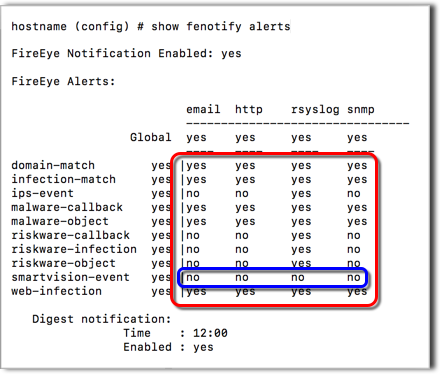
The configuration of SmartVision alert distribution requires the following:
Individually configured Trellix event notification services and service consumers
SmartVision alerts enabled for individual notification services
SmartVision alert distribution is enabled for the Trellix event notification services you want to use.
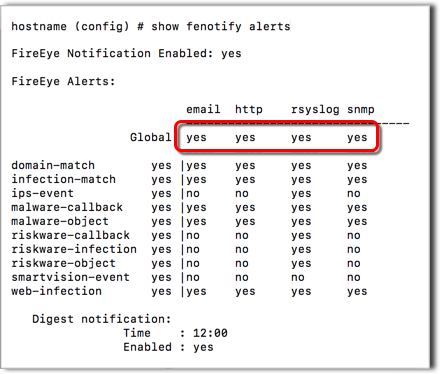
Globally enabled Trellix event notification services
The event notification services you want to use must be globally enabled.
All Trellix event notification services are globally enabled by default. The following example of the show fenotify alerts command output shows this default configuration:
For details, see the Network Security User Guide
Individually configured Trellix event notification services and service consumers
The event notification services you want to use must be individually enabled and configured, and their service consumers must be configured.
Note
Although the Trellix event notification services are globally enabled by default, you must explicitly configure each service and its consumers.
For details, see the Network Security User Guide.
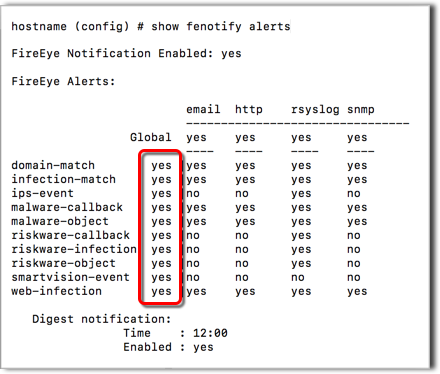
Globally enabled distribution of SmartVision alerts
The distribution of SmartVision alerts must be globally enabled.
The distribution of alerts for all network events (including SmartVision events) is globally enabled by default. The following example of the show fenotify alerts command output shows this default configuration:
Alerts enabled for individual notification services
The distribution of SmartVision alerts must be enabled for the individual Trellix event notification services you want to use.
By default, the distribution of alerts for SmartVision events is disabled for all notification services. The following example of the show fenotify alerts command output shows this default configuration: