The Summary tab for a SmartVision Edition appliance is different from that of a SmartVision-enabled Network Security sensor or integrated appliance. SmartVision Edition appliances detect and distribute alerts for malware object downloads, riskware object downloads, and events (including data exfiltration events). SmartVision-enabled Network Security sensors and integrated appliances detect all network event types, including Trellix IPS events (if IPS detection is enabled).
On SmartVision edition appliances
This example of the Summary tab shows the default settings for a SmartVision Edition appliance.
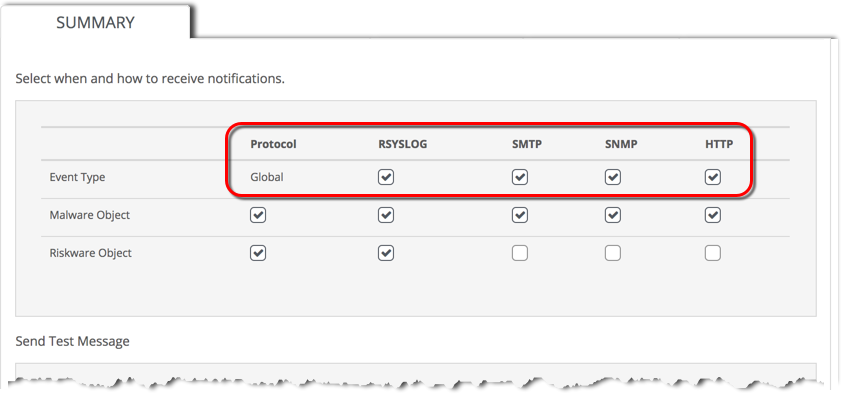
The top (Global) row shows that all of the Trellix event notification methods (protocols) are globally enabled.
The first (Global) column shows that all of the network event types listed are globally enabled for alert distribution using Trellix event notification services.
The other settings show which notification services distribute alerts for the event types listed.
On SmartVision-enabled Network Security sensors and integrated appliances
This example of the Summary tab shows the default settings for a SmartVision enabled Network Security sensor or integrated appliance with Trellix IPS features enabled.
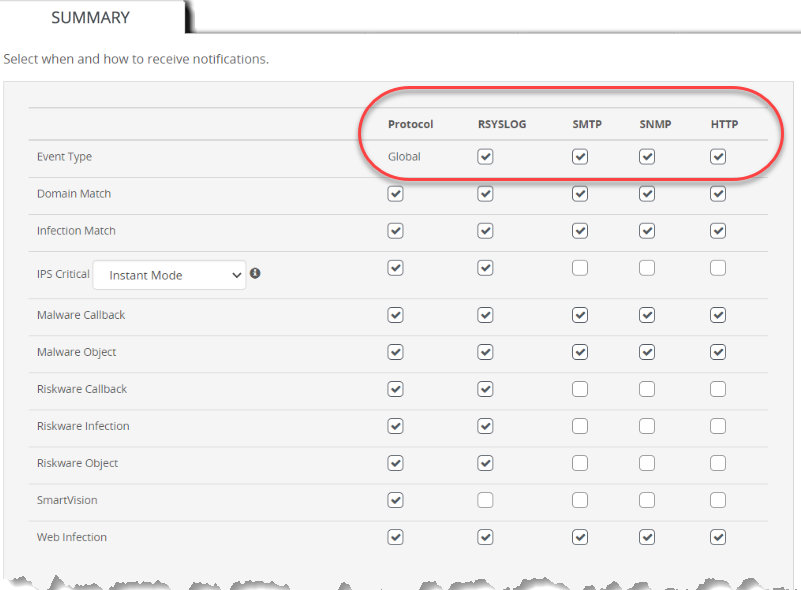
The top (Global) row shows that all of the Trellix event notification methods (protocols) are globally enabled.
The first (Global) column shows that all of the network event types listed are globally enabled for SmartVision alert distribution using Trellix event notification services.
The other settings show which notification services distribute alerts for the event types listed.