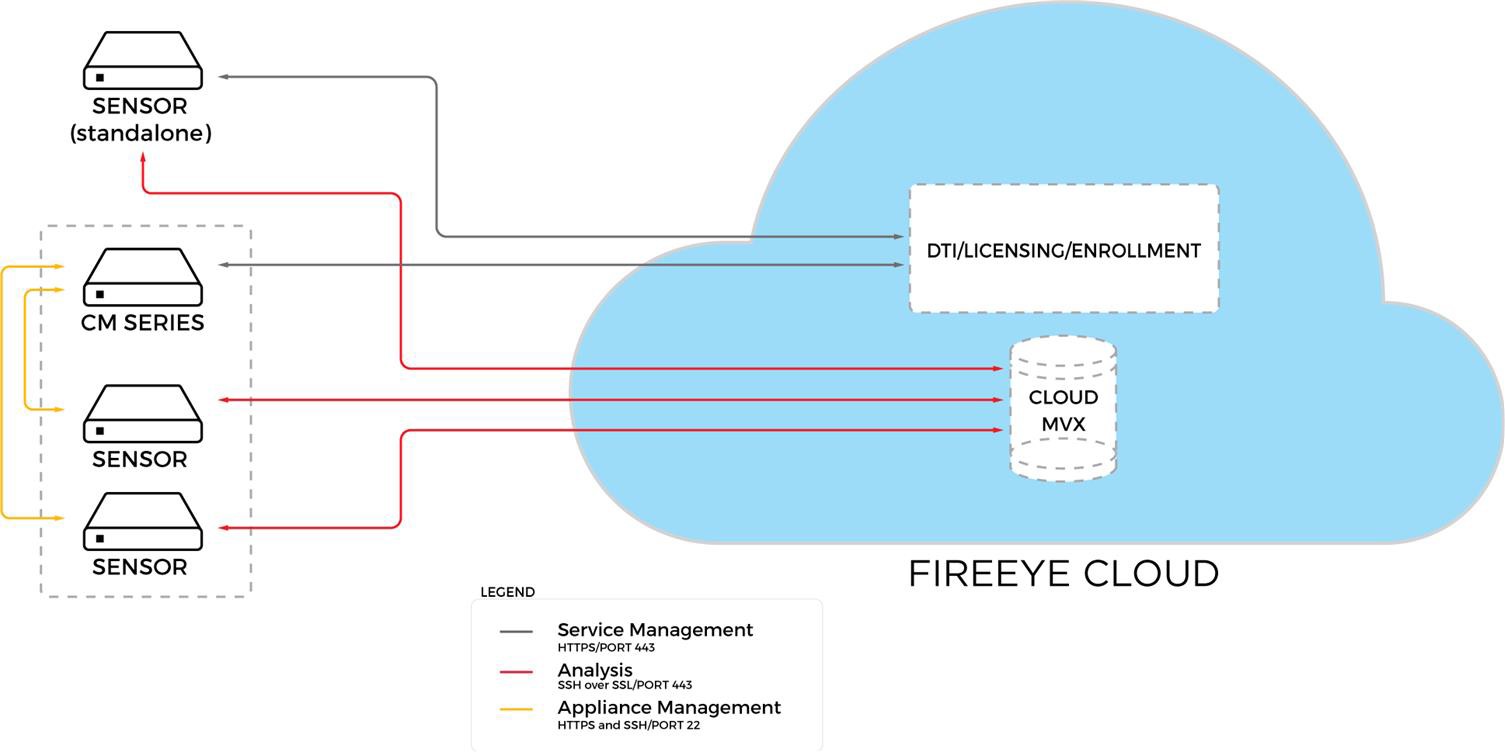
The following diagram shows the communication paths between the Cloud MVX components.
Communication paths
 |
During the initial configuration, you can accept the default interfaces provided by the configuration wizard, or you can change them.
Management interface—Sensors must be connected to the DTI network, which provides the DTI, license, and enrollment services, as well as the software updates described in Management path requirements. The connection is established through the management interface over HTTPS (port 443). Standalone sensors have a direct connection to the DTI network; managed appliances connect to the DTI network through the Central Management System appliance (by default) or through a direct connection. The default management interface is ether1.
Submission interface—Sensors and the cloud broker communicate with each other through the submission interface using SSH over SSL (port 443). The default submission interface is ether1.
Note
To keep management and data traffic separate, Trellix recommends that for the submission interface, you use another management interface, such as ether2, and not a monitoring interface. However, ether2 cannot be used as both the submission interface and the URL Dynamic Analysis interface.