You can configure the Network Security appliance as a SPAN device. In this scenario, a Network Security monitoring interface pair forwards a copy of the network traffic it processes to another port on the same appliance that is configured as a dedicated SPAN (or mirror) port. The mirror port can be connected to another analysis device, such as the Packet Capture appliance. Using this example, the Packet Capture appliance receives the traffic from the Network Security mirror port and performs deeper forensic analysis on the packets.
The interface pair with the mirror port must be configured in tap mode. The monitoring interface pair can be configured in inline mode (monitor or block mode) or tap mode. In inline block mode, all traffic (including the blocked traffic) is forwarded to the other analysis device.
Note
If an interface pair is configured in tap mode, one port can be a monitoring port and the other port can be a mirror port. However, the monitoring port cannot forward its traffic to the mirror port in its own interface pair.
There is a one-to-one relationship between a mirror port on the Network Security appliance and the SPAN port on the receiving device. You can configure multiple mirror ports on the Network Security appliance and multiple SPAN ports on the receiving device, but each Network Security mirror port can forward traffic to only one SPAN port on the other device.
The following diagram illustrates the traffic flow in a Network Security port mirroring configuration. In this example, Interface A mirrors the network traffic to pether6, and pether6 forwards the traffic to the other analysis device.
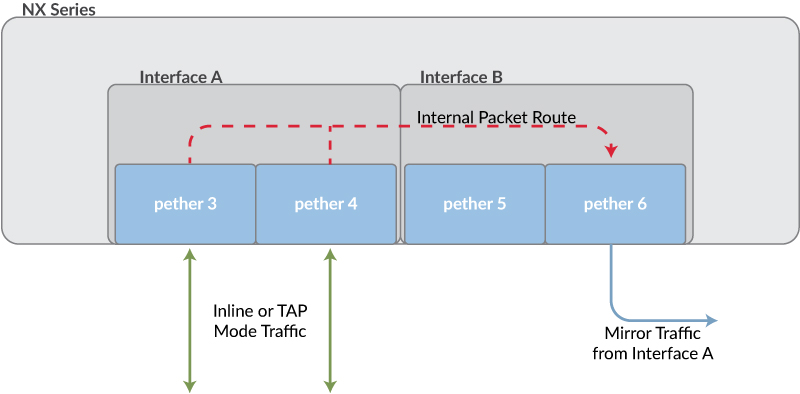
Note the following:
Packets will be dropped if they cannot be handled. For example, packets are dropped if they contain hardware or media errors, or if the volume of traffic exceeds the capacity of the mirror port.
Oversize packets (packets larger than 1700 bytes) and jumbo packets can not be mirrored to the Packet Capture appliance. (Note that the Network Security appliance does not perform detection and analysis on these packets.)
Note
You cannot configure a Network Security appliance to both forward traffic from a mirror port as described in this topic, and to be a member of a Network Security high availability (HA) pair. (For details about Network Security HA, see the Network Security High Availability Guide.)
Operator or Admin access
A minimum of two interface pairs on the Network Security appliance
Mirror port interface pair configured in tap mode