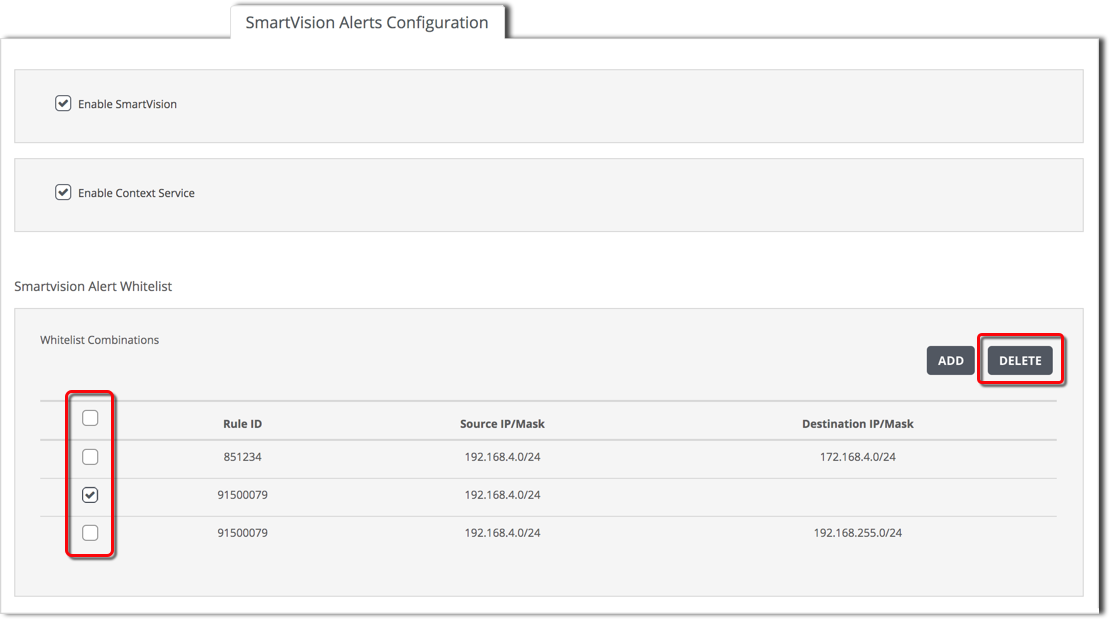
Deleting an entry from the SmartVision alerts whitelist using the Web UI
To remove a combination of conditions from the Alert whitelist, use the checkbox next to that entry.
To add a combination of alert whitelisting criteria:
Click SmartVision Alerts Configuration.
Select the checkbox of each combination of conditions you want to remove.
Click Delete, then click Yes to confirm.
Was this article helpful?
Related articles
Network Security (NX) > Network Security SmartVision Feature Guide > Monitoring > Managing alerts > Managing noisy SmartVision alerts
Network Security (NX) > Network Security SmartVision Feature Guide > Monitoring > Managing alerts > Managing noisy SmartVision alerts
Network Security (NX) > Network Security SmartVision Feature Guide > Monitoring > Managing alerts > Managing noisy SmartVision alerts