Distributed search enables you to search across multiple NDR devices and retrieve PCAP data from multiple PX packet capture appliances. Distributed search requires one NDR appliance set up as the director node and other NDR appliances set up as the data nodes. This setup is similar to the NDR cluster setup. See Clusters.
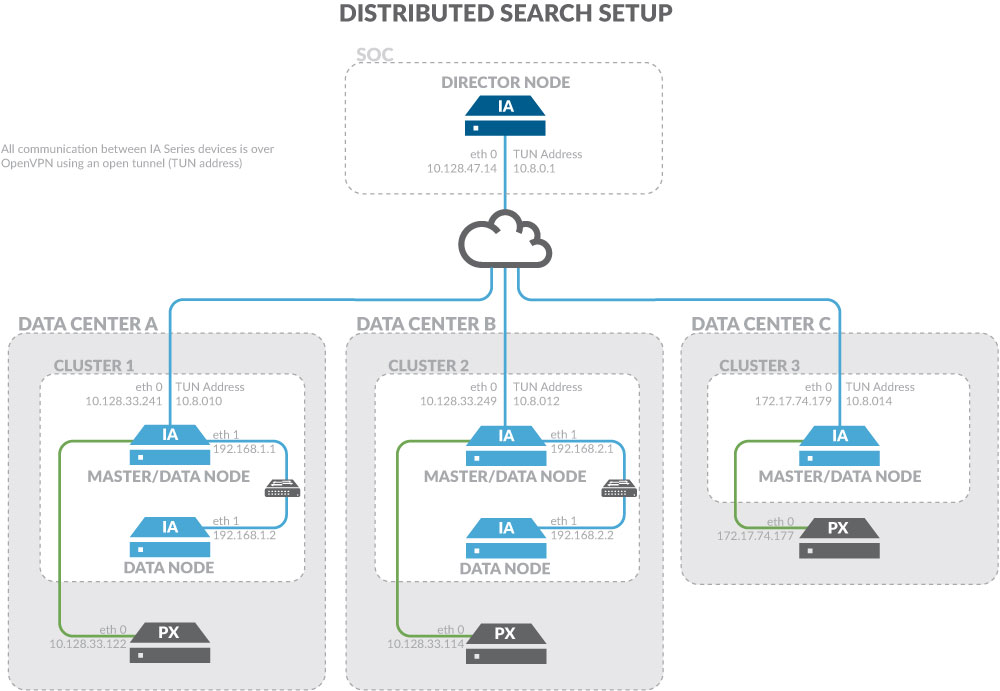
Distributed Search
Distributed Search Components | Definitions |
|---|---|
Director node | An NDR appliance that is a centralized location from which to initiate distributed searches to the data nodes. The director node does not collect metadata directly from NDR data nodes or PX appliances but can pull PCAP from any connected PX appliance.
|
Master data node | An NDR appliance that is connected to one PX appliance and one or more NDR data nodes or multiple PX appliances and one or more NDR data nodes. The master data node collects metadata from connected PX appliances and shares the data load across the connected NDR data nodes. |
Data node | NDR appliances connected to the Master Data Node and used to store and search metadata. |
In distributed search, multiple NDR appliances, known as NDR clusters, operate independently. NDR director nodes query these devices. This approach relies on Elasticsearch tribe nodes to operate.
To configure NDR for distributed search, open the following ports on any firewall between the data nodes and the director node:
TCP 22 on both sides.
TCP and UDP 1194 on both sides.
Converting an NDR series appliance to a director node
Converting an NDR appliance to a director node erases Elasticsearch data, and the appliance becomes an aggregation unit.
Perform this procedure on the NDR Series appliance that you want to convert to a director node.
To convert an NDR Series appliance into a director node in the CLI:
Log in to the NDR as npadmin using the NDR IP address or FQDN. For example:
$ ssh npadmin@10.1.0.1or
$ ssh npadmin@exampleFQDNEnter privileged mode:
npadmin@ia> enableEnter the npadmin password. The password can be 5 to 24 characters long.
[sudo] password for npadmin: <password>Enter configuration mode:
npadmin@ia# configure systemEnter director mode:
npadmin@ia# directorSelect y to confirm that you want o convert the appliance into a director node.
Select y to configure the OpenVPN. This process might take 2 minutes.
Your NDR appliance is now a director node. You must add master data nodes to the configuration. See Adding data nodes to the director node.
Converting an NDR Series Appliance into a Data Node
Converting an NDR Series appliance to a data node stops indexing and Elasticsearch while the change takes effect. Perform this procedure on the NDR Series appliance that you would like to convert to a data node.
To convert an NDR Series appliance to a data node:
Log in to the NDR as npadmin using the NDR IP address or FQDN. For example:
$ ssh npadmin@10.1.0.1or
$ ssh npadmin@exampleFQDNEnter privileged mode:
npadmin@ia> enableEnter the npadmin password. The password can be 5 to 24 characters long.
[sudo] password for npadmin: <password>Enter configuration mode:
npadmin@ia# configure systemEnter data node:
npadmin@ia# datanodeSelect a, and then enter the director node's IP address.
You will see messages about validation and then OpenVPN and PX_ACM restarting.
You will see a confirmation screen:
Currently part of tribe node setup...
Adding data nodes to the director node
You must add the data nodes to the director node. Perform this procedure on the director node.
To add data nodes to the director node:
Log in to the NDR as npadmin using the NDR IP address or FQDN. For example:
$ ssh npadmin@10.1.0.1or
$ ssh npadmin@exampleFQDNEnter privileged mode:
npadmin@ia> enableEnter the npadmin password. The password can be 5 to 24 characters long.
[sudo] password for npadmin: <password>Enter configuration mode:
npadmin@ia# configure systemEnter director mode:
npadmin@ia# directorSelect
ato add a data node.Enter the cluster name that you want to join:
clus-1Enter the cluster master hostname. This must be a FQDN or an eth0 IPv4 address.
10.128.33.249Enter the cluster network subnet in CIDR notation. Press enter if adding single-host cluster.
2.2.2.0/8 Validation 2.2.2.0/8 againstNote
This is the address range used for eth1 of the data nodes. For example, your cluster network subnet might use range 2.2.2.0/24.
Enter the elasticsearch cluster bind_host (eth1 IP Address of cluster master):
2.2.2.249Key generation successful. Moving the key to the client now.When prompted enter the npscp user password of the host:
The authenticity of host '10.128.33.249 (10.128.33.249)' can't be established.ECDSA key fingerprint is 14:6d:4f:65:4b:37:6b:03:50:5a:0a:45:b7:fd:67:b0.Are you sure you want to continue connecting (yes/no)? yesWarning: Permanently added '10.128.33.249' (ECDSA) to the list of known hosts.npscp@10.128.33.249's password:clus-1.tar.gz 100% 5395 5.3KB/s 00:00Transfer completed SUCCESSFULLY 10.128.33.249Transfer of keys was successful. You will need to go to the Data Node and accept the keys now.Select
qto quit and save changes.
You must now go to the data node CLI and associate it with this director. This is explained in Adding a data node to the director node.
Adding a data node to the director node
This section provides instructions for adding your NDR data node to your NDR director node.
To add a data node to the director node:
Log in to the NDR as npadmin using the NDR IP address or FQDN. For example:
$ ssh npadmin@10.1.0.1or
$ ssh npadmin@exampleFQDNEnter privileged mode:
npadmin@ia> enableEnter the npadmin password. The password can be 5 to 24 characters long.
[sudo] password for npadmin: <password>Enter configuration mode:
npadmin@ia# configure systemEnter data node:
npadmin@ia# datanodeSelect option
Ato add the director.Enter the IP address of the director.
Removing a data node from the director node
Perform this procedure on the data node that you would like to remove from the director node.
To remove a data node from the director node:
Log in to the NDR as npadmin using the NDR IP address or FQDN. For example:
$ ssh npadmin@10.1.0.1or
$ ssh npadmin@exampleFQDNEnter privileged mode:
npadmin@ia> enableEnter the npadmin password. The password can be 5 to 24 characters long.
[sudo] password for npadmin: <password>Enter configuration mode:
npadmin@ia# configure systemEnter data node:
npadmin@ia# datanodeSelect r to remove the appliance as part of the setup.
Confirm the removal of the data node.