If configuring application-level logging for a specific domain-level host, then for each host to be configured:
Log on to the DSM as an administrator of type Domain Administrator or All.
Navigate to Domains > Switch Domains.
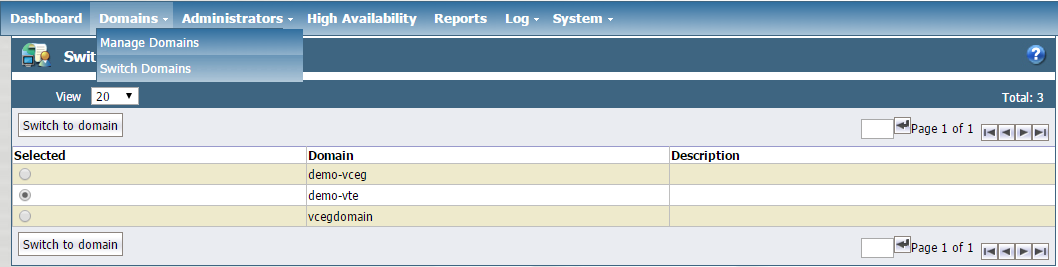
Select the domain for which you want application-level messages to be sent to the syslog server.
Click the Switch to domain button.
Navigate to the Hosts tab.
Click the Host Name that you want to configure.
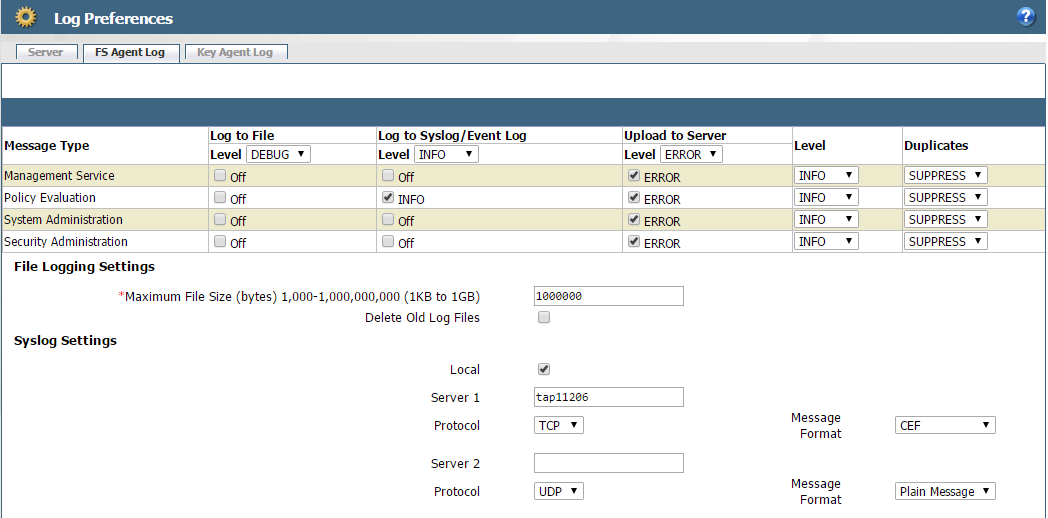
Click the FS Agent Log tab.
At a minimum, make sure the following configurations are made to send Vormetric application-level policy evaluation messages to the Helix Enterprise syslog server:
In the Message Type row:
In the Log to Syslog/Event Log column, set the level to
INFO.In the Upload to Server column, set the level to
ERROR.
In the Policy Evaluation Row:
In the Level column, Set the level to at least
INFO.In the Log to Syslog/Event Log column, set the level to at least
INFO.In the Upload to Server column, set the level to at least
ERROR.
Caution
Setting Upload to Server to INFO or DEBUG level for policy evaluation can affect DSM performance. It is highly recommended to turn on Log to File or Log to Syslog instead of Upload to Server for INFO and DEBUG level.
Under Syslog Settings on FS Agent Log page, add the Helix Enterprise system details:
Server 1 (for example:
tap11206– should be Helix Enterprise system FQDN or IP address)Protocol (for example:
TCP)Message Format (Select
CEF)
Click Apply to apply changes.