The SAML IdP and Service Provider must be registered with each other's metadata for SAML authentication requests and authorization responses to occur.
Download the service provider metadata and upload it to your IdP server. The metadata file includes the single sign-on (SSO) Assertion Consumer Service URL (ACS Endpoint) and the entity ID. The metadata is used by the IdP server to learn where the SP SAML requests are posted. The metadata is also referred to as the SP login URL.
You can download the SP metadata directly from a standalone appliance or from the Central Management System appliance for a managed appliance using the Web UI or CLI.
Admin access to the Trellix appliance operating as a SAML SP.
Admin access to the SAML IdP server.
SAML Web policy setting is enabled by using the CLI.
To download the appliance metadata using the Web UI:
Log in to the appliance Web UI.
Go to the Settings > Authentication > SAML Service Provider Configuration tab.
Click Download to retrieve the entity ID and consumer service URL
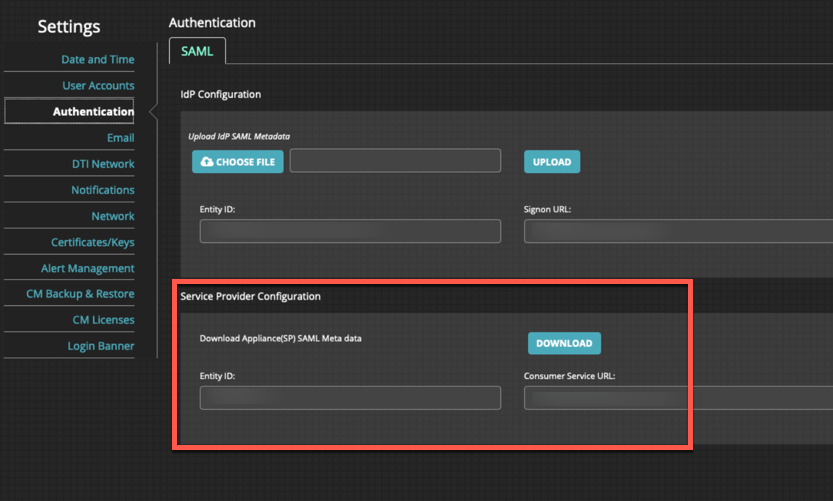
Click OK to save the SP metadata onto your desktop.
To download the appliance (SP) metadata using the CLI:
Log in to the appliance CLI as an admin user.
Go to CLI configuration mode:
hostname # enable hostname # configure terminal
Download the appliance XML metadata by specifying your admin login, password, and path to the metadata.
hostname # aaa authentication saml download meta-data <meta-data-pathname>For example,
aaa authentication saml download meta-data scp://<username>:<password>@x.x.x.x/var/www/html/saml-server-xml/