Note
The integration capability is available only to users with an Enterprise or Core license.
Network Detection and Response (NDR) systems, including those leveraging sources like Network Security or Intrusion Prevention Systems (IPS), may generate alerts containing Common Vulnerabilities and Exposures (CVE) information. When such details are present, it is essential to determine whether the affected asset is truly vulnerable in order to assign an accurate risk score.
To ensure accurate risk assessment, this integration validates potential asset vulnerabilities identified in these alerts by correlating the data with Tenable vulnerability scan reports. Utilizing Tenable APIs, the system cross-references CVEs from alerts against the known vulnerabilities documented in Tenable. Upon confirmation of a vulnerability on an asset, a risk score is assigned based on CVE severity in tenable report, enabling more precise threat prioritization and response.
Log into the NDR CLI using a terminal window or SSH client:
Using the SSH protocol, log into the appliance with management interface's IP address or hostname.
$ ssh npadmin@<NDR IP address>Enter the password when prompted. The
hostname > promptis displayed after you have logged in.
Enter privileged mode on the NDR CLI.
npadmin@hostname> enableEnter the
npadminpassword, when prompted. The password can be 5 to 24 characters long.[sudo] password for npadmin: <password>Enter configuration mode.
npadmin@hostname# configure systemThe prompt changes to
npadmin@hostname(config)#on the terminal indicating that configuration mode is enabled.Type
tenableat the terminal and pressEnter.The Tenable configuration options are displayed.
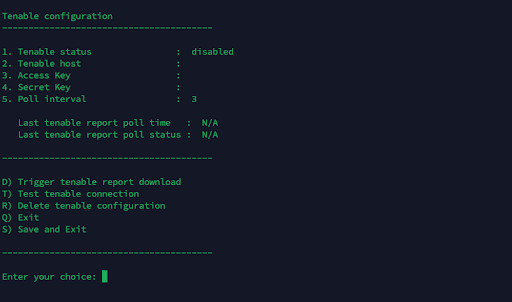
Type
1and pressEnterto enable tenable status.Type
2and pressEnterto add the host. Specify a host by typing the numeric value assigned to the host's IP address and pressEnter.Note
Include only the domain name in the host field, excluding the protocol (e.g., https://). For example, use sc.tenalab.in instead of https://sc.tenalab.in.
Type
3and pressEnterto add a secret key. An access key specifies tenable which account or user is making the API request.Type
4and pressEnterto add an access key to verify the authenticity of the API request.Type
5and pressEnterto add poll interval in minutes. The poll interval is the configured time interval at which your NDR queries tenable’s APIs to fetch the latest data.Type
Dand pressEnterto trigger tenable report download.Type
Tand pressEnterto test tenable connectionNDR.Type
Rand pressEnterto delete tenable configurations.Type
Qand pressEnterexit the tenable configuration page.Type
Sand pressEnterto save and exit to the main menu.