Note
The integration capability is available only to users with an Enterprise or Core license.
Trellix ePolicy Orchestrator - On-premises is a scalable platform for centralized policy management and enforcement of your system security products, such as anti-virus, desktop firewall, and anti-spyware applications. You can integrate Network Detection and Response NDR System with Trellix ePO - On-prem. The integration enables you to query Network Detection and Response ePO - On-prem server from the Network Detection and Response NDR for viewing details of a network host.
The integration bridges the gap between network-centric and endpoint-centric security data, providing more context for analysis.
Log into the NDR CLI using a terminal window or SSH client:
Using the SSH protocol, log into the appliance with management interface's IP address or hostname.
$ ssh npadmin@<NDR IP address>Enter the password when prompted. The
hostname > promptis displayed after you have logged in.
Enter privileged mode on the NDR CLI.
npadmin@hostname> enable
Enter configuration mode.
npadmin@hostname# configure system
The prompt changes to
npadmin@hostname(config)#on the terminal indicating that configuration mode is enabled.Type
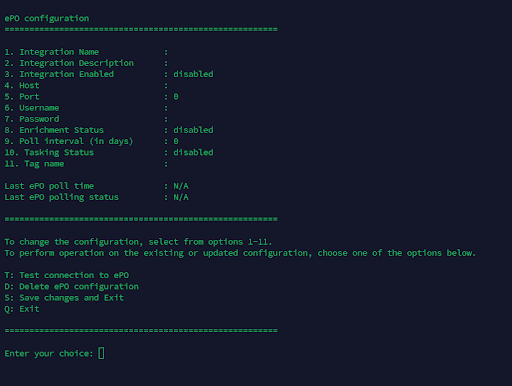
epo configureat the terminal and pressEnter.The ePO Configuration options are displayed.
Type
3and pressEnterto enable integration.Type
1and pressEnterto specify a unique identifier for this integration.Type
2and pressEnterto specify the details about the purpose of this integration.Type
4and pressEnterto define the network address of the ePO server to connect to.Type
5and pressEnterto specify the communication port used to interact with the ePO server.Type
6and pressEnterto add a account name used for authentication with the ePO server.Type
7and pressEnterto add the secret key used to authenticate the connection to the ePO server.Type
8and pressEnterto check whether data from this integration will be used to enhance alerts.Type
9and pressEnterto set the frequency at which Network Detection and Response retrieves data from ePO.Type
10and pressEnterto check if Network Detection and Response is actively sending tasks or commands to ePO.Type
11and pressEnterto allow assigning a label to this integration for easier organization and filtering.
Type
Dand pressEnterto delete ePO configuration.Type
Tand pressEnterto test connection to NDR.Type
Qand pressEnterexit the configuration page.Type
Sand pressEnterto save and exit to the main menu.