When being dynamically analyzed, a sample might access a resource on the Internet. For example, the sample might attempt to download additional malicious code or attempt to upload information that it collected from the host machine (in this case, the analyzer VM).
You can configure Intelligent Sandbox to provide network services to analyzer VMs so that the network activities of a sample file can be analyzed.
Providing Internet access to samples enables Intelligent Sandbox to analyze the network behavior of a sample and also determine the impact of the additional files downloaded from the Internet. Some malware might try to determine if they are being executed in a sandbox by requesting for Internet access and then alter their behavior accordingly.
When an analyzer VM is created, Intelligent Sandbox makes sure that the analyzer VM has the configurations to communicate over a network when required.
You can control granting real network access to an analyzer VM through a setting in the analyzer profiles. Network services are provided regardless of the method used to submit the sample. For example, it is provided to samples submitted manually using the Intelligent Sandbox web interface as well as samples submitted by the integrated products.
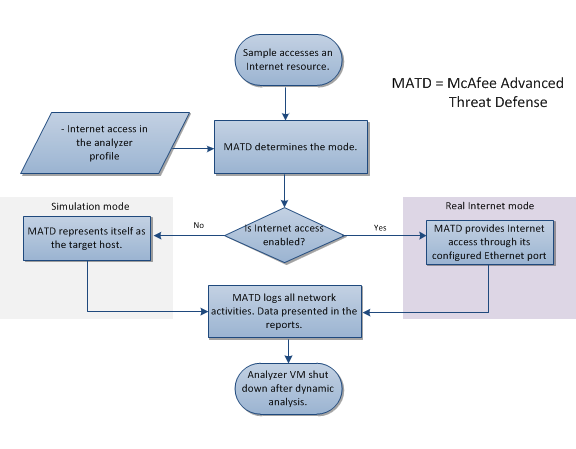
When samples access Internet resources, Intelligent Sandbox checks if the Internet connectivity is enabled in the corresponding analyzer profile. Based on whether Internet connectivity is enabled or not, Intelligent Sandbox determines the mode that provides the network services:
Simulator mode — If Internet connectivity is not enabled in the analyzer profile, this mode is used. Intelligent Sandbox can represent itself as being the target resource. For example, if the sample attempts to download a file through FTP, Intelligent Sandbox simulates this connection for the analyzer VM.
Real Internet mode — This mode requires the management port (eth-0), eth-1, eth-2 or eth-3 to have access to the Internet. If Internet connectivity is enabled in the analyzer profile, Intelligent Sandbox uses this mode. Intelligent Sandbox provides real Internet connection through the management port by default, which is publicly routed or directed towards your enterprise firewall as per your network configuration. Because the traffic from an analyzer VM could be malicious, you might want to segregate this traffic away from your production network. In this case, you can use Intelligent Sandbox's eth-1, eth-2, or eth-3 provide Internet access to the analyzer VM.
Intelligent Sandbox logs all network activities. The types of reports generated vary based on the mode:
Network activities are summarized and presented in the Analysis Summary report. You can find the DNS queries and socket activities under network operations. You can find all the network activities in the Network Operations section of the report.
The dns.log report also contains the DNS queries made by the sample.
The packet capture of the network activities is provided in the NetLog folder within the Complete Results zip file.