A Packet Capture appliance stores only PCAP while paired with an Network Security appliance. L7 metadata from the NX appliance can be used by the NDR to identify PCAP from the Packet Capture.
Perform the following steps on NDR:
Login to NDR CLI.
Create client profile.
For more information on how to create a client profile see, Creating a client profile using the CLI.
Create client group.
For more information on how to create a client profile see, Creating a client group using the CLI.
In the add new group window, type 7 to add a PX host.
Note
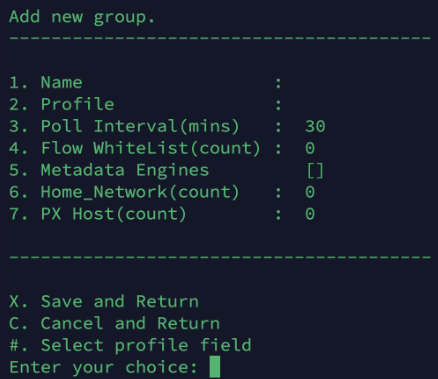
Type
Xto save and return to the client group configuration page.
The client group generates a token, use this token to configure L7 metadata export on NX.
To retrieve PCAP from an Network Security-paired Packet Capture appliance:
Log in to the NDR Web UI.
Select Search > Summary tab.
In the Query bar:
Enter the search query "sensor_type: nx".
Select a window of time to search for event metadata ingested from the Packet Capture.
Click the search button.
The PX event table displays Packet Capture events that correspond to events on the paired Network Security appliance. Information in the event table helps determine which Network Security event the PCAP pertains to.
Perform session reconstruction. Select the event from the search results and then click the Reconstruct icon.
