You can suppress multiple alerts at a time, either by selection or grouped by a unique alert distinguisher (risk, assignee, origin, rule name).
To suppress multiple alerts by selection:
Open the Alerts page and filter or sort alerts as you wish. See Viewing the alerts page.
Select the checkboxes for the alerts you want to suppress in the left column.
Click the n Rows Selected button to the upper-right above the alerts table.
Select Suppress.
In the Suppress Alert dialog, select the length of time for which the alerts should remain suppressed.
Click Confirm.
To suppress multiple alerts by an alert distinguisher:
Open the Alerts page and filter or sort alerts as you wish. See Viewing the alerts page.
Click
 to the left of the alerts table to open the Unique Values sidebar.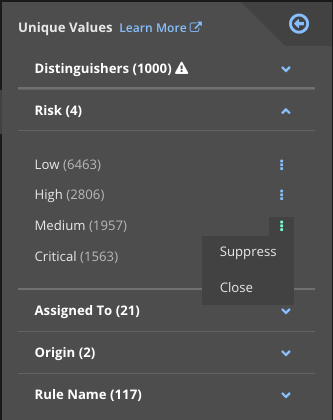
Expand the distinguisher group for the type of distinguisher you need. In the screenshot above, the Risk distinguisher group is expanded.
Click
 for the unique distinguisher you want. Select Suppress from the drop-down menu.
All alerts with that unique distinguisher are suppressed. For example, you might suppress all low-risk alerts.
In the Suppress Alert dialog, select the length of time for which the alert should remain suppressed.
Click Confirm.