The System Health widget shows the overall health of the Trellix appliances in your environment, categorizing them by type.

It also shows whether appliances are connected to Helix Enterprise.
Note
A status of "Not subscribed" on this page means that Helix Enterprise has never received health data from that appliance category. It is not related to whether you are licensed to use that appliance with Helix Enterprise.
The number of appliances in your environment for each appliance type is shown. The number on the left shows the total number of connected appliances with a critical, warning, or OK status. The number on the right shows the total number of appliances, including appliances in disconnected state.
Click .png) to view appliances in that category on the Appliances page.
to view appliances in that category on the Appliances page.
A status icon appears to the right of the appliance counts. It identifies the most critical status of the appliances in that category. If you click on the status icon, the health status breakdown of the appliances in that category appears.
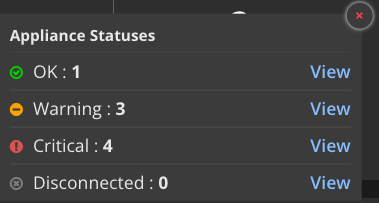
A description of each status follows:
Disconnected—The appliance is disconnected. A disconnected appliance is one that has not provided health data to Helix Enterprise within the last 30 minutes. If an appliance is disconnected for seven days, it is automatically removed from the Appliances page.
OK—The appliance is healthy and operational.
Warning—A problem exists but does not stop an appliance from operating.
Critical—A critical error exists that may affect appliance operations. You should address critical errors as soon as possible.
Click View to view the appliances with that status on the Appliances page. For more information, see Viewing appliances.