This section describes how to use Amazon VPC ingress routing to deploy a Network Security instance. In this scenario, the Network Security instance is deployed inline in AWS between an external Web client and an internal Web server. The traffic between the Web client and the Web server flows through the Network Security instance, which protects the Web server.
All incoming and outgoing traffic is routed through an AWS Internet gateway. The Internet gateway forces incoming traffic to flow directly to the Network Security instance for processing before it reaches the Web server. Outgoing traffic from the Web server is likewise routed to the Network Security appliance and the Internet gateway before it reaches the Web client.
Note
This procedure assumes that security groups and network access control lists are already configured in AWS.
The network mask of the IP addresses in this scenario is 255.255.225.224 (10.88.9.xxx/27).
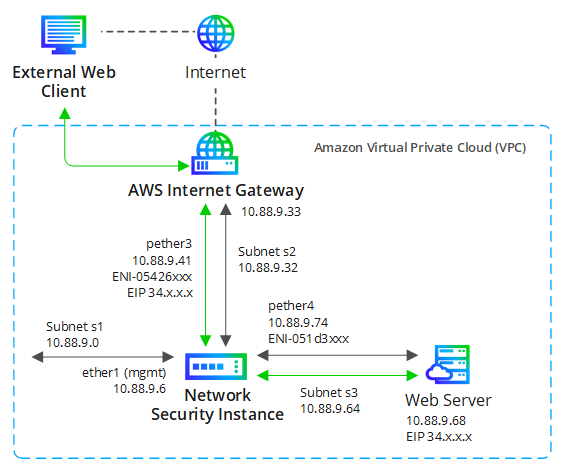
This scenario involves the following components:
Web server—A Web server with an elastic IP address (EIP) on a private subnet in the VPC.
Network Security instance—A Network Security EC2 instance deployed inline. The monitoring interfaces are connected to subnets 2 and 3. The pether3 interface has an elastic IP address (EIP).
External Web client—An external Internet-connected device that attempts to connect to the Web server using the public domain names of the sites it wants to reach. A DNS server resolves the domain names to public IP addresses.
Internet gateway—An AWS internet gateway attached to the VPC that routes all incoming traffic (requests) to the Network Security pether3 interface and routes all outgoing traffic (responses) to the external Web clients.
Perform the following tasks to configure this deployment scenario.
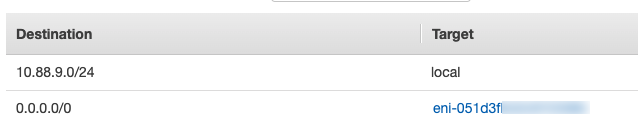
Configure a Network Security monitoring interface as the default gateway for redirected traffic
A Network Security monitoring interface must be the default gateway for the Web server. This allows the Web server to send destination traffic through the Network Security instance.
The following illustration shows the example AWS subnet 3 route table configuration.
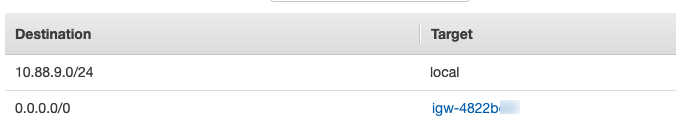
Configure the Internet gateway as the default gateway for outgoing traffic
The subnet 2 route table needs a route that sends outgoing traffic from the Network Security pether3 interface to the Internet gateway.
The following illustration shows the example AWS subnet 2 route table configuration.
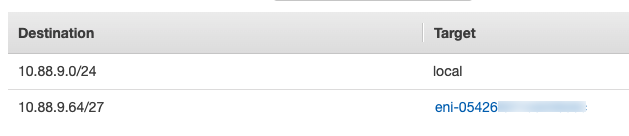
Configure the internet gateway route table
The Internet gateway route table needs a route that redirects incoming traffic through the Network Security pether3 interface to the subnet that hosts the Web server.
The following illustration shows the example AWS route table configuration.
For more information about Internet gateway route tables and detailed instructions for implementing them, see the Amazon AWS VPC Internet gateway documentation.
Configure an edge association
The Internet gateway route table must be associated with the Internet gateway to redirect incoming Web server traffic to the Network Security pether3 interface.
Navigate to the VPC dashboard in the AWS Management Console.
Select Route Tables in the navigation pane.
Select the Internet Gateway route table.
Select the Edge Associations tab.
Select the gateway ID row and click Save.
The following illustration shows the example AWS edge association.
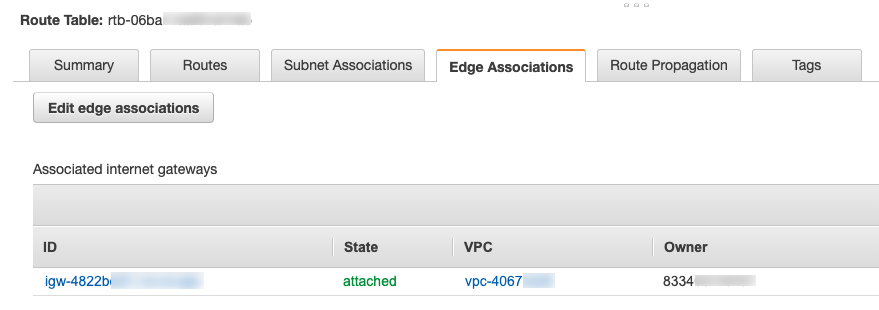
For more information about edge associations and detailed instructions for implementing them, see the Amazon AWS VPC route tables documentation.
Add a static route for outgoing Web Server traffic
A static route must be created in the Web server configuration that allows the Web server to use the IP address of the Network Security monitoring interface as the next-hop gateway for outgoing traffic.
The following is an excerpt from the routing table for the Web server used in this example. In this excerpt, 10.88.9.64 is the IP address of the subnet that hosts the Web server and 10.88.9.74 is the Network Security pether4 IP address.
Kernel IP routing table
Destination Gateway ... 0.0.0.0 10.88.9.74 10.88.9.64 0.0.0.0 ...
Add a static route for outgoing Network Security traffic
A static route must be created in the Network Security configuration that allows outgoing traffic to reach the Internet gateway.
The following command creates a static route in the example scenario:
nx-hostname (config) # ip route vrf vrfA 0.0.0.0 /0 10.88.9.33 nx-hostname (config) # show ip route Destination Mask Gateway Interface Source default 0.0.0.0 10.88.9.33 pether3 static 10.88.9.0 255.255.255.224 0.0.0.0 ether1 interface 10.88.9.32 225.225.255.224 0.0.0.0 pether3 interface 10.88.9.64 255.255.255.224 0.0.0.0 pether4 interface
For details, see the "Layer 3 Forwarding Using VRF instances" information in the Network Security System Administration Guide.