This section provides a high-level overview of the integration between AWS Gateway Load Balancer (GWLB) and Network Security Virtual NX instance. For specific instructions on configuring GWLB, check the AWS documentation.
In this setup, the Network Security instance is deployed in a security VPC while the Web Server is deployed in a service provider VPC. The traffic between the Web Client and the Web Server follows any of these modes of deployment: Inline or Tap. Depending on the mode, the traffic either passes through the Network Security instance or mirrored to the Network Security Instance.
Note
This section assumes that AWS components such as subnets, routes, security groups, and network access control lists are already configured.
The main components are:
Component | Description |
|---|---|
Web Server | A Web server with an elastic IP address (EIP) on a private subnet in the VPC. |
Network Security instance | A Network Security EC2 instance deployed in an appropriate subnet. The Management and monitoring interfaces are connected to different subnets. |
GWLB | A Gateway Load Balancer enables you to deploy, scale, and manage virtual appliances, such as firewalls, intrusion prevention systems. It combines a transparent network gateway (that is, a single entry and exit point for all traffic) and distributes traffic to the virtual appliances. |
GWLB Endpoint | A Gateway Load Balancer endpoint is a VPC endpoint that provides private connectivity between virtual appliances in the service provider VPC and the Gateway Load Balancer and virtual appliances in the security VPC. |
Deploying Network Security Virtual NX in inline mode (Inline operational mode)
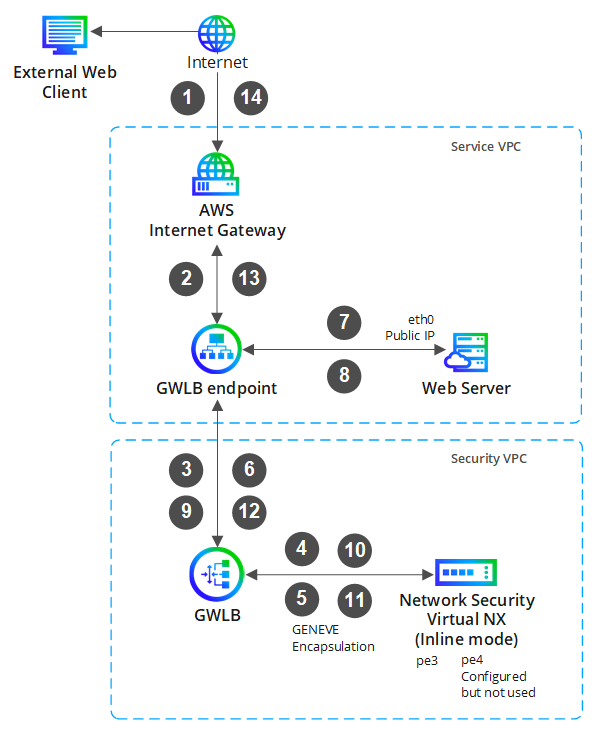
In this scenario, the Network Security instance is deployed in inline mode, positioned between an external Web Client and an internal Web Server. The arrangement ensures that all the traffic between the Web Client and the Web Server should pass through the Network Security instance, providing comprehensive protection for the Web Server.
The incoming traffic is routed through a GWLB endpoint, GWLB, and the Network Security instance. The gateway load balancer directs incoming traffic to the Network Security instance for initial processing before it proceeds to the Web Server. Similarly, outgoing traffic from the Web Server is channeled through the Network Security appliance in the reverse direction, ultimately reaching the Web Client. Throughout this process, the Network Security instance inspects traffic in both directions, determining whether to forward or block it. It also generates alerts as necessary. The diagram illustrates the traffic flow with incremental numbers indicating the sequence of the path.
Note
Complete all the steps of the Network Security instance deployment.
Enable the health monitoring at the interface as outlined in section Enabling HTTP health checks for Network Security monitoring ports on AWS.
SSL decryption Network Security virtual NX in TAP mode (Tap operational mode)
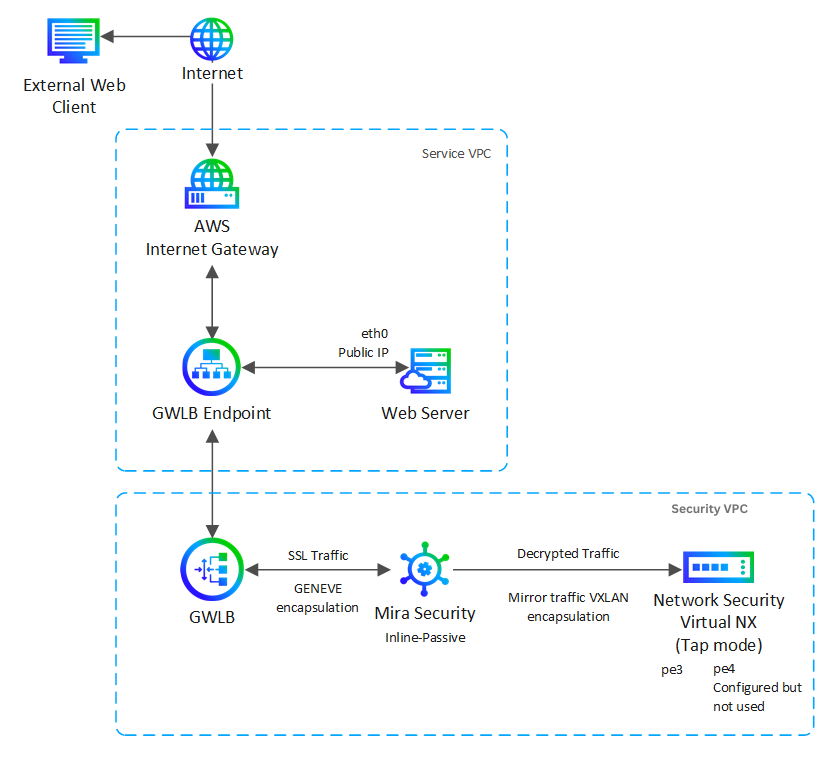
In this scenario, the SSL traffic from the GWLB undergoes decryption using Mira Security's Encrypted Traffic Orchestrator (ETO) appliance. Subsequently, the traffic is mirrored to the Network Security appliance configured in Tap mode. The mirrored traffic is encapsulated with VXLAN. However, currently the Network Security appliance does not support Inline mode for decrypted mirrored traffic.
Note
Please see mirasecurity.com and the Virtual ETO Getting Started Guide in their website for deploying Mira security ETO. The ETO will be in Inline-Passive deployment.
Deploying Network Security Virtual NX in TAP mode ( Tap operational mode)
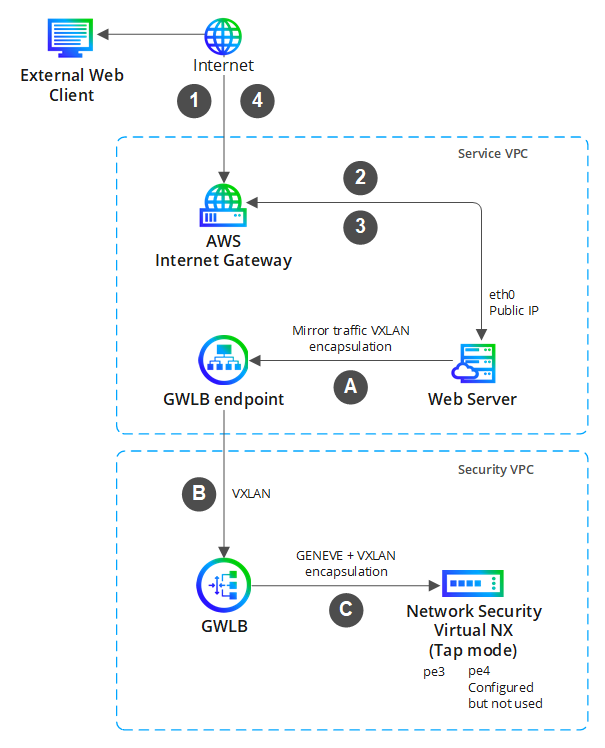
In this specific scenario, the Network Security instance is deployed in Tap mode. Consequently, all traffic between the Web Client and the Web Server is mirrored through the GWLB endpoint and GWLB to the Network Security instance for monitoring and analysis. Appropriate alerts are also generated. The diagram llustrates the traffic flow with incremental numbers and letters indicating the sequence of the path.
Note
Complete all the steps of the Network Security instance deployment.
Enable the health monitoring at the interface as outlined in section Enabling HTTP health checks for Network Security monitoring ports on AWS.