If SSO authentication is required when you make a Helix appliance Web UI page request (through an application or by entering the appliance URL in the browser address bar), you must sign in to Trellix Helix with your Trellix IAM account credentials.
Logging in when SSO is required
If SSO authentication is required, and if no SSO session exists when you make a Web request for a Web UI page on the appliance, use the login page to log in to the appliance:
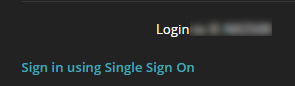
When you click Sign In Using Single Sign-On, the Trellix Cloud Account login page appears. Enter your Trellix IAM account credentials.
After you authenticate against Trellix IAM, the Alerts page of the requested appliance appears. You can access other Helix components in your network without logging in locally to individual appliances, as long as your SSO session has not expired.
Logging out when SSO is required
If SSO authentication is required, the logout dialog box allows you to log out of the local session only, or to log out of both the local and SSO sessions.
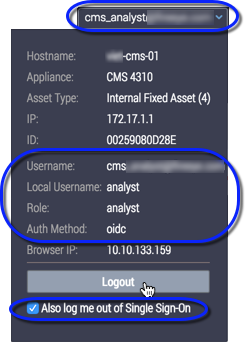
Information about the authentication methods is displayed in the logout dialog box:
Dialog Box Field | Description |
|---|---|
Username | The user's Trellix IAM account username. |
Local Username | The user's appliance-specific local username. |
Role | The role assigned to the user's IAM account |
Auth Method | The value oidc means that the user logged in with SSO authentication using Trellix IAM credentials. |
Also log me out of Single Sign‑On | The user has the option to log out of both the local session and the SSO session. |
Logging out from a local session only
When SSO is required and you also have a local session to an appliance, you can log out from the local session while continuing to work in other areas of the Helix Web UI. The SSO session remains open until you log out of SSO or the SSO session token expires.
At the appliance, select the logout command.
The SSO local logout dialog box (shown at Logging out when SSO Is required) appears.
Make sure the Also log me out of Single Sign‑On checkbox is clear.
Click Logout.
The appliance logout page shown appears.
Click Appliance Console.
The Central Management System appliance Dashboard appears.
If you log out from both the local and SSO sessions
When SSO is required you can log out of your SSO Web UI session and any local sessions to individual appliances.
At the appliance, select the logout command.
The SSO local logout dialog box (shown at Logging out when SSO is required) appears.
Select Also log me out of Single Sign‑On.
Click Logout.
The appliance logout page shown appears.
Click one of the following options:
Helix Console—The Helix console login page appears.
Appliance Console—The Central Management System appliance login appears.