Trellix Endpoint Detection and Response with Forensics (EDRF) operates by collecting data from endpoints and sending it to a central management platform for analysis and action. The key components and their functions are:
Trellix Agent - The Trellix Agent functions as the management and communication layer between endpoints and the on-premises or cloud-based ePolicy Orchestrator (ePO) server. It enforces policies, handles task scheduling and execution, and transports system properties, product properties, events, and data for all installed Trellix endpoint modules.
EDRF Client - The Trellix EDR with Forensics module uses the EDRF Client to monitor process, file, registry, and network activity and collect detailed forensic telemetry from each endpoint. It supports advanced evidence collection, IOC detection, response actions, and includes Audit and Eventor capabilities for expanded event visibility.
XConsole - This is the central, cloud-native management platform for EDRF. It hosts the Forensics, Trellix EDR, and ePO services.
Note
In XConsole, EDRF features are available in the Forensics and Trellix EDR tiles. There is no separate product tile labeled EDRF.
Security Teams - Administrators and SecOps analysts: Access these services to investigate threats, manage policies, and orchestrate responses, ensuring comprehensive protection across the organization.
The architecture is flexible and can be deployed in a:
Hybrid deployment
In a hybrid model, EDRF leverages both on-premises infrastructure and cloud services to provide a layered security approach, combining local control with cloud-powered analytics.
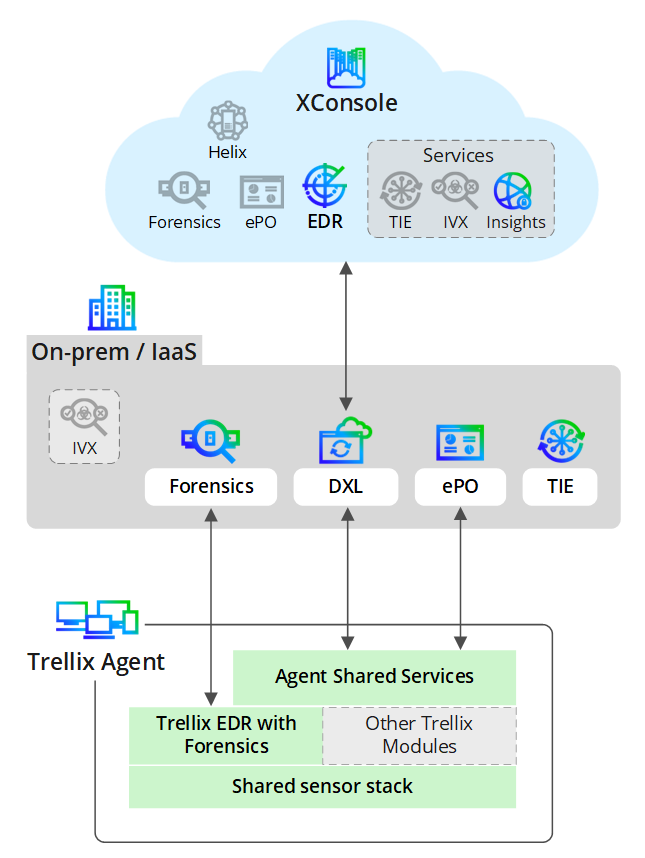
Data Collection at the Endpoint: The shared sensor stack in the Trellix Agent monitors system activities and collects raw data such as process executions, network connections, and registry changes. You can also integrate other Trellix products, such as Endpoint Security, Trellix Data Loss Prevention (DLP), and Application and Change Control (TACC) to contribute additional data.
Trellix Agent Processing and Routing: EDRF receives and initially processes raw telemetry from the endpoint. The Agent Shared Services component then routes this data to the appropriate on-premises or cloud components.
On-Premises and Cloud Analysis:
On-premises: Data is sent to local servers for immediate processing. The Trellix Data Exchange Layer (DXL) shares threat events instantly with Forensics workspace, ePO, and Threat Intelligence Exchange (TIE) services. An Intelligent Virtual Execution (IVX) appliance can also be used for sandboxing.
Cloud (XConsole): Telemetry is also sent directly to the XConsole for advanced analysis. Here, a suite of services—including Helix, Forensics, ePO, Trellix EDR, TIE, Intelligent Virtual Execution (IVX), and Insights—provides powerful threat hunting, orchestration, and intelligence capabilities.
Note
You can configure on-premises and cloud products such as Trellix Endpoint Security (ENS), Trellix Data Loss Prevention, and Trellix Application and Change Control to tailor the endpoint security solution to your organization's needs.
Coordinated response: Responses from both on-premises and cloud platforms are sent back to the Trellix Agent. The agent then executes coordinated actions on the endpoint, such as isolating a host, terminating a malicious process, or updating a security policy based on the findings.
Cloud deployment
In a cloud deployment, all security management, analysis, and integration are centralized in the XConsole, offering a scalable and streamlined solution.
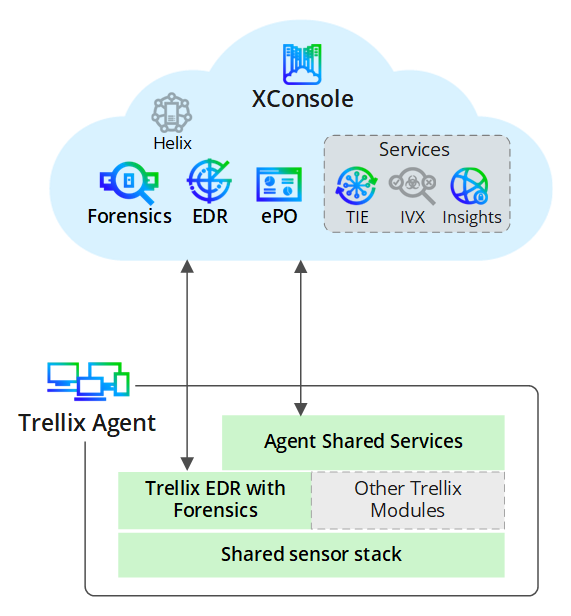
Data collection at the endpoint: The shared sensor stack in the Trellix Agent continuously monitors system activities, collecting raw data such as process executions, network connections, and registry changes. You can also integrate other Trellix products, such as Trellix Endpoint Security (ENS), Trellix Data Loss Prevention, and Trellix Application and Change Control to contribute additional data.
Direct communication with the cloud: The agent sends all collected data, events, and alerts from EDRF and Agent Shared Services directly to the XConsole. This direct connection simplifies architecture and ensures the cloud platform has real-time visibility.
Cloud analysis: All analysis occurs within the XConsole. A full suite of integrated services, including Helix, Forensics, Trellix EDR, ePO, Threat Intelligence Exchange, Intelligent Virtual Execution (IVX), and Insights, work together to detect threats, determine file reputations, analyze malware behavior, and provide security posture recommendations.
Centralized response: After analysis, the XConsole sends responses and policy updates back to the Trellix Agent. The agent enforces these actions on the endpoint, allowing for a centrally managed response.
On-premises deployment
An on-premises deployment keeps all data and security components within your own network or IaaS environment, providing maximum control over your data and infrastructure.
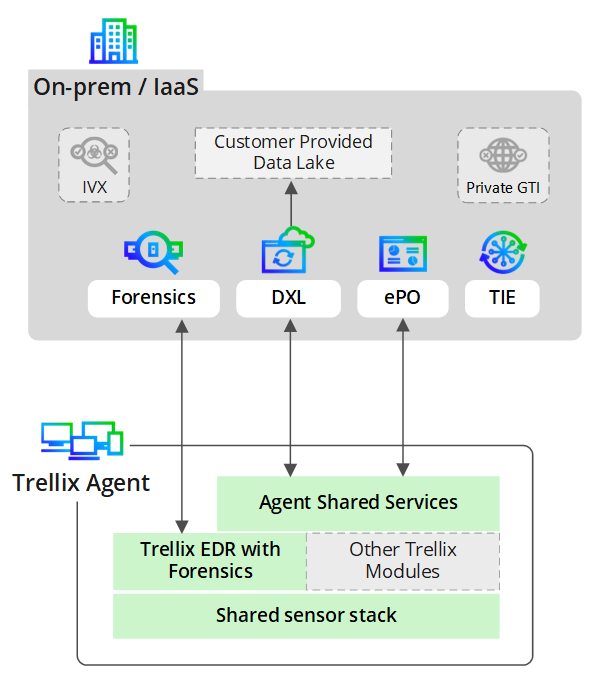
Data collection at the endpoint: The shared sensor stack in the Trellix Agent continuously monitors system activities, collecting raw data such as process executions, network connections, and registry changes. You can also integrate other Trellix products, such as Trellix Endpoint Security (ENS), Trellix Data Loss Prevention, and Trellix Application and Change Control, to contribute additional data.
Local data processing and exchange: The agent sends all data from EDRF and Agent Shared Services exclusively to the on-premises servers. The Trellix Data Exchange Layer (DXL) acts as the central communication backbone, connecting the agent to the entire on-premises security ecosystem and allowing for data to be contributed to a customer-provided Data Lake.
On-premises security analysis: Your local servers host the core security stack. ePO manages policies, Threat Intelligence Exchange ( TIE) provides file reputation services (often connected to a Private GTI), and Forensics allows for in-depth investigations. An optional Intelligent Virtual Execution (IVX) appliance can be integrated for local malware sandboxing.
Localized response and enforcement: All response actions are determined and orchestrated by the on-premises infrastructure. Responses are sent back to the Trellix Agent via the DXL and ePO, which then execute the required actions, such as blocking a file or quarantining a device, keeping the entire response cycle within your network.