This topic covers the following information:
ATI alert drill-down view
From the eAlerts > Recipient page, eAlerts > Sender page, eAlerts > Alerts page, or eQuarantine page, you can drill down from an ATI-badged alert to the threat intelligence developed by the Trellix Research Labs team.
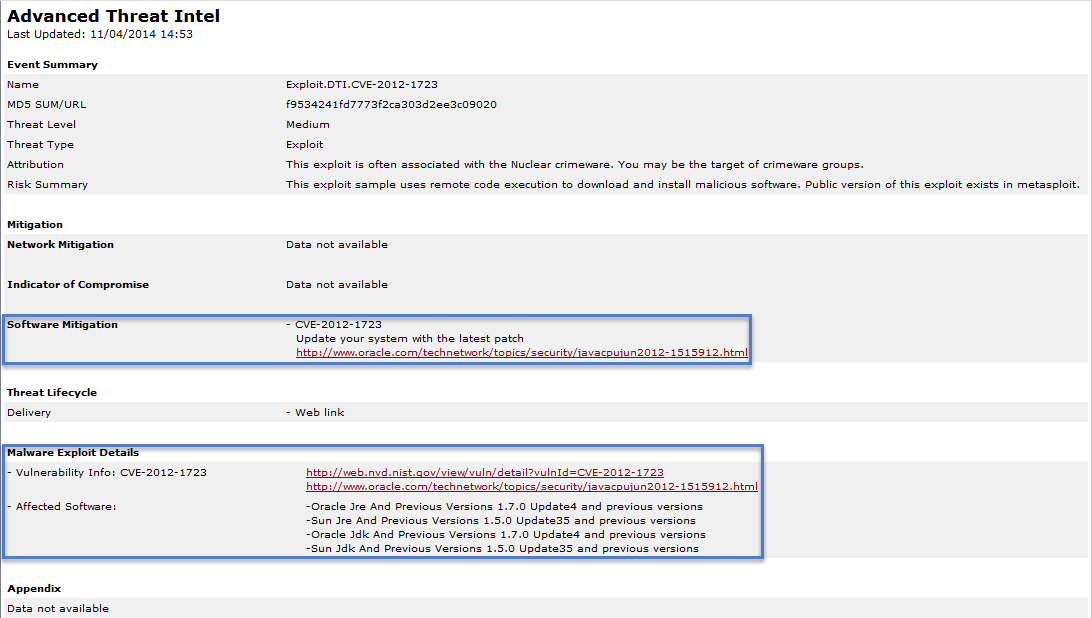
The following example shows threat intelligence for a malware object alert. The following sections are highlighted in the example ATI drill-down view:
The Mitigation section provides a link to the critical patch for the security vulnerability.
The Malware Exploit Details section provides a link to a summary of the vulnerability and a list of the affected software.
Automatic updates to ATI alerts
The Trellix Research Labs team continually uploads the latest threat intelligence to the Trellix DTI Cloud. By default, the appliance automatically queries the DTI server for updated threat intelligence.
For more information, see Enabling or disabling ATI alert auto updates using the CLI.
Sections within the ATI alert details
Threat intelligence information for an ATI alert consists of an Event Summary section followed by additional sections of information, depending on what is known about the threat.
Event summary
The Event Summary section displays the following information about the threat:
Name
Name of the malware object event.
MD5 sum/URL
MD5 checksum that identified the malware object.
Threat level
Level of risk posed by the attack against the targeted organization, in terms of how damaging the attack can be: High, Medium, or Low. This score is based on the malware's behavioral capabilities and intent, threat actor profiles, and otherTrellix intelligence.
The Threat Level determination for an ATI alert is different from the Severity for any alert. The Severity estimates the likelihood that the targeted host has been compromised by an event. For example, established command and control (CnC) channels result in highest severity, while host connection to a compromised site is low severity because it does not indicate whether the host was breached.
Threat type
Examples of threat types displayed in this field are listed below:
APT
Backdoor
Downloader
Exploit
Heuristic
Infostealer
Trojan
Worm
Attribution
Threat actor believed to have performed an act observed on your network.
Risk summary
Description of the risk to your network.
Mitigation
This section lists threat mitigation information, if known.
Network mitigation
Lists IP addresses or domains used in the attack. You might use this information to take action in other products, such as a web proxy or firewall.
Indicator of compromise
Can include new files, modified registry keys, and system services created.
Software mitigation
For threat type exploit only, this field lists the CVE and patch information.
Threat life cycle
This section lists threat life cycle elements, if known.
Installations
Installation activity performed on the victim machine.
Delivery
Method used to deliver the malware object, such as Email Attachment or Web link.
Malware exploit details
This section lists malware exploit details, if known.
Vulnerability info
Lists of links to threat advisories.
Affected software
List of software susceptible to the exploit.
Appendix
This section lists files installed by the attack, if known.