The quarantine contains all email that was classified as either spam or malware by the system. You can search for quarantined emails based on various filters.
To access the Quarantine page, click Quarantine in the top navigation bar.
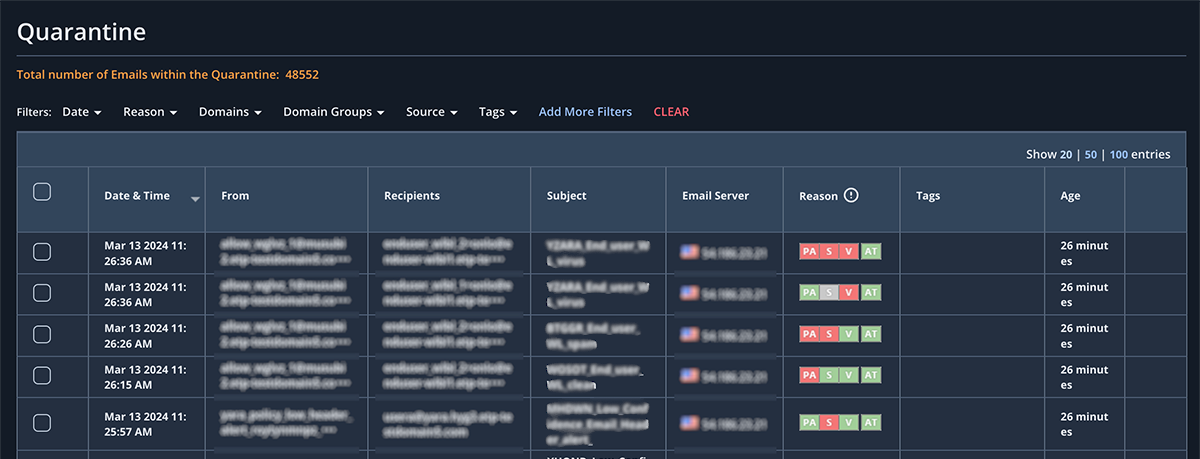
The Quarantine page displays information about each quarantined email:
Date and Time the email was received
From
Recipients
Subject
Email server (originating)
Reason it was flagged as malicious (Policy Action - PA, Spam - S, Virus - V, and Advanced Threats - AT)
Tags that show what policy quarantined the email
Age: The amount of time the email has been in the quarantine
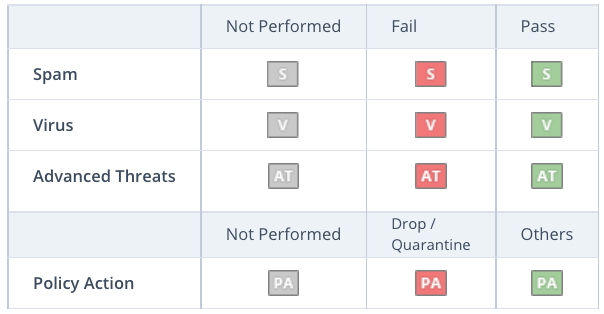
Analysis categories are noted in the Pass column if the email was considered to be non-malicious and Fail if it was considered to be spam or malicious. A green icon in a category indicates that the email was not considered malicious for that specific category. A red icon indicates that it was malicious. A gray icon indicates that the email analysis was not performed.
Note
The quarantine functionality is only available for domains configured in Inline or Inline with Hygiene mode. Messages are automatically deleted from the quarantine after 30 days.