The SiteList specifies from where automatic updates are downloaded.
By default, Trellix Security for Microsoft Exchange uses a sitelist that points to a Trellix site for automatic updates, but you can use a sitelist that points to a different location. For example, you might have copied the automatic updates to a local repository and created a sitelist that points your TSME systems to that local repository.
Click → → . The Edit AutoUpdate Repository List dialog box appears.
From the Repositories tab, click Add. The Repository Settings dialog box appears.
Repository Settings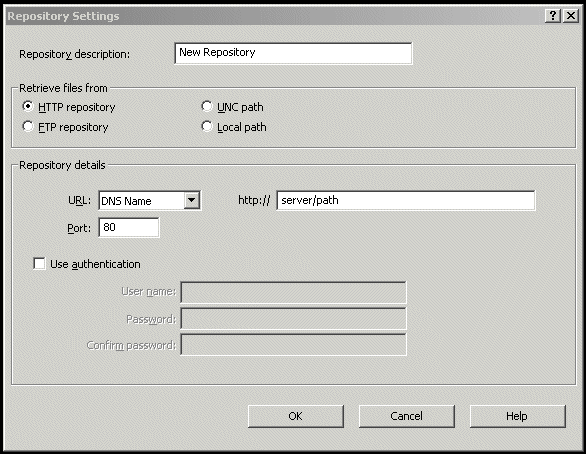
Select from the following options:
Repository Description — To give a brief description of the repository.
Retrieve files from — To specify from which type of repository to retrieve the files. The available options are HTTP repository, FTP repository, UNC Path, and Local Path.
URL — To specify the URL of the repository.
Port — To specify the port number of the repository.
Use Authentication — To enable user authentication to access the repository.
Specify a user name and password for authentication of the repository and confirm the password by typing it again.
Click OK to add the new repository to the Repository Description list.
Click OK to close the Edit AutoUpdate Repository List dialog box.