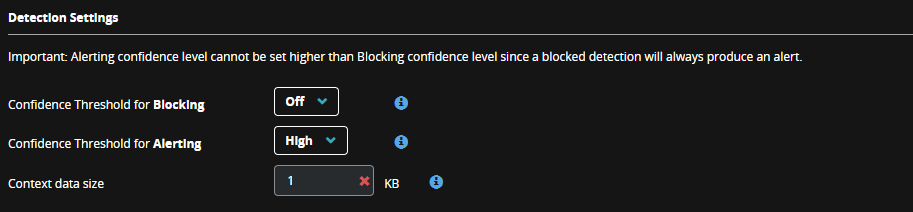
The AMSI module generates alerts or blocks execution when any script matches a rule. You can control the number of alerts generated by using the Confidence Threshold for Alerting section in Policies. The confidence threshold allows you to suppress alerts based on a triggered rule’s confidence level. For example, a High level setting only alerts on rules with a high confidence level, and a Low level setting alerts on every rule. The alert includes an extract of the suspicious script for quick analysis. Use the Context data size option to control the size of the sample script.
When blocking is enabled, the execution of scripts is blocked when a detection matches the selected confidence level or higher. By default, blocking is disabled, alerting is High, and the default data size is 1 KB.
Note
To prevent AMSI blocking a known allowed script, add it to the exclusions rules in policy.
To configure Alerts:
Log in to the Endpoint Security Web UI.
From the Admin menu, select Polices.
On the Policies page, select the policy you want.
On the Edit Policy page, in the Configurations section, select the AMSI tab.
On the AMSI details panel, in the Detection Settings section, select settings for confidence level, blocking, and data size.
Click Save.
Note
Confidence levels are decided by the Trellix research team and applied to each rule. The confidence levels are tuned based on the observations from internal testing and feedback from the field.