The AMSI module provides advanced settings to tune the performance and disk input/output (IO) operations. Default values address most scenarios. If you modify the settings, make sure that you validate the outcome.
Note
If your system has a high AMSI workload that uses large buffers for scanning operations, the AMSI module database size may exceed the configured value.
Workload is defined as the number of AMSI requests per minute and the average payload size of each request. The database may grow if there are few requests with large payloads, or many requests with small payloads.
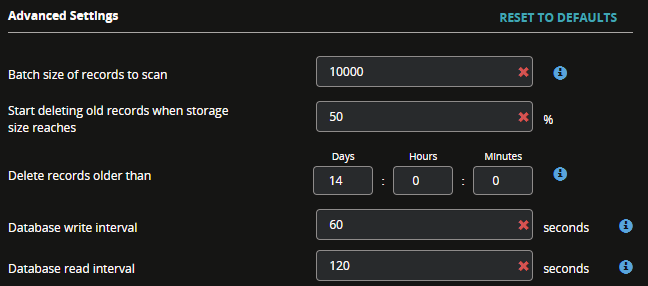 |
Use the following guidelines to monitor your usage and then adjust the settings relative to your findings.
Advanced Settings in Policy | Description | Default Values | Recommendation |
|---|---|---|---|
Batch size of records to scan | The number of records to scan during a scan cycle. The AMSI module stores the records in a database and scans at configured intervals to control the disk IO operations. Increasing the batch size of records to scan, may temporarily increase the memory usage allocated to the AMSI process on your system. | 10 KB | Increase this value until you get a satisfactory result. |
Delete records older than | The length of time to keep records. | 14 days | Reduce this to an hour or less until you get a satisfactory result. |
Database write interval | How often the database writes data to the disk. Keep this value lower than the read interval. | 15 seconds. Minimum value is 5 seconds. | Set the write interval to half the read interval value and reduce the value until you get a satisfactory result. |
Database read interval | How often the database scans the records. When the scan is complete, the database size is checked against the policy. If the database size needs to be reduced, records will be deleted to bring it within the configured limits. | 30 seconds | Reduce this to 10 seconds and increase until you get a satisfactory result. A low value can lead to a temporary increase in CPU consumption. |
Important
Database size management involves the creation of a journal file before the database size is reduced. This journal file is normal database behavior and can double the size of the database temporarily. It is not a reason to change the database settings.