Endpoint Security Process Tracker Module User Guide Release 1.2.7
Last Updated: September 17, 2023

Contents
Module Overview ............................................................ 4
Unique Process Execution .................................................. 4
General Description of Flow ...................................... 4
Supported Platforms .................................................... 5
Installing the Process Tracker Module .................................................. 6
Installing the Process Tracker Server Module ........................ 6
Installing the Process Tracker Agent Module .......................... 6
Uninstalling the Process Tracker Module ............................................. 8
Uninstalling the Process Tracker Module Completely ............ 8
Uninstalling the Process Tracker Agent Module .................... 8
Configuring the Process Tracker Module .............................................. 9
Enabling the Process Tracker Module ........................................ 9
Enabling the Process Tracker Server Module .......................... 9
Enabling the Process Tracker Agent Module ........................... 9
Verifying Installation ................................................ 10
Disabling the Process Tracker Module .......................... 11
Disabling the Process Tracker Server Module ................ 11
Disabling the Process Tracker Agent Module ..................... 11
Configuring the Process Tracker Server Module ............. 12
Enrichment Settings ................................................. 12
Logging Settings ..................................................... 13
Aging Settings ....................................................... 14
Alert Settings ........................................................ 15
Configuration API .................................................. 16
Get Process Tracker Configuration ........................................................ 16
Update the Process Tracker Configuration .................................................... 18
Configuring the Process Tracker Agent Policy .............................................. 19
Exclusions .............................................................................. 19
Onboarding Endpoints ................................................................. 19
Process Tracker Module Home Page ...................................................... 20
Banner and Tools Area .............................................................. 20
Grid Area .................................................................... 21
Record Details Area .............................................................. 25
Navigation Area ............................................................... 25
Alerts ............................................................. 26
Hosts with Alerts ............................................................. 26
Accessing Process Tracker Data Using the API ..................................... 33
Data Availability ................................................................ 33
Message Bus .................................................................... 33
Process Execution Events .......................................................... 33
Process Tracker Alerts .......................................................... 37
CEF Notifications ............................................................... 39
Endpoint Security Process Tracker Hit Found ..................................... 40
Module REST API Endpoints ...................................................... 40
API: Get Process Execution Events ............................................... 40
API: Get Process Execution Events, CSV Formatted ................................ 43
API: Get Specific Process Execution Event ........................................ 45
Agent Reporting via Agent Info Audit ............................................ 47
1 | Module Overview
Module Overview
The Process Tracker Module recognizes unique process execution events on a Windows, macOS, or Linux host, and streams the associated execution metadata to your Endpoint Security Server. These events are published on a public message bus topic that is accessible by Helix or your Security Information and Event Management solution (SIEM). The events are also stored locally within a database and are accessible via API. You can view the events using the Endpoint Security Web UI on the Process Tracker home page.
If the Enricher Module is installed and enabled, you can use the standard enricher workflow to process the Process Tracker events and obtain a verdict. For a malicious verdict, you can configure the Process Tracker to trigger an alert. The Process Tracker alert can then be configured to trigger an automatic triage.
If the Enricher Module is not installed and enabled, the Process Tracker can still post messages on the bus and store them in its database. The Process Tracker does not require the Enricher Module to be installed and enabled to stream the event data.
Unique Process Execution
These execution events are unique, which means that they are reported the first time that they are observed on the endpoint. If the same process executes on more than one endpoint, each endpoint will individually report the execution event. If a process executes more than once, only the first execution is reported unless any of the following exceptions occur:
- The process is executed from a new file path that has not been seen before on the endpoint.
- The hash of the process executable has not been seen before on the endpoint. For instance, the process has been updated to a new binary.
General Description of Flow
When the Process Tracker Module is installed and enabled on the agent, the agent monitors the process execution events to determine if a unique process execution occurs. To identify a unique process execution, the agent module collects metadata associated with the event and forwards the information to the Process Tracker Server Module. In addition to reporting these events, the agent continues to report its runtime health via the Agent Info Audit.
Note
For the Process Tracker Module to function on an agent, the real-time detection must be turned in the agent's policy. For more information, see Configuring the Process Tracker Agent Policy

For each event, the Process Tracker agent completes the following actions:
- Publishes the process execution event on a message bus topic, including the metadata collected by the agent.
1 | Module Overview
-
Stores the event within its local database so that it is accessible via the Endpoint Security Web UI and the REST API.
-
If the enrichment of events is enabled, enrichment is requested for the event. The Enricher Module executes its standard workflow to enrich the event with additional information from its configured data sources. When the enrichment request is completed the Process Tracker Module publishes an update of the event on the message bus topic that includes the enrichment verdict. The Process Tracker Module will also update the event within its local database.
-
If a malicious enrichment verdict is received, and alerting is enabled, the Process Tracker Server Module will publish a generic alert of type PRO to the Alerting Service of the Endpoint Security Server. This alert will be associated to the host where the process executed. The alert information will be available within the Endpoint Security Web UI, accessible via REST API, published on a message bus topic, and provided within a CEF notification.
Supported Platforms
This release of the Process Tracker Module is supported on Endpoint Security with Endpoint Agent running on Windows, macOS or Linux.
Note
Installing the Process Tracker Module 1.2.x on Endpoint Security 4.9.x or earlier, or with Endpoint Agent 31 or earlier, is not supported. If you are running a release prior to version 1.2.x of the Process Tracker Module you must uninstall it, then install this version. An upgrade from a prior version is not supported.
2 | Module Overview
Installing the Process Tracker Module
You can install the Process Tracker Module using the Endpoint Security Web UI or download the CMS package from the FireEye Market.
The Process Tracker Module is a server-only module.
Installing the Process Tracker Server Module
Select one of the following options to install the module:
- To install the Process Tracker Module using the Endpoint Security Web UI:
- Log in to the Endpoint Security Web UI as an administrator.
- From the Modules menu, select Endpoint Module Administration.
- Click the Available Modules tab and locate Process Tracker in the Module list.
- In the Actions column, click the gear icon, and click Install.
- Click Install on the dialog box.
- To download the module installer CMS package, go to the FireEye Market, then upload the module CMS file to your Endpoint Security Web UI.
The module is disabled by default. When the module is installed successfully, it appears on the Modules menu.
To enable to Process Tracker Server Module, see Configuring the Process Tracker Module.
For more information about installing the server module, see the "Installing or Uninstalling Modules" section in the Endpoint Security Server User Guide.
Installing the Process Tracker Agent Module
- Log in to the Endpoint Security Web UI as an administrator.
- From the Admin menu, select Policies to access the Policies page.
- On the Policies page, in the Actions column, click the gear icon for the appropriate policy assigned to the host that you want to deploy Process Tracker to, and select Edit Policy.
- On the Edit Policy page, click Categories, and select Process Tracker. Click Apply.
- Click Save.
6
Endpoint Security Process Tracker Module User Guide Release 1.2.7
2 | Module Overview
After installation, the Process Tracker needs to be enabled, see Configuring the Process Tracker Agent Policy. The Process Tracker creates a new process as a sub-process of the main agent. The sub-process is named the same as the process, xagt.
Endpoint Security Process Tracker Module User Guide Release 1.2.7 7
3 | Module Overview
Uninstalling the Process Tracker Module
Uninstalling the Process Tracker Module removes Process Tracker policy settings from all policies, removes the server module from the management server, and removes the agent modules from endpoints on host systems. You do not need to disable Process Tracker before you uninstall it. You can also remove the agent module from a host set without removing the module from the server.
Uninstalling the Process Tracker Module Completely
To uninstall the Process Tracker Module using the Endpoint Security Web UI, complete the following steps:
-
Log in to the Endpoint Security Web UI as an administrator.
-
From the Modules menu, select Endpoint Module Administration.
-
Click the Installed Modules tab and locate Process Tracker in the Module list.
-
On the Modules page, locate the Process Tracker module and click the Actions icon.
-
Select Uninstall and click Uninstall in the confirmation window.
-
Click Save.
A message at the top of the page tells you that module uninstallation succeeded.
Uninstalling the Process Tracker Agent Module
-
Log in to the Endpoint Security Web UI as an administrator.
-
From the Admin menu, select Policies to access the Policies page.
-
On the Policies page, in the Action column, click the gear icon for the policy that you want to remove the Process Tracker from, and select Edit Policy.
-
On the Edit Policy page, click Categories.
-
Clear the Process Tracker checkbox and click Apply.
-
Click Save.
4 | Module Overview
Configuring the Process Tracker Module
The Process Tracker Module consists of a server module and an agent module. The agent module is installed and enabled on agents using the Process Tracker policy. If you disable the server module, this will automatically disable the agent module for all policies.
Enabling the Process Tracker Module
Before you enable the Process Tracker Module, ensure that you understand the concepts of host sets and assigning a policy. For more information, see the Endpoint Security Server User Guide.
Enabling the Process Tracker Server Module
- Log in to the Endpoint Security Web UI.
- From the Modules menu, select Endpoint Module Administration.
- On the Modules page, click Installed Modules.
- Locate the Process Tracker module in the list.
- In the Actions column, click the gear icon, and select Enable.
Note
Enabling the server module does not automatically enable the Process Tracker on the agents.
Enabling the Process Tracker Agent Module
Before enabling Process Tracker on endpoint agents, review Configuring the Process Tracker Agent Policy.
To enable Process Tracker on a host set, complete the following steps:
- Log in to the Endpoint Security Web UI as an administrator.
- From the Admin tab, select Policies.
- On the Policies page, click the appropriate policy.
- Select Process Tracker in the Configurations list.
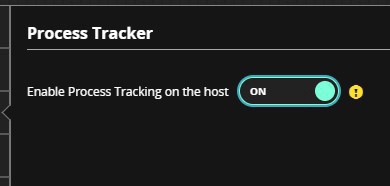
- In the Process Tracker details panel, move the Process Tracker toggle to On, and click Save.
4 | Module Overview
The Process Tracker Module will be enabled the next time the configuration is updated on the agent.
Verifying Installation
To verify that the Process Tracker Module is installed and running on a host, use the Host Management home page to locate the target host and observe the values within the Process Tracker Status and the Process Tracker Version columns. See the following table for the correct values.
| Host Management Column | Value |
|---|---|
| Process Tracker Status | Running |
| Process Tracker Version | 1.2.7 |
The Host Management User Module provides information about the system's features installed on each host in your endpoint population that is connected to the Endpoint Security Server. For more information, see the Host Management Module User Guide on the FireEye Market.
If the columns are not visible, complete the following steps:
- Log in to the Endpoint Security Web UI.
- From the Modules menu, select Host Management.
- In the upper-right corner, click the Manage Column icon.
- Select Process Tracker Status and Process Tracker Version from the list.
There are no log files specific to the Process Tracker server module. The log entries from the module can be found within the log file of the base Endpoint Security Server.
There are no log files specific to the Process Tracker agent module. The log entries from the module can be found within the log file of the agent on the host.
4 | Module Overview
file of the main agent.
Disabling the Process Tracker Module
Disabling the server module automatically disables Process Tracker in all existing policies.
Disabling the Process Tracker Server Module
- Log in to the Endpoint Security Web UI as an administrator.
- From the Modules tab, select Endpoint Module Administration.
- On the Modules page, click Installed Modules.
- Locate the Process Tracker module in the list.
- In the Actions column, click the gear icon, and select Disable.
Disabling the Process Tracker Agent Module
- Log in to the Endpoint Security Web UI as an administrator.
- From the Admin menu, select Policies.
- On the Policies page, locate the appropriate policy for the agent on which you want to disable Process Tracker.
- In the Actions column, click the gear icon and click Edit Policy.
- In the Edit Policy page, in the Configurations panel, click Process Tracker.
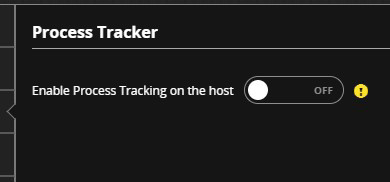
- In the details panel, move the Enable Process Tracker on the host toggle to Off.
- On the Edit Policy page, click Save.
Endpoint Security Process Tracker Module User Guide Release 1.2.7
11
4 | Module Overview
Configuring the Process Tracker Server Module
-
Log in to the Endpoint Security Web UI as an administrator.
-
From the Modules menu, select Endpoint Module Administration to access the Modules page.
-
On the Installed Modules page, locate the Process Tracker Module.
-
In the Actions column, click the gear icon, and select Configure.
-
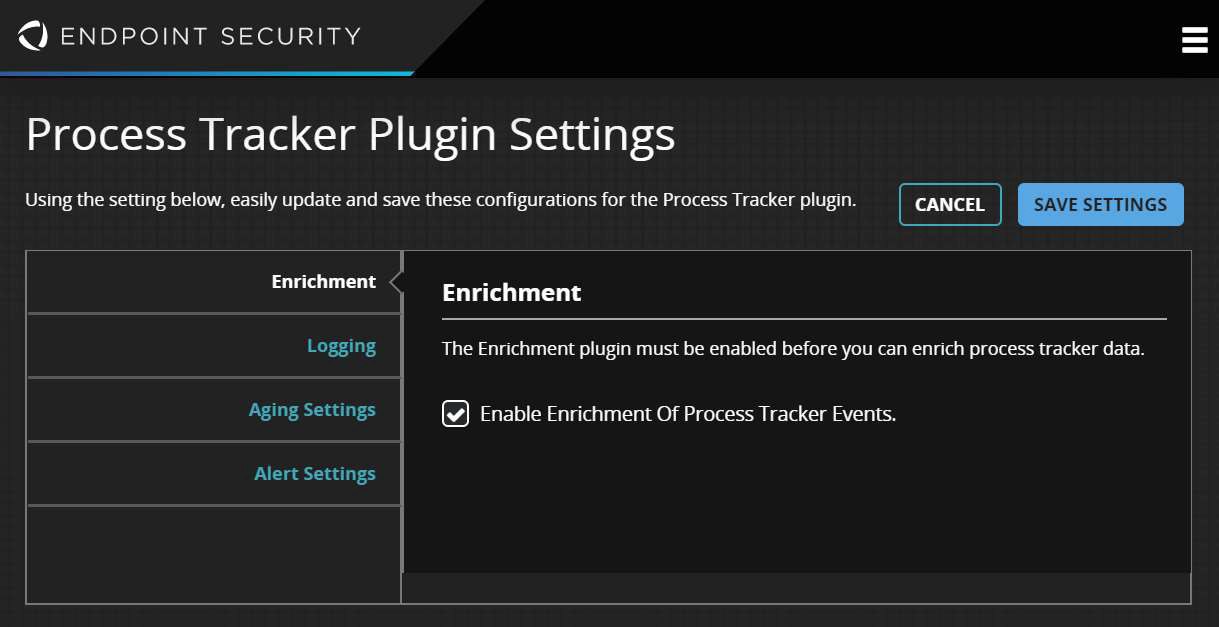
The Process Tracker Settings page opens.
Note
You can also configure the Process Tracker by accessing the API. For more information, see Configuration API.
Enrichment Settings
Note
For this option to function, the Enricher Module must be installed and enabled on the same Process Tracker server as the Process Tracker. Enrichment is not available for events from endpoints running a distribution of Linux with prelinking enabled.
The Process Tracker Module can collaborate with the Enricher Module and receive enriched information for process execution events.
4 | Module Overview
When this option is selected, Enricher will engage its workflow for Process Tracker events, and provide a value for Enrichment Status to associate to each event.
Enabling Enrichment
To enable enrichment of Process Tracker events:
-
Log in to the Endpoint Security Web UI.
-
From the Modules menu, select Endpoint Module Administration.
-
On the Modules page, click Installed Modules.
-
Locate the Process Tracker module in the list.
-
In the Actions column, click the gear icon, and select Configure.
-
In the Enrichment detail panel, select Enable Enrichment of Process Tracker Events.
Viewing Enrichment Status
To view Enrichment Status from the Process Tracker home page:
-
Log in to the Endpoint Security Web UI.
-
From the Modules menu, select Process Tracker.
-
In the upper-right corner, click the Manage Columns icon.
-
Select Enrichment Status from the list.
Logging Settings
You can adjust the level of detail provided in the log messages by the Process Tracker Server Module in the Process Tracker Plugin Settings. The agent logging details are controlled by the Agent Logging configuration in Edit Policy and are not independently adjustable for the Process Tracker Module.
The server logging feature contains a log level setting that searches messages by type, including Debug, Information, Notice, Warning, Error, Critical, Alert, and Emergency. Each logging level includes the messages generated by the level below it. For example, Critical includes Alert and Emergency messages. Debug is the highest level and includes all other levels. For information about accessing the log file and notifications related to its content, refer to the CLI Command Reference.
Endpoint Security Process Tracker Module User Guide Release 1.2.713
4 | Module Overview
| Logging Level | Description |
|---|---|
| Debug |
Logs debugging messages. This logging level is normally used when debugging a program only. It includes all types of logging messages. |
| Info |
Logs Informational messages about regular system processing. |
| Notice (default) |
Logs notification messages that identify minor problems on the host endpoint that do not inhibit regular agent function. Defaults are used until the problem is resolved. |
| Warning |
Logs warning messages that identify non-critical and correctable errors on the host endpoint, such as a specified value that is too large. |
| Error |
Logs error messages that identify program errors on the host endpoint, such as when a file cannot be found. |
| Critical |
Logs critical messages that identify serious conditions on the host endpoint, such as hard drive errors. |
| Alert |
Logs messages that identify urgent conditions on the host endpoint that require immediate remediation, such as a corrupted system database. |
| Emergency |
Logs system failure messages that identify total system failures on the host endpoint. These system failures usually cause the agent to stop functioning. |
Aging Settings
Process Tracker receives events from the endpoints for each unique process execution. These events are held within the Process Tracker database for 30 days by default, after which they are discarded. While the events are in the database, they can be viewed
4 | Module Overview
in the Endpoint Security Web UI in the Process Tracker home page and retrieved via the API. To manage the size of the database, use the Aging Settings to specify how long to retain events before they are discarded.
- Log in to the Endpoint Security Web UI as an administrator.
- From the Admin menu, select Endpoint Module Administration.
- On the Modules page, click Installed Modules.
- Locate the Process Tracker module in the list.
- In the Actions column, click the gear icon, and click Configure.
- In the Aging Settings details panel, in the Delete database entries after field, adjust the value.

Alert Settings
The Process Tracker Module can generate alerts for events related to a malicious process execution. Enrichment must be enabled in Enabling Enrichment. If you want to receive alerts from the Process Tracker for malicious process execution events, complete the following steps:
- Log in to the Endpoint Security Web UI as an administrator.
- From the Modules menu, select Endpoint Module Administration.
- On the Modules page, click Installed Modules.
- Locate the Process Tracker module in the list.
- In the Actions column, click the gear icon, and select Configure.
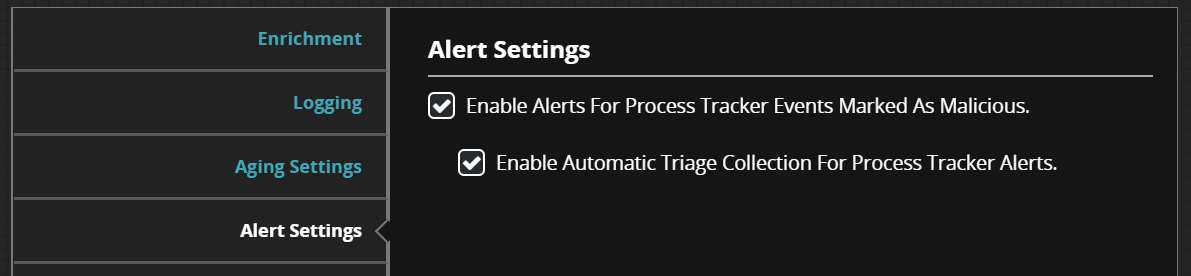
- In the Process Tracker Plugin Settings, click Alert Settings.
- Select Enable Alerts For Process Tracker Events Marked As Malicious.
Endpoint Security Process Tracker Module User Guide Release 1.2.7
15
4 | Module Overview
Configuration API
The configuration API is available through the configuration endpoint of the Endpoint Security Server REST API. For more information about how to interact with the Endpoint Security Server API, refer to the Endpoint Security REST API Guide.
Get Process Tracker Configuration
Use the following API request to get the current configuration tree for the Process Tracker Module.
Request
| HTTP Verb | Path | Parameters |
|---|---|---|
| GET | hx/api/services/config/tree | node_name=/config/process-tracker |
Response
The returned information is a JSON dictionary with the following keys.
| Key | Notes |
|---|---|
| Data |
List of configuration properties. Each property has the following attributes:
|
4 | Module Overview
| Key | Notes |
|---|---|
|
Configuration Properties
| Purpose | Path | Type {Values} |
|---|---|---|
| Enrichment | /config/process-tracker/enrichment/enabled | Boolean {true | false} |
| Logging level | /config/process-tracker/logging/level | String {'debug' | 'info' | 'warning' | 'notice' | 'error' | 'critical' | 'alert' | 'emergency'} |
| Aging setting | /config/process-tracker/aging/database/period | Int32 (number of seconds) Default = 30 days as seconds |
| Alert setting | /config/process-tracker/alerting/enabled | Boolean {true | false} |
Sample Response
{
"data": [
{
"default_value": "2592000",
"name": "/config/process-tracker/aging/database/period",
"type": "int32",
"value": "2592000"
},
{
"default_value": "false",
"name": "/config/process-tracker/alerting/enabled",
"type": "bool",
"value": "true"
}
]
}
Endpoint Security Process Tracker Module User Guide Release 1.2.717
4 | Module Overview
{
"default_value": "true",
"name": "/config/process-tracker/enrichment/enabled",
"type": "bool",
"value": "true"
},
{
"default_value": "notice",
"name": "/config/process-tracker/logging/level",
"type": "string",
"value": "notice"
}
]
}Update the Process Tracker Configuration
Update a configuration property for the Process Tracker module. See Configuration Properties in Configuration API.
Request
| HTTP Verb | Path | Parameters |
|---|---|---|
| PUT | hx/api/services/config/tree | node_name=/config/process-tracker |
Request Headers
The following header indicates that there will be JSON formatted request data within the body.
| Content-Type | Application/json |
Request Body
The request body contains a list of configuration properties to be set, formatted as JSON. For example, the following request body will specify that the Logging level be updated to a value of Error.
{"data": [{"default_value": "notice", "name": "/config/process-tracker/logging/level", "type": "string", "value": "error" }]}Note
If an invalid value is specified, this request will not provide feedback. The Process Tracker accepts the value and, if it finds an invalid configuration property, it replaces the value with the default value for that property. You also cannot modify the default value of a configuration property using this request.
18 Endpoint Security Process Tracker Module User Guide Release 1.2.7
4 | Module Overview
Configuring the Process Tracker Agent Policy
For the Process Tracker to function on the agent, the Real-Time Indicator Detection in Configurations in Edit Policy must be turned on. If you install the module on an agent without turning on real-time indicator detection, no process execution events will be detected.
Log in to the Endpoint Security Web UI as an administrator.
From the Admin menu, select Policies.
Locate the policy you want to edit.
In the Actions column, click the gear icon, and click Edit Policy.
In the Edit Policy page, in Configurations, select Real-Time Indicator Detection.
In the details panel, move the Real-Time Indicator Detection toggle to On.
For information on enabling the Process Tracker, see Enabling the Process Tracker Agent Module.
Exclusions
You may need to fine-tune the exclusions that the Process Tracker ignores for process execution events. Process Tracker uses the list of excluded files or folders and processes that are configured in policy in the Real Time Indicator Detection category.
Onboarding Endpoints
When the module is enabled on the agent, the endpoint will begin streaming unique process execution events. The first time that the module observes a process execution that it has not reported before, the event will be streamed. Therefore, when the Process Tracker Module is first enabled, many process execution events will be for ones that are reported for the first time.
Over time, uniqueness of the process execution events will taper off. If you plan to onboard a large population of endpoints, perform the onboarding with groups of endpoints to avoid an initial burst of events being streamed. If you monitor the process when a group is enabled, this will inform you of the size of the next group to enable, according to the available capacity of your system.
Endpoint Security Process Tracker Module User Guide Release 1.2.7 19
Process Tracker Module Home Page
The Process Tracker Module home pages allows administrators to view events generated by the Process Tracker Module. This section describes how to use the Process Tracker user interface on the Endpoint Security Web UI.
To access the Process Tracker home page:
- Log in to the Endpoint Security Server Web UI.
- From the Modules menu, select Process Tracker.
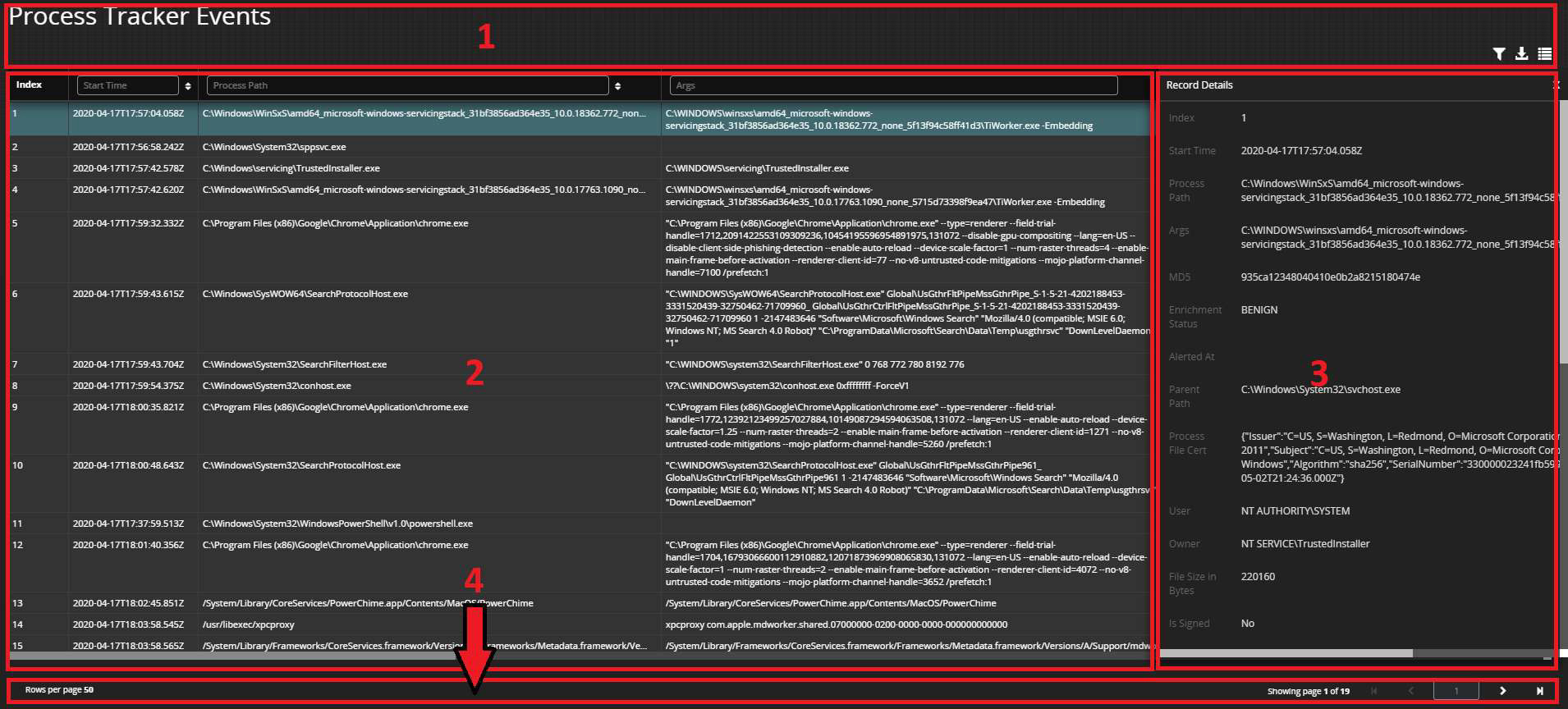
The Process Tracker page has four functional areas:
- Banner & tools area
- Grid area
- Record details area
- Navigation area
Banner and Tools Area
On the upper-right side there is a set of tools to interact with the information in the grid.
Manage Filter Sets: Use filter sets to define and save specific filters that are applied to the grid. This allows quick access to customized views of the events data. The filter tool has the following features:
20Endpoint Security Process Tracker Module User Guide Release 1.2.7
5 | Module Overview
-
Save the current filter applied to the grid as a new filter set.
-
Control who has access to this filter set by selecting private or public.
-
Export and Import filter sets.
-
Remove filter sets that are no longer useful.
Export Grid Data to CSV: Export the current grid data to a CSV file. The data that is exported is sorted and filtered according to the active settings applied in the grid.
Note
You can export a maximum of 10,000 rows with the Export to CSV tool. If you need to routinely export large numbers of rows, with or without filters applied, use the Module REST API.
Manage Columns: Configure, which columns are displayed in the grid. You can also adjust the order of presentation. The top-down order of the columns in this tool represents the left-right position of the columns within the grid.
Grid Area
The grid displays the events collected by the Process Tracker Module. Each row in this table contains a process execution event. For more information, see Unique Process Execution. The following table describes each column in the grid. The grid displays 50 events per page.
| Column | Description | Notes |
|---|---|---|
| Agent ID | The unique system-generated ID for the host endpoint that reported the event. | |
| Alerted At | Time stamp of the associated alert, if one was generated. | |
| Args | The command arguments supplied to the process when it executed. | |
| Attributes | Attributes associated with the process file. Possible values include the following: | Only available on Windows |
Endpoint Security Process Tracker Module User Guide Release 1.2.721
5 | Module Overview
Column | Description | Notes |
|---|---|---|
| ||
Creation Time | The creation time of the process file. | Not available on Linux |
Enrichment Status |
The status from the enrichment workflow, if enabled. Possible values include the following:
| |
Event At | The time stamp for when the process execution was detected on the endpoint. | |
File Size (Bytes) | The size of the file associated with the process. | |
Group | The name of the user group associated with the process file. | Not available on Windows |
5 | Module Overview
|
Column |
Description |
Notes |
|
Index |
The ordinal of the event as it was received by the Process Tracker Module. | |
|
Is Prelinked |
The file associated to the process was prelinked. Enrichment of prelinked files is not supported. |
Only available on Linux distributions that support prelinking. |
|
Is Signed |
Whether the file associated to the process is signed. Yes or No. |
Only available on Windows |
|
Last Accessed Time |
The last access time of the process file. |
May not be available on some Windows versions |
|
Last Status Change Time |
The last metadata update time of the process file. |
Not available on Windows |
|
MD5 |
The MD5 hash of the process file. | |
|
Modified Time |
The time for last content modification of the process file. | |
|
Owner |
The owner associated to the process file. | |
|
Parent Path |
The fully qualified path of the file associated with the parent process of the process being executed. | |
|
Parent PID |
The process ID of the parent process. | |
|
PID |
The process ID of the process that was executed. |
5 | Module Overview
|
Column |
Description |
Notes |
|---|---|---|
|
Process File Cert |
Certificate details, if the process file was signed. The following are possible values:
|
Only available on Windows |
|
Process File Exists |
Whether the associated process file existed on disk at the time that the event was detected. Yes or No. | |
|
Process Path |
The fully qualified path of the file associated with the process. | |
|
Signature Verified |
Whether a verified signature exists for the file associated to the process. Yes or No. |
Only available on Windows |
|
Start Time |
The time that the process started execution on the endpoint. | |
|
Type |
This event is a start or stop event. Stop events are only issued for processes when an associated start event was not detected. | |
|
User |
The ID of the user who launched the process. |
For each column in the grid, you can apply a filter that will show only the rows that match your criteria. You can filter on more than one column at a time, according to the information that you are seeking to reveal. Your filter settings can be saved and recalled by using the Filter Sets tool.
The rows in the grid can be sorted in ascending and descending order on most columns. Columns that can be sorted have an ▲
5 | Module Overview
button to the right of the column name in the header. A sort cannot be applied to more than one column at a time.
Record Details Area
When you click a row within the grid, a panel on the right appears and lists the details of the selected row. The list of details shows a value for every column that is available in the grid, not just the columns that were configured visible within the grid. Clicking another row displays the details of the new row.
Navigation Area
Use the navigation area to page through the rows of the grid.
- The rows displayed per page is on the lower-left corner. This value is not adjustable and currently set to 50.
- Click the > button to move to the next page.
- Click the < button to move to the previous page.
- Click the >| button to move to the last page.
- Click the |< button to move to the first page.
- You can move to any page number by entering the page number you want into the entry field and pressing enter.
6 | Module Overview
Alerts
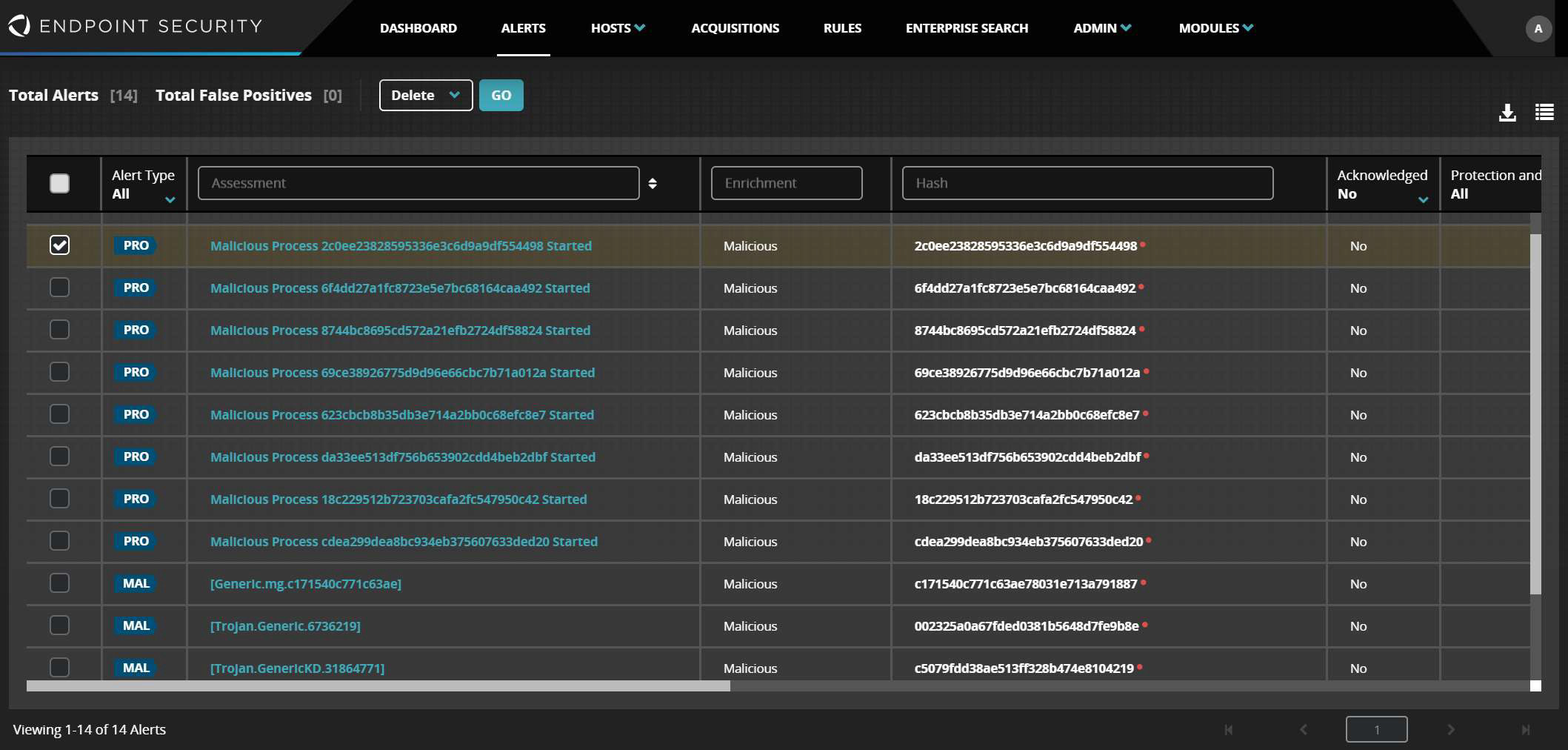
Alerts from Process Tracker are displayed on the Alerts page of the Endpoint Security Web UI with the following details:
- Alert Type: PRO
- Assessment: Malicious Process <md5 hash> Started
The following is a example of a Process Tracker alert on the Alerts page. When you click the alert, a page opens with the details of the alert for that host.
Hosts with Alerts
Alerts from Process Tracker are displayed on the Host page of the Endpoint Security Web UI with the following details:
- Alert Type: PRO
- Assessment: Malicious Process <md5 hash> Started
The following is an example of a Endpoint Security alert on the Hosts page. The Raw Alerts Details provide the alert information in JSON format.
26
Endpoint Security Process Tracker Module User Guide Release 1.2.7
6 | Module Overview
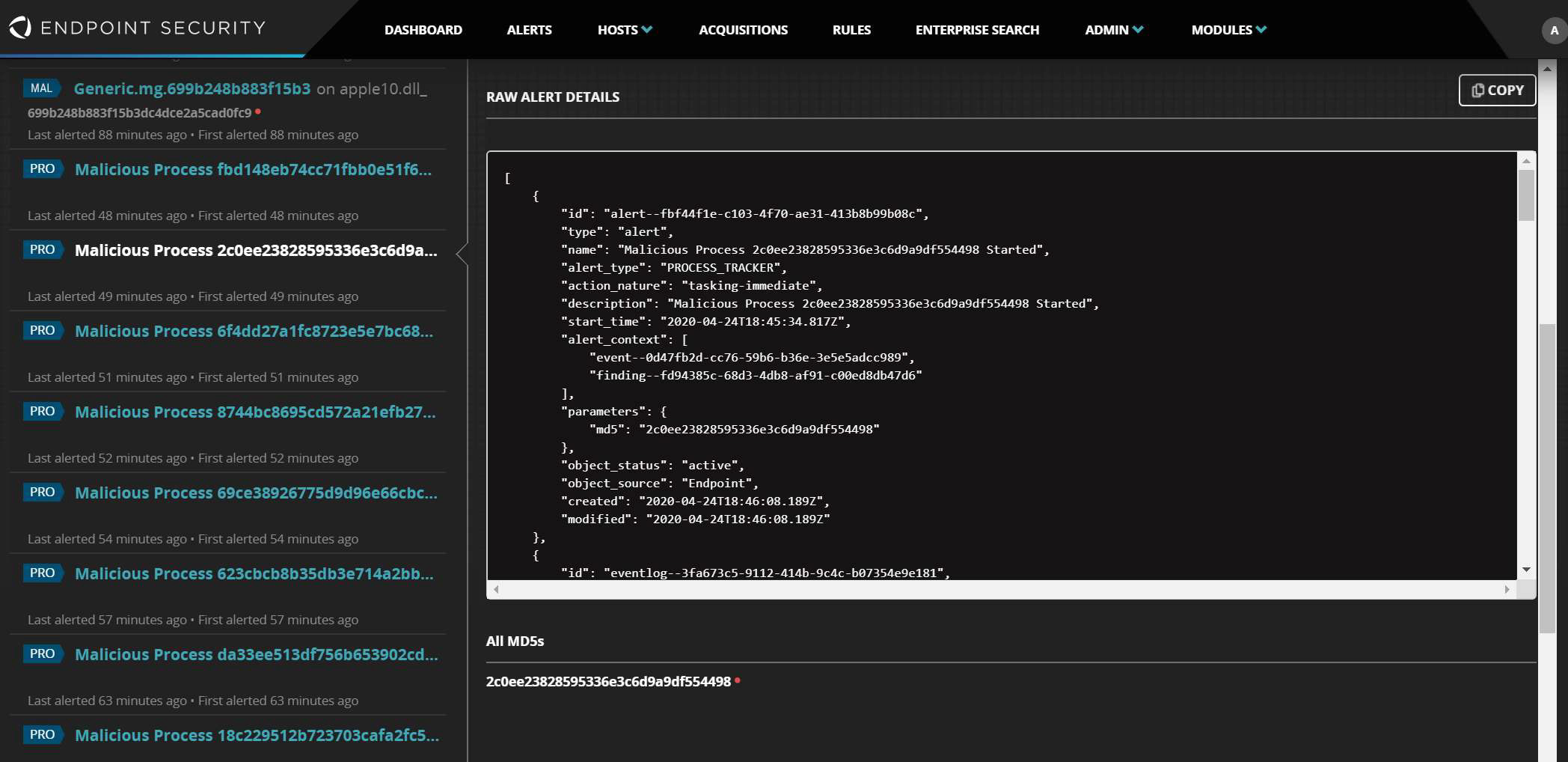
The data model for this format is a set of interrelated objects, where each object carries attributes related to a specific aspect of the alert. See the following table for the data model object types.
| Alert | High level attributes of the alert. |
|---|---|
| DigitalSignature | Signature attributes of the file related to the process execution. |
| Event | Attributes related to the execution detection. |
| File | File information related to the process execution. |
| Process | Information related to the process and the parent process. |
Fields in the Process Tracker map into the Raw Alert Details model as follows.
| Field | Data Model Destination |
|---|---|
| Agent ID | Not represented. It is implicated by the host being viewed. |
| Alerted At | Alert.start_time |
|
Field |
Data Model Destination |
|
Args |
Process.arguments |
|
Attributes |
File.is_archive, File.is_compressed, File.is_encrypted, File.is_hidden, File.write |
|
Creation Time |
File.file_created |
|
Enrichment Status |
Not represented. Malicious is implied as the verdict. |
|
Event At |
Event.start_time |
|
File Size (bytes) |
File.size_in_bytes |
|
Group |
File.owner_group |
|
Index |
Not represented. |
|
Is Prelinked |
Not represented. |
|
Is Signed |
DigitalSignature.signature_exists |
|
Last Accessed Time |
File.file_last_accessed |
|
Last Status Change Time |
Not represented. |
|
MD5 |
Alert.parameters.md5, File.hashes.value |
|
Modified Time |
File.file_last_modified |
|
Owner |
File.owner_user |
|
Parent Path |
Process.parent.( File.path, File.name, File.file_extension) |
|
Parent PID |
Process.parent.pid |
6 | Module Overview
|
Field |
Data Model Destination |
|---|---|
|
PID |
Process.pid |
|
Process File Cert |
DigitalSignature.certificate_issuer, DigitalSignature.certificate_subject |
|
Process File Exists |
Not represented. |
|
Process Path |
File.path, File.name, File.file_extension |
|
Signature Verified |
DigitalSignature.signature_verified |
|
Start Time |
Event.start_time |
|
Type |
Event.event_type |
|
User |
Event.account_name |
The following is a sample alert copied from Raw Alert Details. The fields that have been populated by the specific Process Tracker alert are emphasized in bold.
[
{
"id": "alert--fbf44f1e-c103-4f70-ae31-413b8b99b08c",
"type": "alert",
"name": "Malicious Process 2c0ee23828595336e3c6d9a9df554498 Started",
"alert_type": "PROCESS_TRACKER",
"action_nature": "tasking-immediate",
"description": "Malicious Process 2c0ee23828595336e3c6d9a9df554498 Started",
"start_time": "2020-04-24T18:45:34.817Z",
"alert_context": [
"event--0d47fb2d-cc76-59b6-b36e-3e5e5adcc989",
"finding--fd94385c-68d3-4db8-af91-c00ed8db47d6"
],
"parameters": {
"md5": "2c0ee23828595336e3c6d9a9df554498"
},
"object_status": "active",
"object_source": "Endpoint",
"created": "2020-04-24T18:46:08.189Z",
"modified": "2020-04-24T18:46:08.189Z"
},
{
"id": "eventlog--3fa673c5-9112-414b-9c4c-b07354e9e181",
"type": "eventlog",
"extensions": {
6 | Module Overview
"cef-log-ext": {
"meta_information": {
"categoryTechnique": "Malware",
"categoryDeviceType": "ProcessTracker",
"categoryTupleDescription": "ProcessTracker found a compromise indication",
"categoryOutcome": "Success",
"categoryBehavior": "Found",
"categorySignificance": "Compromise"
}
}
}
},
{
"id": "file--79920691-91a0-5345-b53a-39afe34db2da",
"type": "file",
"name": "hipAutomationWhiteListTest10164.exe",
"file_extension": ".exe",
"file_path": "C:\\Users\\Administrator\\AppData\\Roaming\\Microsoft\\Windows\\StartMenu\\Programs\\Startup\\hipAutomationWhiteListTest10164.exe",
"size_in_bytes": 186861,
"file_created": "2020-04-24T18:45:21.234Z",
"file_last_modified": "2020-04-24T18:45:21.250Z",
"file_last_accessed": "2020-04-24T18:45:21.250Z",
"is_archive": true,
"is_compressed": false,
"is_encrypted": false,
"is_hidden": false,
"write": true,
"hashes": [
{
"hash_algorithm": "md5",
"value": "2c0ee23828595336e3c6d9a9df554498"
}
],
"object_status": "active",
"object_source": "Endpoint",
"created": "2020-04-24T18:46:08.189Z",
"modified": "2020-04-24T18:46:08.189Z",
"owner_user": "BUILTIN\\Administrators",
"owner_group": null,
"digital_signatures": [
"digital-signature-info-type--bca29082-6209-4543-87d0-35517feaf8fe"
]
},
{
"id": "file--2cca9aa5-a3a9-5969-b2c8-1b5a7e6f5a1e",
"type": "file",
"name": "cmd.exe",
"file_extension": ".exe",
"file_path": "C:\\Windows\\System32\\cmd.exe",
"object_status": "active",
"object_source": "Endpoint",
"created": "2020-04-24T18:46:08.189Z",
"modified": "2020-04-24T18:46:08.189Z"
},
{
"id": "process--0431d562-b9cd-4f24-9623-39a6139dfb98",
"type": "process",
"pid": 3620,
"binary": "file--79920691-91a0-5345-b53a-39afe34db2da",
"parent": "process--c45cdb05-bb5a-49d7-b0a7-2f8caf5cfe97",
"object_status": "active",
"object_source": "Endpoint",30
Endpoint Security Process Tracker Module User Guide Release 1.2.7
6 | Module Overview
"created": "2020-04-24T18:46:08.189Z",
"modified": "2020-04-24T18:46:08.189Z",
"arguments":
"\"C:\\Users\\Administrator\\AppData\\Roaming\\Microsoft\\Windows\\StartMenu\\Programs\\Startup\\hipAutomationWhiteListTest10164.exe\" /auto C:\\"
},
{
"id": "process--c45cdb05-bb5a-49d7-b0a7-2f8caf5cfe97",
"type": "process",
"pid": 4384,
"binary": "file--2cca9aa5-a3a9-5969-b2c8-1b5a7e6f5a1e",
"object_status": "active",
"object_source": "Endpoint",
"created": "2020-04-24T18:46:08.189Z",
"modified": "2020-04-24T18:46:08.189Z"
},
{
"id": "finding--fd94385c-68d3-4db8-af91-c00ed8db47d6",
"type": "finding",
"risk_nature": "malicious",
"object_status": "active",
"object_source": "Endpoint",
"created": "2020-04-24T18:46:08.189Z",
"modified": "2020-04-24T18:46:08.189Z"
},
{
"id": "software--79920691-91a0-5345-b53a-39afe34db2da",
"type": "software",
"name": "Enricher",
"object_status": "active",
"object_source": "Endpoint",
"created": "2020-04-24T18:46:08.189Z",
"modified": "2020-04-24T18:46:08.189Z"
},
{
"id": "action--114e445e-6f84-59c2-a50a-0b7c5e7d8e0d",
"type": "action",
"name": "process-start",
"action_nature": "observed",
"start_time": "2020-04-24T18:45:33.446Z",
"objects": [
"process--0431d562-b9cd-4f24-9623-39a6139dfb98"
],
"object_status": "active",
"object_source": "Endpoint",
"created": "2020-04-24T18:46:08.189Z",
"modified": "2020-04-24T18:46:08.189Z"
},
{
"id": "event--0d47fb2d-cc76-59b6-b36e-3e5e5adcc989",
"type": "event",
"event_type": "start",
"name": "process-event observed and analyzed",
"start_time": "2020-04-24T18:45:33.446Z",
"objects": [
"file--79920691-91a0-5345-b53a-39afe34db2da",
"process--0431d562-b9cd-4f24-9623-39a6139dfb98",
"finding--fd94385c-68d3-4db8-af91-c00ed8db47d6",
"software--79920691-91a0-5345-b53a-39afe34db2da"
],
"object_status": "active",
"object_source": "Endpoint",
"created": "2020-04-24T18:45:33.446Z",
Endpoint Security Process Tracker Module User Guide Release 1.2.731
6 | Module Overview
"modified": "2020-04-24T18:45:33.446Z",
"account_name": "WINE51B13E84DB6\\Administrator"
},
{
"id": "analysis--79920691-91a0-5345-b53a-39afe34db2da",
"type": "analysis",
"name": "enrich-context",
"action_nature": "tasking-immediate",
"is_automated": true,
"performer": "software--79920691-91a0-5345-b53a-39afe34db2da",
"parameters": {
"hash": "2c0ee23828595336e3c6d9a9df554498"
},
"results": [
"finding--fd94385c-68d3-4db8-af91-c00ed8db47d6"
]
},
{
"id": "relationship--b1165b5d-55e0-4615-afc0-153deb7a3f58",
"type": "relationship",
"source": "event--0d47fb2d-cc76-59b6-b36e-3e5e5adcc989",
"target": "analysis--79920691-91a0-5345-b53a-39afe34db2da",
"relationship_type": "triggered"
},
{
"id": "digital-signature-info-type--bca29082-6209-4543-87d0-35517feaf8fe",
"type": "digital-signature-info-type",
"signature_verified": false,
"signature_exists": false
}
]7 | Module Overview
Accessing Process Tracker Data Using the API
This section provides information about how to access the data that is made available by the Process Tracker Module.
Data Availability
Some attributes are not available on all platforms. For more information, see the table in the Grid Area. If an attribute is not available, the value is null. This is relevant when parsing attributes that are made available in the interfaces in the following sections.
Message Bus
The Endpoint Security Server provides two message bus topics that the Process Tracker module will post activity to. One streams the process execution events that are posted by the endpoints, the other streams the alerts generated by the module.
Access to the message bus is via the Endpoint Security Server REST API. API details relevant to the Process Tracker are covered in this guide. For more information about how to interact with the API, refer to Endpoint Security REST API Guide.
Note
Old messages roll off the message bus as new ones are created. Extract any messages you want to save.

Process Execution Events
The process execution events are available on the PROCESS_TRACKER topic. Messages are recorded here when an agent posts a unique process event. If enrichment of events is enabled, a secondary update message is posted when the enrichment status for the event is received from the Enricher Module.
HTTP Verb | Path | URI |
|---|---|---|
GET | /hx/api/services | /topic/PROCESS_TRACKER |
Request Headers
X-OFFSET | The offset ID of the first message to retrieve. This can be omitted for the first request. A response header will provide an updated value for your next |
Endpoint Security Process Tracker Module User Guide Release 1.2.733
7 | Module Overview
|
request. If you provide a value that is below the earliest message available, then the earliest available message is provided in the response. | |
| X-MAX-MESSAGES |
Optional, to limit the number of messages returned. Default is 500. |
| X-POLL-TIMEOUT |
Maximum number of seconds to wait for X-MAX_MESSAGES to become available. |
Response Codes (subset)
| 200 | Success |
| 204 | No content |
Response Headers (subset)
| X-OFFSET |
The new position in the topic. This should be saved and provided as the X-OFFSET in the next GET request. |
| Warning |
Provides details regarding issues with X-OFFSET. |
Response
The response is newline terminated text based that is a combination of boundary tags, message header information and JSON message payload.
--Boundary_409686_968730724_1587661791987
TS: 1587146250151
BTS: 1587146250151
MID: 186ca9acbbd6842c
SID: PROCESS-TRACKER
CID: tVC951q7Ri4dQgIrR5NrtQ
AID: PROCESS-TRACKER
TPC: PROCESS_TRACKER
Content-Disposition: form-data; name="PROCESS_TRACKER"; filename="PROCESS-TRACKER"
Content-Type: application/binary
{"type":"event","data":{"uuid":"7e4a1da6-7e49-4829-9f5d-566e1c7d16c6","id":2,"md5":"acbdfbdbfb5f1995d26e34ca351a6657","agent_id":"BH3E2ZjPcd3bUeKIrjYe5n","eve7 | Module Overview
"nt_at":"2020-04-17T17:56:58.242Z","process_file_exists":true,"process_path":"C:\\Windows\\System32\\sppsvc.exe","pid":17612,"parent_path":"C:\\Windows\\System32\\services.exe","parent_pid":700,"file_size":4589056,"file_created_at":"2020-03-17T17:25:36.446Z","file_last_accessed_at":"2020-03-17T17:25:36.717Z","file_last_modified_at":"2020-03-17T17:25:36.717Z","args":null,"type":"end","started_at":"2020-04-17T17:56:58.242Z","user":"NT AUTHORITY\\NETWORK SERVICE","owner":"NT SERVICE\\TrustedInstaller","is_signed":true,"file_attributes":"Archive","process_file_cert":{"Issuer":"C=US, S=Washington, L=Redmond, O=Microsoft Corporation, CN=Microsoft Windows Production PCA 2011","Subject":"C=US, S=Washington, L=Redmond, O=Microsoft Corporation, CN=Microsoft Windows","Algorithm":"sha256","SerialNumber":"330000023241fb59996dcc4dff0000000000232","ExpirationTime":"2020-05-02T21:24:36.000Z"},"signature_verified":true,"group":null,"last_status_change_time":null,"is_prelinked":null,"updated_at":"2020-04-17T17:57:30.135Z","created_at":"2020-04-17T17:57:30.118Z","alerted_at":null,"enrichment_status":"REQUESTED","enrichment_requested_at":"2020-04-17T17:57:30.134Z"}}--Boundary_409686_968730724_1587661791987--
Process Execution Event Payload
The payload is a key-value dictionary with the following keys.
| Key | Notes |
|---|---|
| type |
event: The message within the topic is for a process execution event. event_update: The message is an update for a prior message posted within the topic. |
| data | Dictionary of attributes associated to the event. |
The following table maps the keys in the data dictionary to the fields that are described in the Grid area of the Process Tracker home page or describes the value directly, if it is not available within the grid.
| data.key | Notes |
|---|---|
| agent_id | Grid Area.Agent ID |
| alerted_at | Grid Area.Alerted At |
| args | Grid Area.Args |
| attributes | Grid Area.Attributes |
Endpoint Security Process Tracker Module User Guide Release 1.2.7
35
7 | Module Overview
|
data.key |
Notes |
|---|---|
|
created_at |
Tiem when the event was consumed by the server module. |
|
enrichment_requested_at |
Time when the event was posted to the Enricher Module. |
|
enrichment_status |
Grid Area.Enrichment Status |
|
event_at |
Grid Area.Event At |
|
file_created_at |
Grid Area.Creation Time |
|
file_last_accessed_at |
Grid Area.Last Accessed Time |
|
file_last_modified_at |
Grid Area.Modified Time |
|
file_size |
Grid Area.File Size (bytes) |
|
group |
Grid Area.Group |
|
id |
Grid Area.Index |
|
is_prelinked |
Grid Area.Is Prelinked |
|
is_signed |
Grid Area.Is Signed |
|
last_status_change_time |
Grid Area.Last Status Change Time |
|
md5 |
Grid Area.MD5 |
|
owner |
Grid Area.Owner |
|
parent_path |
Grid Area.Parent Path |
|
parent_pid |
Grid Area.Parent PID |
7 | Module Overview
|
data.key |
Notes |
|---|---|
| pid | Grid Area.PID |
| process_file_cert | Grid Area.Process File Cert |
| process_file_exists | Grid Area.Process File Exists |
| process_path | Grid Area.Process Path |
| signature_verified | Grid Area.Signature Verified |
| started_at | Grid Area.Start Time |
| type | Grid Area.Type |
| updated_at | Timestamp of last update to this event |
| user | Grid Area.User |
| uuid | Unique ID for the event. This can be used to tie events and update_events together. |
Process Tracker Alerts
If the Process Tracker module is configured to generate alerts for malicious process executions, it will post the alert to the HX_Alerts topic. This topic will hold messages for all alert types generated on your instance of the Endpoint Security Server, not only the ones produced by the Process Tracker Module.
| HTTP Verb | Path | URI |
|---|---|---|
| GET | /hx/api/services | /topic/HX_ALERTS |
The request headers, response codes and response headers are the same as those called out in the previous section, Process Execution Events.
7 | Module Overview
Response
The response is newline terminated text base that is a combination of boundary tags, message header information and JSON message payload.
--Boundary_300_380661968_1587754355337
TS: 1587751687198
BTS: 1587751687198
MID: f9b04b28bf4c87f3
SID: app-processor
CID: baAHA18PHEgdx80GtPZyiI
AID: HX
TPC: HX_ALERTS
Content-Disposition: form-data; name="HX_ALERTS"; filename="HX"
Content-Type: application/binary
{"type":"alert","producer":"app-processor","subtype":"PROCESS_TRACKER","data":{"_id":5,"agent":{"_id":"6Kk3YlsJus6dTm1E9zS3yc","url":"/hx/api/v3/hosts/6Kk3YlsJus6dTm1E9zS3yc","containment_state":"normal"},"event_at":"2020-04-24T18:07:20.115Z","matched_at":"2020-04-24T18:07:20.115Z","reported_at":"2020-04-24T18:07:48.571Z","source":"PROCESS_TRACKER","subtype":null,"matched_source_alerts":[],"resolution":"ALERT","is_false_positive":false,"decorators":[],"md5values":["cdea299dea8bc934eb375607633ded20"],"decorator_statuses":[],"url":"/hx/api/v3/alerts/5","condition":null,"indicator":null,"event_id":null,"event_type":null,"event_values":[{"id":"alert--ff8367cb-1451-4a1d-88b0-e715dcf162ef","type":"alert","name":"Malicious Process cdea299dea8bc934eb375607633ded20 Started","alert_type":"PROCESS_TRACKER","action_nature":"tasking-immediate","description":"Malicious Process cdea299dea8bc934eb375607633ded20 Started","start_time":"2020-04-24T18:07:20.115Z","alert_context":["event--79920691-91a0-5345-b53a-39afe34db2da","finding--644ad639-b5fa-49e0-968f-1c7b556ca305"],"parameters":{"md5":"cdea299dea8bc934eb375607633ded20"},"object_status":"active","object_source":"Endpoint","created":"2020-04-24T18:07:48.528Z"},{"id":"file--79920691-91a0-5345-b53a-39afe34db2da","type":"file","name":"RandomEvent.exe","file_extension":".exe","file_path":"C:\\Program Files\\RandomEvent\\RandomEvent.exe","size_in_bytes":2272432,"file_created":"2016-10-16T01:19:22.000Z","file_last_modified":"2016-10-16T01:20:22.000Z","file_last_accessed":"2016-10-28T18:26:12.144Z","is_archive":true,"is_compressed":false,"is_encrypted":true,"is_hidden":false,"write_time":null,"hashes":[{"hash_algorithm":"md5","value":"cdea299dea8bc934eb375607633ded20"}],"object_status":"active","object_source":"Endpoint","created":"2020-04-24T18:07:48.528Z","modified":"2020-04-24T18:07:48.528Z"},{"id":"file--2cca9aa5-a3a9-5969-b2c8-1b5a7e6f5a1e","type":"file","name":"explorer.exe","file_extension":".exe","file_path":"C:\\Windows\\explorer.exe","object_status":"active","object_source":"Endpoint","created":"2020-04-24T18:07:48.528Z","modified":"2020-04-24T18:07:48.528Z"},{"id":"process--2b652c42-970a-4720-bc40-bc44de64a2f5","type":"process","pid":11864,"binary":"file--79920691-91a0-5345-b53a-39afe34db2da","parent":"process--cc72747d-cd9d-4d29-b8f1-ad93afc6bb86","object_status":"active","object_source":"Endpoint","created":"2020-04-24T18:07:48.528Z","modified":"2020-04-24T18:07:48.528Z"},{"id":"finding--644ad639-b5fa-49e0-968f-1c7b556ca305","type":"finding","risk_nature":"malicious","object_status":"active","object_source":"Endpoint","created":"2020-04-24T18:07:48.528Z","modified":"2020-04-24T18:07:48.528Z"},{"id":"software--79920691-91a0-5345-b53a-39afe34db2da","type":"software","name":"Enricher","object_status":"active","object_source":"Endpoint", ...}
38
Endpoint Security Process Tracker Module User Guide Release 1.2.7
7 | Module Overview
"created":"2020-04-24T18:07:48.528Z","modified":"2020-04-24T18:07:48.528Z"},{ "id":"action--735adbdc-6553-5b19-b6f4-2ceca35afafd","type":"action","name":"process-start","action_nature":"observed","start_time":"2020-04-24T00:00:00.000Z","objects":["process--2b652c42-970a-4720-bc40-bc44de64a2f5"],"object_status":"active","object_source":"Endpoint","created":"2020-04-24T18:07:48.528Z","modified":"2020-04-24T18:07:48.528Z"},{ "id":"event--79920691-91a0-5345-b53a-39afe34db2da","type":"event","event_type":"start","name":"process-event observed and analyzed","start_time":"2020-04-24T00:00:00.000Z","objects":["file--79920691-91a0-5345-b53a-39afe34db2da","process--2b652c42-970a-4720-bc40-bc44de64a2f5","finding--644ad639-b5fa-49e0-968f-1c7b556ca305","software--79920691-91a0-5345-b53a-39afe34db2da"],"object_status":"active","object_source":"Endpoint","created":"2020-04-24T00:00:00.000Z","modified":"2020-04-24T00:00:00.000Z","account_name":"FIREEYE\\matthew.tardiff"},{ "id":"analysis--79920691-91a0-5345-b53a-39afe34db2da","type":"analysis","name":"enrich-context","action_nature":"tasking-immediate","is_automated":true,"performer":"software--79920691-91a0-5345-b53a-39afe34db2da","parameters":{"hash":"cdea299dea8bc934eb375607633ded20"},"results":["finding--644ad639-b5fa-49e0-968f-1c7b556ca305"]},{ "id":"relationship--4baee7d9-d716-4ee3-beec-e2d0508d0ab9","type":"relationship","source":"event--79920691-91a0-5345-b53a-39afe34db2da","target":"analysis--79920691-91a0-5345-b53a-39afe34db2da","relationship_type":"triggered"},{ "id":"digital-signature-info-type--0d9619a3-048e-4da4-8684-7c70b4208bf0","type":"digital-signature-info-type","signature_verified":true,"signature_exists":true,"certificate_issuer":"C=US, S=Washington, L=Redmond, O=Microsoft Corporation, CN=Microsoft Windows Production PCA 2011","certificate_subject":"sha256"}]}} --Boundary_300_380661968_1587754355337Process Tracker Alert Payload
The payload is a key-value dictionary with the following keys.
| Key | Notes |
|---|---|
| type |
alert: The message within the topic is for a new alert. alert_update: The message is an update for a prior alert posted within the topic. |
| data |
Dictionary of attributes associated to the alert. |
The information that is returned within the data dictionary of the response is structured exactly the same as previously described in Hosts with Alerts.
CEF Notifications
The Process Tracker Module submits a CEF notification for every alert that it creates. For background information on CEF notifications and field definitions, see Alert Notifications CEF | LEEF | CSV | XML | JSON. Also refer to the "Appendix B, CEF Logs and Output" section in the Endpoint Security Server User Guide.
7 | Module Overview
Endpoint Security Process Tracker Hit Found
Sample Process Tracker Hit Found message.
CEF:0|fireeye|hx|9.9.0|Process Tracker Hit Found|Process Tracker Hit Found|10|rt=May 01 2018 05:42:14 UTC dvchost=abc-hx.helix.apps.fireeye.com categoryDeviceGroup=/IDS categoryDeviceType=Process Tracker categoryObject=/Host cs1Label=Host Agent Cert Hash cs1=Doug5I839radPSmAwf3512 dst=10.1.49.81 dmac=00-50-56-88-e5-99 dhost=Home-PC-11 dntdom=WORKGROUP deviceCustomDate1Label=Agent Last Audit deviceCustomDate1=May 01 2018 04:54:30 UTC cs2Label=FireEye Agent Version cs2=26.21.8 cs5Label=Target GMT Offset cs5=+PT2H cs6Label=Target OS cs6=Windows 10 Pro 16299 externalId=3407 start=May 01 2018 05:42:13 UTC categoryOutcome=/Success categorySignificance=/Compromise categoryBehavior=/Found cs7Label=Resolution cs7=ALERT cs8Label=Alert Types cs8=PRT cs13Label=Malware Engine cs13=AV cs12Label=Malware Category cs12=file-event act=Detection PRT Hit msg=Host Home-PC-11 Malware alert categoryTupleDescription=Process Tracker found a compromise indication. cs4Label=Process Name cs4=C:\Program Files (x86)\Google\Chrome\Application\chrome.exe cs9Label=MD5 cs9=94bcdff4b00947b34795c6f2209c9707 cs10Label=SHA1 cs10=918652d77d2ffce0ea282fe1f61fffd207b5d6ab cs11Label=Malware Signature cs11=Trojan.GenericKD.30688709 categoryTechnique=MalwareModule REST API Endpoints
The following API endpoints are provided by the Process Tracker Module. These API endpoints focus on the retrieval of process execution events. To access other aspects associated with Endpoint Security Server artifacts such as alerts and policies, refer to the Endpoint Security REST API Guide.
| Endpoint | Purpose |
|---|---|
| /events | GET the process execution events currently available as JSON. |
| /events/export | GET the process execution events currently available as CSV. |
| /events/:id | GET a specific process execution event. |
Accessing these API Endpoints is the same process as for the base API for the Process Tracker Server. For more information, refer to the Endpoint Security REST API Guide.
API: Get Process Execution Events
Returns process execution events from the Process Tracker database as a JSON result.
7 | Module Overview
|
HTTP Verb |
Path |
URI |
|---|---|---|
|
GET |
/hx/api/plugins |
/process-tracker/v1/events |
Request Parameters
|
Parameter |
Notes |
|---|---|
|
limit=<unsigned 32> |
Limits the number of records returned. The default is 50. |
|
offset=<unsigned 32> |
Used for pagination. Returns the records starting with this offset. Default is 0. |
|
sort=<text> |
Sorts the result by the specified field and direction. Default is id:ascending. Valid fields: agent_id, alerted_at, args, enrichment_requested_at, enrichment_status, event_at, file_attributes, file_created_at, file_last_accessed_at, file_last_modified_at, file_size, group, id, is_prelinked, is_signed, last_status_change_time, md5, owner, parent_path, parent_pid, pid, process_file_cert, process_file_exists, process_path, signature_verified, started_at, type, user, uuid Valid directions: ascending, descending |
|
filter=<filter spec list> |
Specifies how to filter the events. The Default is no filter. A filter spec is declared with the following keys and values: {
"operator":"eq",
"field":"file_size",
"arg":[30000]
}
Where field is any of the listed Valid Fields above, arg is the value(s) to match against. Valid values for operator are: eq, contains, between |
Endpoint Security Process Tracker Module User Guide Release 1.2.7
41
7 | Module Overview
| Parameter | Notes |
|---|---|
|
A complex filter can contain more than one filter spec as follows: filter=[{filter spec 1},{filter spec 2},…]
where the implied operation between filter specs is AND |
Response
The information that is returned is a JSON dictionary with the following keys.
| Key | Notes |
|---|---|
| total | Number of data rows (events) available. |
| data | List of rows, each as a key-value dictionary with a key for each field listed in the Valid Fields in the previous table. |
| offset | The offset requested. |
| limit | The limit requested. |
| filter | The filter requested. |
| sort | The sort requested. |
{
"total": 5468,
"data": [
{
"id": 1,
"md5": "935ca12348040410e0b2a8215180474e",
"agent_id": "IRpLUYULZijcI7GgQKb3FA",
"event_at": "2020-04-17T17:57:04.058Z",
"process_file_exists": true,
"process_path": "C:\\Windows\\WinSxS\\amd64_microsoft-windowsservicingstack_31bf3856ad364e35_10.0.18362.772_none_5f13f94c58ff41d3\\TiWorker.exe",
"pid": 34568,
"parent_path": "C:\\Windows\\System32\\svchost.exe",
"parent_pid": 940,
...
}
]
}
7 | Module Overview
{
"file_size": 220160,
"file_created_at": "2020-04-15T10:58:40.081Z",
"file_last_accessed_at": "2020-04-17T17:57:04.061Z",
"file_last_modified_at": "2020-03-17T04:00:01.152Z",
"args": "C:\\WINDOWS\\winsxs\\amd64_microsoft-windowsservicingstack_31bf3856ad364e35_10.0.18362.772_none_5f13f94c58ff41d3\\TiWorker.exe -Embedding",
"type": "start",
"started_at": "2020-04-17T17:57:04.058Z",
"user": "NT AUTHORITY\\SYSTEM",
"owner": "NT SERVICE\\TrustedInstaller",
"is_signed": false,
"file_attributes": "Archive",
"alerted_at": null,
"process_file_cert": {
"Issuer": "C=US, S=Washington, L=Redmond, O=Microsoft Corporation, CN=Microsoft Windows Production PCA 2011",
"Subject": "C=US, S=Washington, L=Redmond, O=Microsoft Corporation, CN=Microsoft Windows",
"Algorithm": "sha256",
"SerialNumber": "330000023241fb59996dcc4dff000000000232",
"ExpirationTime": "2020-05-02T21:24:36.000Z"
},
"signature_verified": false,
"last_status_change_time": null,
"group": null,
"created_at": "2020-04-17T17:57:03.633Z",
"updated_at": "2020-04-17T17:59:59.472Z",
"is_prelinked": null,
"uuid": "35bed136-cd36-4486-b290-dae59400c53d",
"enrichment_status": "BENIGN",
"enrichment_requested_at": "2020-04-17T17:57:03.655Z"
}],
"offset": 0,
"limit": 1,
"filter": {},
"sort": [
{
"id": "ascending"
}
]
}API: Get Process Execution Events, CSV Formatted
Returns process execution events from the Process Tracker database as CSV formatted data.
| HTTP Verb | Path | URI |
|---|---|---|
| GET | /hx/api/plugins | /process-tracker/v1/events/export |
Endpoint Security Process Tracker Module User Guide Release 1.2.743
7 | Module Overview
Request Parameters
| Parameter | Notes |
|---|---|
| limit=<unsigned 32> | Limits the number of records returned. The default is 50. The maximum allowed is 10,000. |
| offset=<unsigned 32> | Used for pagination. Returns the records starting with this offset. Default is 0. |
| sort=<text> | Sorts the result by the specified field and direction. See //events for the remaining details of this parameter. |
| filter=<filter spec list> | Specifies how to filter the events. The Default is no filter. See //events for the remaining details of this parameter. |
| columns=<text> | A comma separated list of Valid Fields to include in the export. Default is all fields. |
Response
The information that is returned is CSV formatted data. Each row of the CSV data is terminated by a newline. The first row is the column header row. The column headers represent the text that is shown in the data grid. For example, field id is returned as Index because that is how it is represented in the Grid area of the Endpoint Security Web UI. The following fields are also available that are not in the Grid area. For a description, see the second table in the Process Execution Event Payload.
- Created At
- Enrichment Requested At
- Updated At
- UUID
Index,UUID,MD5,Agent ID,Event At,Process File Exists,Process Path,PID,Parent Path,Parent PID,File Size in Bytes,Creation Time,Last Accessed Time,Modified Time,Args,Type,Start Time,User,Owner,Is Signed,Attributes,Alerted At,Process File Cert,Signature Verified,Last Status Change Time,Group,Is PreLinked,Enrichment Status,Enrichment Requested At,Created At,Updated At 1,35bed136-cd36-4486-b290-dae59400c53d,935ca12348040410e0b2a8215180474e,IRpLUYULZijcI7GgQKb3FA,2020-04-17T17:57:04.058,WinSxS\amd64_microsoft-windows- servicingstack_31bf3856ad364e35_10.0.18362.772_none_5f13f94c58ff41d3\
7 | Module Overview
TiWorker.exe,34568,C:\Windows\Sys_tem32\
svchost.exe,940,220160,2020-04-15T10:58:40.081Z,2020-04-17T17:57:04.061Z,2020-03-17T04:00:01.152Z,C:\WINDOWS\
winsxs\amd64_microsoft-windows- servicingstack_31bf3856ad364e35_10.0.18362.772_none_5f13f94c58ff41d3\
TiWorker.exe - Embedding,start,2020-04-17T17:57:04.058Z,NT AUTHORITY\SYSTEM,NTSERVICE\TrustedInstaller,false,Archive,,"{""Issuer"":""C=US, S=Washington, L=Redmond, O=Microsoft Corporation, CN=Microsoft Windows Production PCA 2011""}",""Subject"":""C=US, S=Washington, L=Redmond, O=Microsoft Corporation, CN=Microsoft Windows"",""Algorithm"":""sha256"",""SerialNumber"":""330000023241fb59996dcc4dff000000000232"",""ExpirationTime"":""2020-05-02T21:24:36.000Z""}",false,,,BENIGN,2020-04-17T17:57:03.655Z,2020-04-17T17:57:03.633Z,2020-04-17T17:59:59.472Z
2,7e4a1da6-7e49-4829-9f5d-566e1c7d16c6,acbdfdbdfb5f1995d26e34ca351a6657,BH3E2ZjPcd3bUeKIrjYe5n,2020-04-17T17:56:58.242Z,true,C:\Windows\System32\sppsvc.exe,17612,C:\Windows\System32\services.exe,700,4589056,2020-03-17T17:25:36.446Z,2020-03-17T17:25:36.717Z,2020-03-17T17:25:36.717Z,,end,2020-04-17T17:56:58.242Z,NT AUTHORITY\NETWORK SERVICE,NTSERVICE\TrustedInstaller,true,Archive,,"{""Issuer"":""C=US, S=Washington, L=Redmond, O=Microsoft Corporation, CN=Microsoft Windows Production PCA 2011""}",""Subject"":""C=US, S=Washington, L=Redmond, O=Microsoft Corporation, CN=Microsoft Windows"",""Algorithm"":""sha256"",""SerialNumber"":""330000023241fb59996dcc4dff000000000232"",""ExpirationTime"":""2020-05-02T21:24:36.000Z""}",true,,,REQUESTED,2020-04-17T17:57:30.134Z,2020-04-17T17:57:30.118Z,2020-04-17T17:57:30.135Z
API: Get Specific Process Execution Event
Returns information about a specific event, identified by the ID. The ID is the value represented by Index in the Grid area of the Endpoint Security Web UI, which is the same as the value returned in the id attribute of these API.
| HTTP Verb | Path | URI |
|---|---|---|
| GET | /hx/api/plugins | /process-tracker/v1/events/:id |
Request Parameters
None. The URI specifies the query.
Response
The information that is returned is a JSON dictionary with the following keys
| Key | Notes |
|---|---|
| data | A one element list for the inquired row, where the element is a key-value dictionary with a key for each field listed in the Valid Fields, above. |
Endpoint Security Process Tracker Module User Guide Release 1.2.745
7 | Module Overview
| Key | Notes |
|---|---|
| query | The ID of the event requested |
{
"data": [
{
"id": 1,
"md5": "935ca12348040410e0b2a8215180474e",
"agent_id": "IRpLUYULZijcI7GgQKb3FA",
"event_at": "2020-04-17T17:57:04.058Z",
"process_file_exists": true,
"process_path": "C:\\Windows\\WinSxS\\amd64_microsoft-windowsservicingstack_31bf3856ad364e35_10.0.18362.772_none_5f13f94c58ff41d3\\TiWorker.exe",
"pid": 34568,
"parent_path": "C:\\Windows\\System32\\svchost.exe",
"parent_pid": 940,
"file_size": 220160,
"file_created_at": "2020-04-15T10:58:40.081Z",
"file_last_accessed_at": "2020-04-17T17:57:04.061Z",
"file_last_modified_at": "2020-03-17T04:00:01.152Z",
"args": "C:\\WINDOWS\\winsxs\\amd64_microsoft-windowsservicingstack_31bf3856ad364e35_10.0.18362.772_none_5f13f94c58ff41d3\\TiWorker.exe -Embedding",
"type": "start",
"started_at": "2020-04-17T17:57:04.058Z",
"user": "NT AUTHORITY\\SYSTEM",
"owner": "NT SERVICE\\TrustedInstaller",
"is_signed": false,
"file_attributes": "Archive",
"alerted_at": null,
"process_file_cert": {
"Issuer": "C=US, S=Washington, L=Redmond, O=Microsoft Corporation, CN=Microsoft Windows Production PCA 2011",
"Subject": "C=US, S=Washington, L=Redmond, O=Microsoft Corporation, CN=Microsoft Windows",
"Algorithm": "sha256",
"SerialNumber": "330000023241fb59996dcc4dff00000000232",
"ExpirationTime": "2020-05-02T21:24:36.000Z"
},
"signature_verified": false,
"last_status_change_time": null,
"group": null,
"created_at": "2020-04-17T17:57:03.633Z",
"updated_at": "2020-04-17T17:59:59.472Z",
"is_prelinked": null,
"uuid": "35bed136-cd36-4486-b290-dae59400c53d",
"enrichment_status": "BENIGN",
"enrichment_requested_at": "2020-04-17T17:57:03.655Z"
}
],
"query": {
"id": 1
}
}8 | Module Overview
Agent Reporting via Agent Info Audit
An agent with Process Tracker enabled will report the following additional information within the AgentInfo audit. The prefix for the keys on the following fields is AgentInfo/ProcessTracker.
Field<type> | Description |
|---|---|
version<text> | Version of the Process Tracker agent module installed on the endpoint. |
operational<bool> | The module is operational and monitoring for process execution events. |
processEventCount<unsigned 64> | Number of process execution events encountered since installation. |
uniqueProcessCount<unsigned 64> | Number of unique process execution events encountered since installation. |
augmentationErrors<unsigned 64> | Number of process execution events that the module failed to collect the event metadata. |
lastEventTimestamp<text> | Time of last process execution event that was encountered, ISO 8601. |
lastMessageTimestamp<text> | Time of last process execution event streamed to the Endpoint Security Server, ISO 8601. |
lastDBResetTimestamp<text> | Time of last database reset, ISO 8601. |
store<enum-text> | Database storage mode: |
queueDepth<unsigned 64> | Number of process execution events awaiting augmentation before being streamed to the Endpoint Security Server. |
Endpoint Security Process Tracker Module User Guide Release 1.2.7
8 | Module Overview
|
Field<type> |
Description |
|---|---|
|
maxQueueDepth<unsigned 64> |
High water mark of the queueDepth since restart. |
|
minQueueTimeMs<float> |
Minimum time queued for processing since restart. |
|
maxQueueTimeMs<float> |
Maximum time queued for processing since restart. |
|
avgQueueTimeMs<float> |
Average time queued for processing since restart. |
|
queueTimeStdDevMs<float> |
Standard deviation for time queued for processing since restart. |
|
maxRunTimeMs<float> |
Maximum time elapsed while processing an event since restart. |
|
minRunTimeMs<float> |
Minimum time elapsed while processing an event since restart. |
|
avgRunTimeMs<float> |
Average time elapsed while processing an event since restart. |
|
runTimeStdDevMs<float> |
Standard deviation for elapsed time while processing an event since restart. |
|
excludedProcessPaths<unsigned 64> |
Number of times that a process event was excluded via process exclusion since install. For more information, see Configuring the Process Tracker Agent Policy. |
|
excludedFilePatterns<unsigned 64> |
Number of times that a process event was excluded via file or path exclusion since install. For more information, see Configuring the Process Tracker Agent Policy. |
|
excludedAgentProcs<unsigned 64> |
Number of times that Endpoint Security agent excluded itself since install. |
48 Endpoint Security Process Tracker Module User Guide Release 1.2.7
COPYRIGHT
Copyright © 2026 Musarubra US LLC.
Trellix and FireEye are the trademarks or registered trademarks of Musarubra US LLC, FireEye Security Holdings US LLC, and their affiliates in the US and /or other countries. Other names and brands are the property of these companies or may be claimed as the property of others.