Trellix security software and ePO - On-prem work together to stop malware attacks on your systems and notify you when an attack occurs.
What happens during an attack
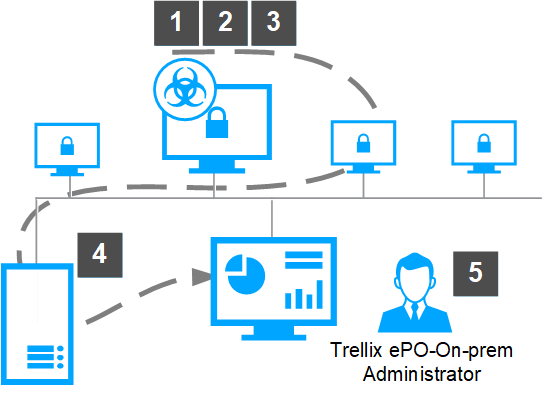
ePO - On-prem components and processes stop an attack, notify you when the attack occurs, and record the incident.
Malware attacks a computer in your ePO - On-prem managed network.
Trellix product software, for example Trellix® Endpoint Security, cleans or deletes the malware file.
Trellix Agent notifies ePO - On-prem of the attack.
ePO - On-prem stores the attack information.
ePO - On-prem displays the notification of the attack on a Number of Threat Events dashboard and saves the history of the attack in the Threat Event Log.
ePO - On-prem components
The architecture helps you successfully manage and protect your environment, regardless of size.
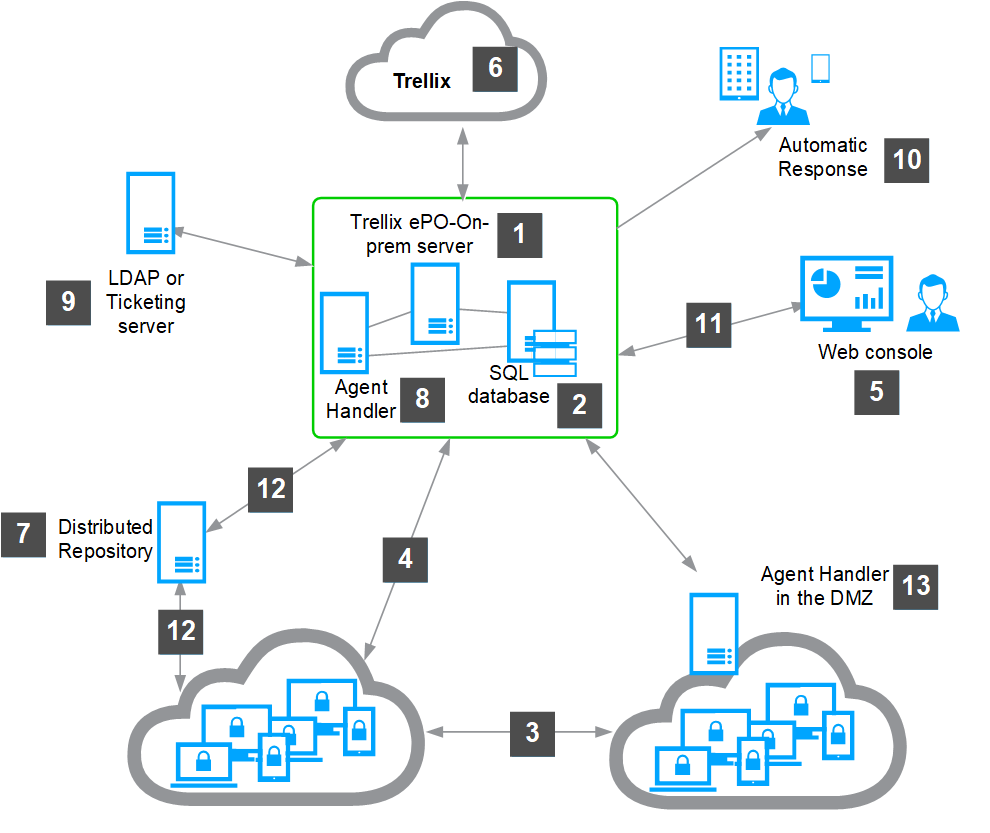
ePO - On-prem server
Manages and deploys products, upgrades, and patches.
Connects to the ePO - On-prem update server to download the latest security content.
Enforces policies on your endpoints.
Collects events, product properties, and system properties from the managed endpoints and sends them back to ePO - On-prem.
Reports on the security of your endpoint.
Microsoft SQL database — Stores all data about your network-managed systems, ePO - On-prem, Agent Handlers, and repositories.
Trellix Agent installed on clients — Provides communication to the server for policy enforcement, product deployment and updates, and connections to send events, product, and system properties to the ePO - On-prem server.
Agent-server secure communication (ASSC) connections — Provides communications that occur at regular intervals between your endpoints and the server.
Web console — Allows administrators to log on to the ePO - On-prem console to perform security management tasks, such as running queries to report on security status or working with your managed software security policies.
Trellix web server — Hosts the latest security content so that your ePO - On-prem server can pull the content at scheduled intervals.
Distributed repositories — Hosts your security content locally throughout your network so that agents can receive updates more quickly.
Agent Handlers — Reduces the workload of the server by off-loading event processing and Trellix Agent connectivity duties.
LDAP or Ticketing system — Connects your ePO - On-prem server to your LDAP server or SNMP ticketing server.
Automatic Responses — Notifies administrators and task automation when an event occurs.
Web Console connection — Provides HTTPS connection between the ePO - On-prem server and the web browser using default port 8443.
Distributed Repository connections — Provides various connections to resources stored on Distributed Repositories in your network. For example, HTTP, FTP, or UDP connections.
Agent Handler in DMZ — Supports specific port connections to Agent Handlers installed in the DMZ allowing you to connect through a firewall.