Web Control can disable itself when operating inside your enterprise network to allow Skyhigh Client Proxy to perform web reputation checking.
Note
For Web Control to be disabled, the client system must meet the Client Proxy criteria set in the MCP Policy settings.
Web Control remains enabled unless both of the following are true:
The Disable if Skyhigh Client Proxy is detected option is selected.
If this option is not selected, Web Control remains enabled even if Client Proxy is redirecting.
Client Proxy is redirecting.
If Client Proxy is installed but not redirecting for some reason, such as network or license issues, Web Control is enabled.
When Web Control is configured to be disabled when Client Proxy is redirecting:
When the client system is outside the internal network, Web Control is disabled and Client Proxy redirects network traffic.
When the client system moves from outside to inside the internal network, Client Proxy stops redirecting and Web Control is reenabled.
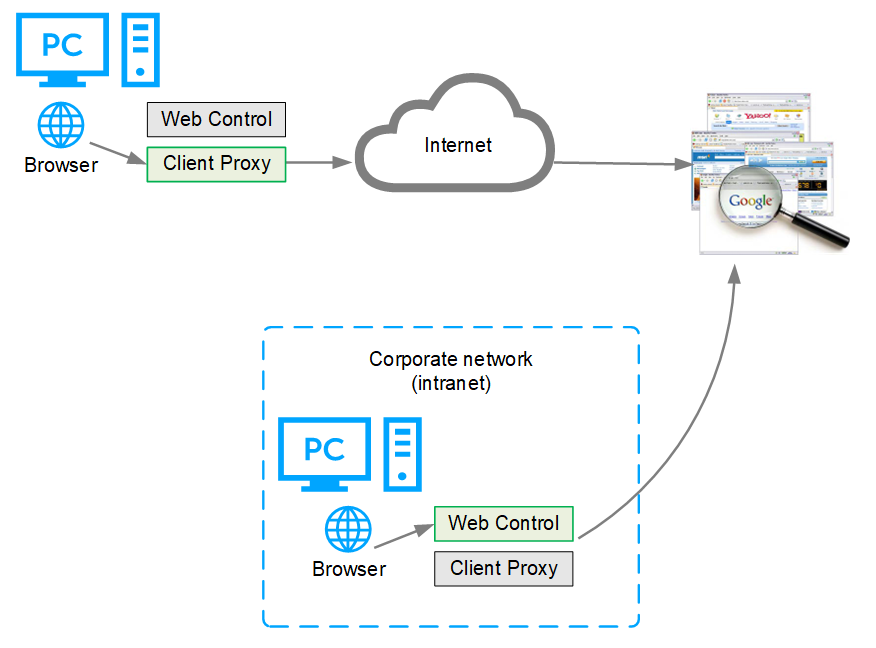
When Web Control is disabled because Client Proxy is present and redirecting:
Web Control ignores rating and enforcement actions.
Web Control browser controls are disabled.
Trellix Endpoint Security (ENS) Client Status page shows Web Control status as Disabled.
Trellix Endpoint Security (ENS) Client Settings page indicates that Web Control is disabled because Client Proxy is detected.