The Set Visualizer area lets you combine groups of hosts and manipulate their relationships within the final Result Set.
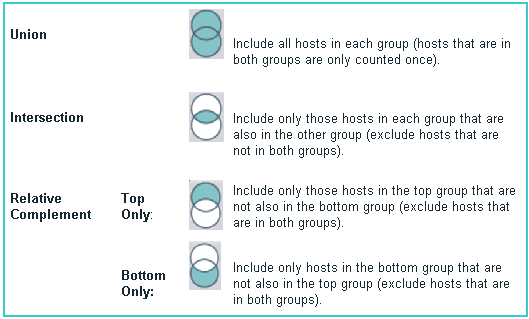
Use the Venn diagrams appearing between the host groups in the Set Visualizer to manipulate the relationships between two host groups. When you click the Venn diagram, you cycle through options that let you combine the groups of hosts in different ways, based on relationships between the groups: Union, Intersection, and Relative Complement:
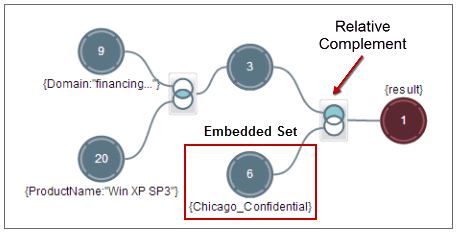
For example, you can embed a static host set in a host set with standard (dynamic) host sets and then exclude the host set. The illustration below shows a static host set (Chicago_Confidential) embedded in a larger group of hosts and then excluded using a relative complement:
To remove host groups from the Set Visualizer, press the Alt key while you click the circle containing the host group that you want to remove.
As you combine and adjust relationships between groups of hosts, the Result Set shows the group of hosts produced by your choices. Details about the result set are shown in the Result Set Detail pane.
Tip
If you combine a new group with the Result Set, the new Result Set shows a relationship between the new group and all the previous combinations that you created.
If you combine a new group with one of the other group circles in the Set Visualizer, a new branch shows the relationship between the groups that you combined; the Result Set shows the final combination.
You continue combining relevant groups of hosts and adjusting their relationships until you have the final results that you want.