Use the Group Table widget to select fields, perform a “group by" on those fields, and order the data by count. The default count is 10. Use the Settings icon in the Group Table panel to configure or modify the table attributes.
Note
All "group by" fields must be the same record type.
The Bytes and Packet columns in a Group Table will only show results for pxflow records because these have packet and byte count fields.
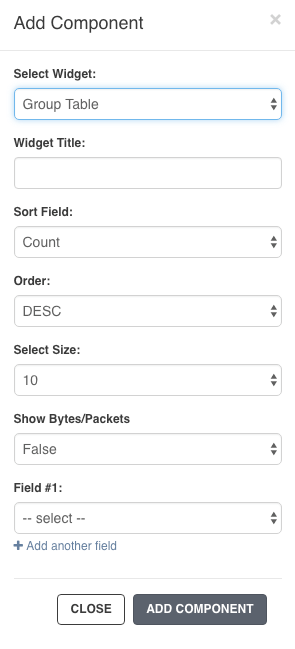
From the selected dashboard, click the Add Component button and select Group Table.
Name the widget.
Select the sort parameter (count, packets, or bytes) from the Sort Field drop-down menu.
Select the sort order (ascending or descending) from the Order drop-down menu.
Configure your table size. You can display 10, 15, 25, or 50 terms in the list.
Select True or False to show or hide data in the Show Bytes/Packets field.
Select the field you want to group from Field #1 drop-down menu.
Click Add Component to save the Group Table widget to your dashboard.
Click the search icon in the Query Bar to run your query and display the results.