The NDR HTML reconstruction tool advances your forensic analysis capabilities by allowing you to reconstruct HTTP packets captured within a PCAP file. Reconstruct HTML traffic visited on your network from the Event Table, Protocol Connections and File Info charts, and the Details tab on the Alert page. The HTML reconstruction tool provides three options for viewing reconstructed HTML: Sanitized HTML, RAW Unsanitized HTML, and Unsanitized HTML.
Reconstructed HTML View | Description |
|---|---|
Sanitized HTML | Displays the reconstructed HTML without any executable scripts. For example, JavaScript, css, images, and links. |
RAW Unsanitized HTML | Displays the raw HTML code, including the executable scripts, including JavaScript and css, in plain text. |
Unsanitized HTML | Displays the reconstructed HTML with links and executable scripts enabled.
|
HTML reconstruction from the Event Table
The Event Table summarizes and displays all session results for the current search query. Follow the steps below to reconstruct HTML from the Event Table.
Click
 and from INVESTIGATION, select Search.
Enter doc_values_type:http in the search bar and click Enter.
Click the search icon to perform the search.
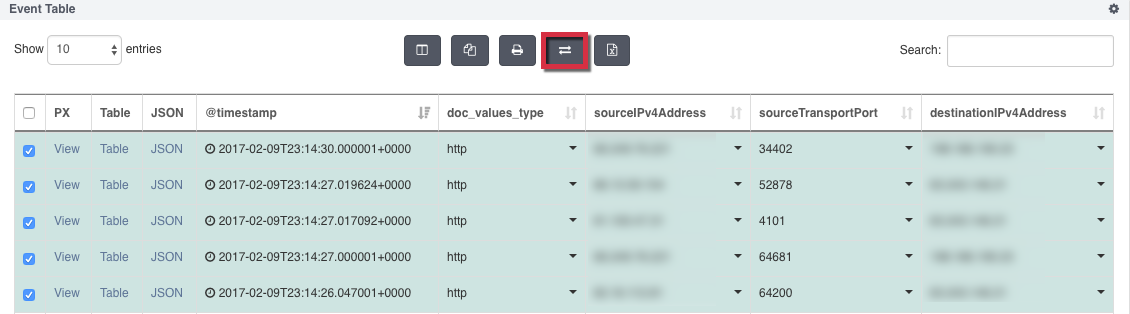
After the search completes, select the HTTP events you want to reconstruct in the Events Table.
Click the Reconstruct button at the top of the Event Table to pivot directly to the Artifacts dashboard. Each reconstructed HTML appears as a unique record on the Web tab.
(Optional) To download all the artifacts simultaneously, click DOWNLOAD ALL ARTIFACTS.
The DOWNLOAD ALL ARTIFACTS button is enabled if there is at least one artifact available.
From the Web tab, select a record and click + to expand the record.
Select a view of the reconstructed HTML: Sanitized HTML, Raw Unsanitized HTML, or Unsanitized HTML.
HTML reconstruction from the protocol connections and file info charts
The Protocol Connections and File Info charts both display the number of documents transferred between the source IP and destination IP. Follow the steps below to reconstruct HTML from one of these charts.
Enter doc_values_type:http in the search bar and click Enter.
Click the search icon to perform the search.
After the search completes, select the HTTP events you want to reconstruct in the chart. Hover over the document number to view additional metadata.
Click the Reconstruct link to pivot directly to the Artifacts dashboard.
(Optional) To download all the artifacts simultaneously, click DOWNLOAD ALL ARTIFACTS.
The DOWNLOAD ALL ARTIFACTS button is enabled if there is at least one artifact available.
From the Web tab, select a record and click + to expand the record.
Select a view of the reconstructed HTML: Sanitized HTML, Raw Unsanitized HTML, or Unsanitized HTML.
HTML reconstruction from the Alerts page
The Alerts page also allows you to reconstruct HTML from HTTP events captured in the PCAP. Follow the steps below to reconstruct HTML from the Alerts page.
Click
and from INVESTIGATION, select Alerts.Click on an alert to see the alert details under the Details tab.
Click the Reconstruct button to pivot directly to the Artifacts dashboard and reconstruct all HTTP events captured in the PCAP.
(Optional) To download all the artifacts simultaneously, click DOWNLOAD ALL ARTIFACTS.
The DOWNLOAD ALL ARTIFACTS button is enabled if there is at least one artifact available.
From the Web tab, select a record and click + to expand the record.
Select a view of the reconstructed HTML: Sanitized HTML, Raw Unsanitized HTML, or Unsanitized HTML.