The NDR appliance Web UI Protocol Encode and Decode tool allows your experienced analysts to analyze and decode data formats. Analysts can access the Payload Encode/Decode tool from the NDR Web UI and use it to create an encode and decode chain, apply the chain to specific data stream, and run the chain to extract information from the payload of TCP/UDP sessions.
You can also save commonly used custom chains to reuse or edit existing chains. This advanced data analysis tool is useful for determining the command and control traffic of malware. The Payload Encode/Decode tool allows you to encode and decode the following data formats:
Base64
gzip
HEX
HEXDUMP
JSON
URL
XOR
Note
The Payload Encode and Decode tool is available in NDR only.
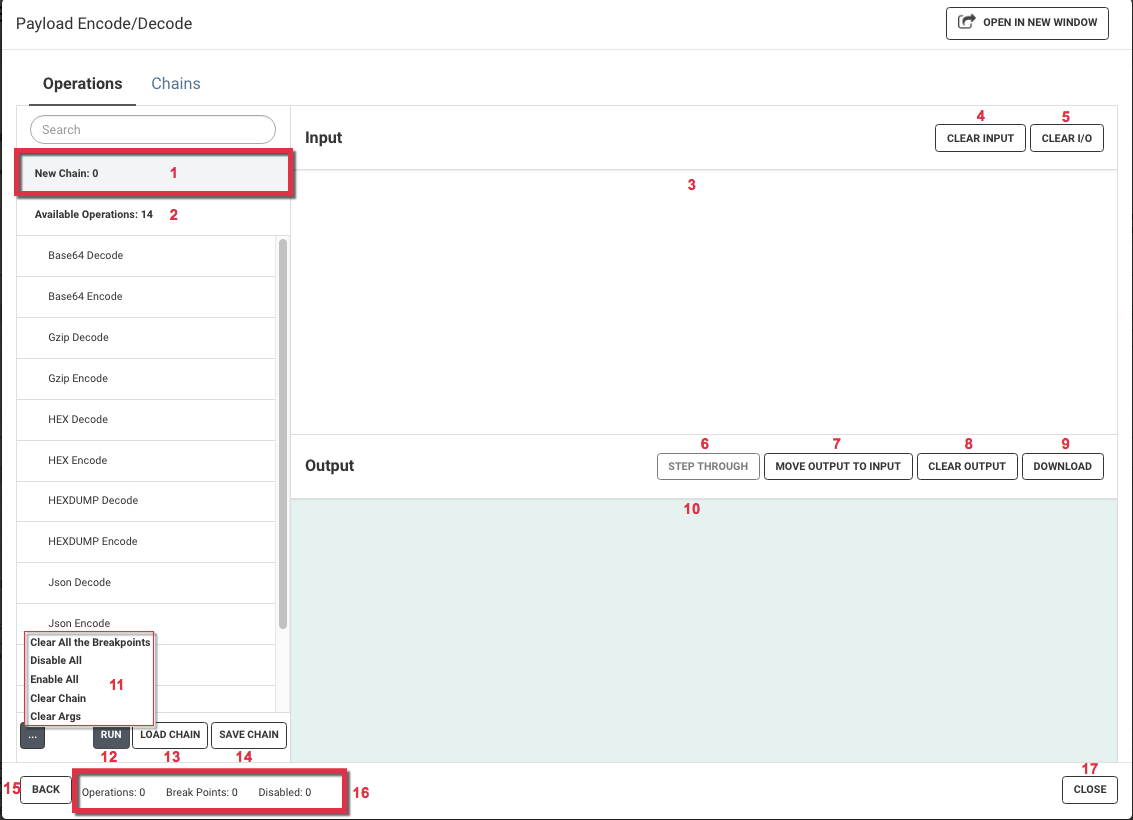
1) New Chain Window | 10) Output Window |
2) Available Operations List | 11) Additional Functions |
3) Input Window | 12) Run New Chain |
4) Clear Input Window | 13) Load Saved Chain |
5) Clear Input and Output Window | 14) Save Chain |
6) Step Through Chain | 15) Back to Stream Window |
7) Move Output to Input | 16) Chain Status |
8) Clear Output Window | 17) Close |
9) Download Output Text File |