Helix Enterprise cloud connections allow events and logs from Trellix products and security products from other vendors to be sent to Helix Enterprise. Cloud Connect allows third-party SaaS applications to authenticate and utilize webhooks, pull, and push commands through API connections. This means that you can quickly and easily integrate your existing applications into Helix Enterprise without complex custom development. With Cloud Connect, you can ingest data from a variety of sources, including endpoint devices, cloud applications, and network infrastructure. Helix Enterprise then analyzes this data to identify potential threats and security incidents.
The Cloud Connect portal allows you to add, view, and manage Helix Enterprise cloud connections.
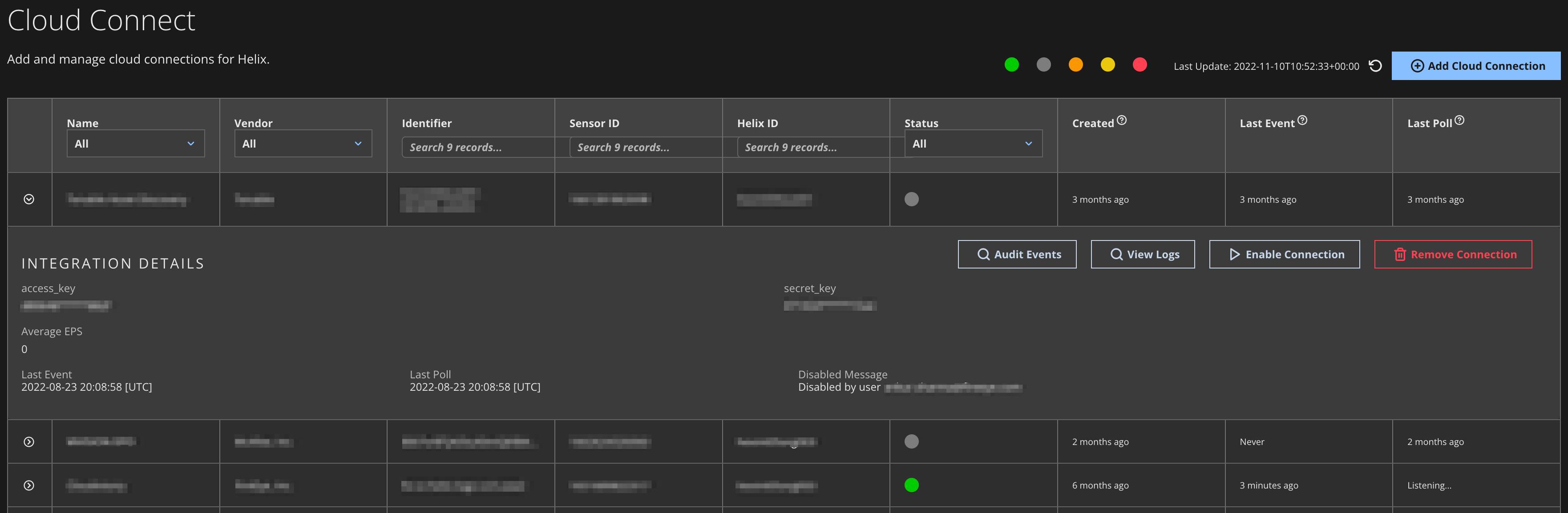
The Cloud Connect page lists all installed cloud connections and includes the following information for each one:
Name—The product name.
Vendor—The product vendor.
Identifier—A unique identifier for the connection (if one exists).
Sensor ID—A unique identifier for the sensor (the log source).
Helix Enterprise ID—The unique identifier for the Helix Enterprise instance.
Status—The connection status.
Created—The date the connection was added.
Last Event—The last event logged from the connection.
Last Poll—The amount of time since Helix Enterprise last attempted to receive an event from the connection. This can be used to troubleshoot the connection.
The detail view of a cloud connection on the Cloud Connect page provides additional information and the ability to manage the connection. See Managing a cloud connection.
The Add Connection page allows you to add new cloud connections. See Adding a cloud connection.