To view the lists of user groups associated with your Trellix IAM organization, use the User Groups page.
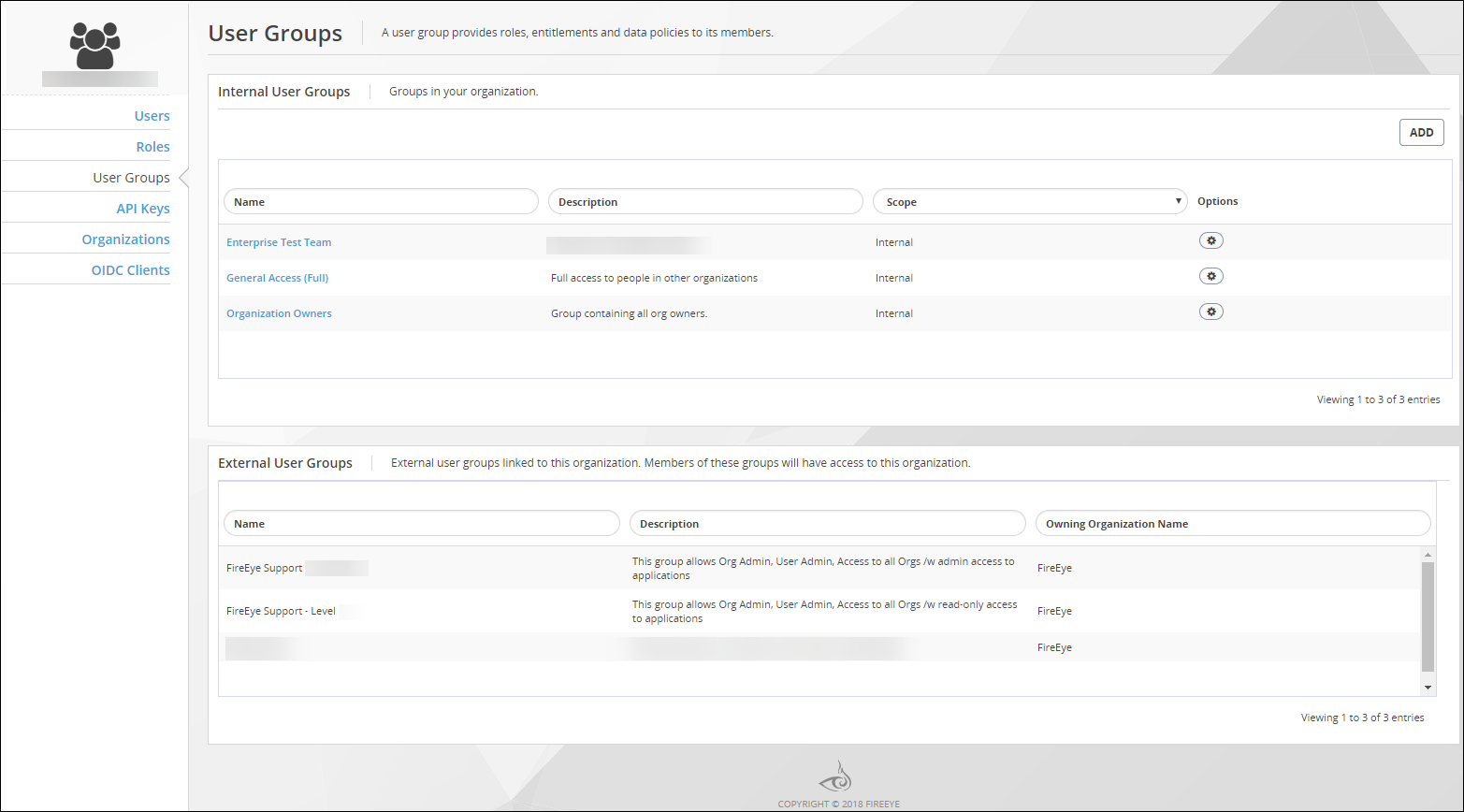
The page lists user groups in two panels:
User Groups―This panel lists user groups that are defined in your IAM organization. Access privileges granted to the members of an internal user group are applicable within your IAM organization only.
External User Groups―This panel lists user groups that are defined in external IAM organizations. that Trellix Customer Support added to your IAM organization. You cannot view, edit, or delete the users in external groups, and you cannot edit or delete external user groups.
A user group that is listed in the External User Groups panel for your IAM organization can access your IAM organization as allowed by the roles assigned to that user group in its owning organization. From the perspective of the owning organization, that same user group is listed with a Scope value of External in the User Groups panel (list of internal user groups).
To view the list of user groups in your organization:
Log in to the Trellix IAM Web UI.
Select Organization Settings > User Groups.
The User Groups page lists all Trellix IAM user groups known to your IAM organization.
The Internal User Groups panel lists user groups that are defined in your organization. The External User Groups panel lists user groups that are defined in other organizations but which Trellix has added to your organization.
(Optional) Sort and filter either of the lists on the Name field.
Note
Filtering is case-sensitive, and it does not match wild card characters.