Upgrade to Trellix Endpoint Security Storage Protection 2.4.x
You can use multiple deployment methods to upgrade to Trellix Endpoint Security Storage Protection 2.4.x on your endpoints. You can upgrade from version 2.0.x, 2.1.x, 2.2.x, or 2.3.x.
The method you choose for deploying the product software to endpoints depends on not only your environment and your goals for the installation, but also your preferences and department policies for tools.
Deciding which deployment method to use:
Using Trellix ePO - On-prem | Using Trellix ePO - SaaS | Using Installer (on self-managed endpoints) | Use this method |
|---|---|---|---|
Yes | |||
Yes | |||
Yes |
Upgrade to Trellix Endpoint Security Storage Protection 2.4.x using Trellix ePO - On‑prem 5.10.x or 5.9.x
You can use a deployment task in Trellix ePO - On‑prem 5.10.x or 5.9.x to upgrade to Trellix Endpoint Security Storage Protection on your endpoints. You can upgrade from version 2.0.x, 2.1.x, 2.2.x, or 2.3.x.
Deployment tasks can be set up as continuous (for endpoints in specific groups or with specific tags) or fixed (for a static set of endpoints).
Before the installation:
Verify that all endpoints meet the minimum requirements (KB94811).
Verify that you're aware of compatibility requirements for other installed products (KB94811).
Verify that you have permission to access the user temp folder (KB85033).
Detect and allow trusted third-party software to make sure that they work with Endpoint Security Storage Protection by running Trellix SysPrep (KB89860).
Upgrade the product extensions and packages on Trellix ePO - On-prem.
Update content files on Trellix ePO - On-prem.
Deploy product software to endpoints.
After the installation, review the policy settings that are new or changed in Trellix Endpoint Security Storage Protection 2.4.x.
Add Trellix Endpoint Security Storage Protection 2.4.x extensions and packages when upgrading using Trellix ePO - On-prem 5.10.x or 5.9.x
When using Trellix ePO - On-prem 5.10.x or 5.9.x to upgrade to Trellix Endpoint Security Storage Protection 2.4.x, you need to upgrade the product extensions and packages on the Trellix ePO - On-prem server.
The product extensions manage policies and tasks on the Trellix ePO - On-prem server and the installation packages installs Trellix Endpoint Security Storage Protection on your endpoints. When you check in the installation packages, you need to choose the repository branch where to store them.
Task
In Trellix ePO - On-prem, select Menu → Software → Software Catalog (Software Manager on version 5.9.x).
From the Category list, expand Endpoint Security Storage Protection, then click Bundles.
In the right pane, select Trellix Endpoint Security Storage Protection 2.4. Trellix Endpoint Security Storage Protection includes Threat Prevention, Storage Protection, Web Control, Firewall, and Adaptive Threat Protection.
From the Actions column, click Check In All.
Select the checkbox to accept the license agreement.
Select the branch where to check in the installation packages, then select Check In.
Results
When check-in is complete, the product extensions are listed on the Extensions page and the installation packages are listed in the Main Repository. You can view the extensions and packages in these locations.
Extensions | Navigation |
|---|---|
Endpoint Security Platform | Menu → Extension → Trellix → Endpoint Security |
Endpoint Security Threat Prevention | |
Endpoint Security Storage Protection | |
Endpoint Security Firewall | |
Endpoint Security Web Control | |
Endpoint Security Adaptive Threat Protection | |
Threat Detection Reporting | Menu → Extension → Trellix → Threat Detection Reporting |
Packages | Navigation |
|---|---|
AMCore Content Package | Menu → Main Repository |
Endpoint Security Storage Protection | |
Endpoint Security Platform | |
Endpoint Security Exploit Prevention Content | |
Endpoint Security Threat Prevention | |
Endpoint Security Firewall | |
Endpoint Security Web Control | |
Endpoint Security Adaptive Threat Protection |
Update Trellix Endpoint Security Storage Protection 2.4.x content files on Trellix ePO - On-prem 5.10.x or 5.9.x
Make sure that the latest content files for antimalware and exploit prevention are updated on the Trellix ePO - On-prem.
Task
In Trellix ePO - On-prem, select Menu → Software → Product Deployment.
On the Product Deployment page, click New Deployment.
On the New Deployment page:
Enter a name for the deployment.
Select the Storage Protection module from the Package drop-down list.
Click + Add another package each time you want to select another one.
Note
Trellix Endpoint Security (ENS) Threat Prevention and Trellix ENS platform will be deployed on the endpoints along with the Storage Protection module.
Select the endpoints to deploy to.
Configure any other settings, then click Save at the top of the page.
The Product Deployment page opens with your new project added to the list of deployments. Also, a client task is automatically created with the deployment settings.
Check the status of the deployment on the Product Deployment page.
From the list on the left side of the page, click the deployment task to display its details.
Results
To verify that Trellix Endpoint Security Storage Protection is upgraded on your endpoints:
Select Menu → Systems → System Tree → Systems, then click the system and in the Products tab check for Trellix Endpoint Security Storage Protection 2.4.x and its related Trellix ENS 10.7.x modules.
Note
The policy settings are preserved on endpoints after upgrading from Trellix Endpoint Security Storage Protection 2.0.x or later to 2.4.x version.
Upgrade Trellix Endpoint Security Storage Protection 2.4.x using Trellix ePO - SaaS
You can create a deployment link in Trellix ePO - SaaS to upgrade Trellix Endpoint Security Storage Protection 2.4.x on your endpoints. The link is sent to users so they can upgrade it on their endpoints. The link downloads and upgrade the software on each endpoint.
Before the upgrade:
Verify that all endpoints meet the minimum requirements (KB94811).
Verify that you're aware of compatibility requirements for other installed products (KB94811).
Deploy product software to endpoints.
After the upgrade, configure your policy settings for your environment, as needed.
Note
If you have selected Automatically deploy latest version of products during the installation of Trellix Endpoint Security Storage Protection, then no action is needed to deploy the latest version. Else, follow the steps mentioned here.
Task
In Trellix ePO - SaaS, select Menu → Software → Product Deployment.
Edit the Group Name value as needed.
Select the operating system from the Platform drop-down list.
Under Advanced Options, click Advanced Product Deployment.
In Advanced Deployment page, click New Deployment.
On the New Deployment page:
Enter a name for the deployment.
You can do one of the following:
Select the Storage Protection module from the Package drop-down list.
Enter the command to deploy the software.
Click + Add another package each time you want to select another one.
Select the endpoints to deploy to.
In the Auto Update section, select the required settings:
Automatically deploy latest version of products - Select to automatically deploy the latest product version.
Allow end users to postpone this deployment (Windows only) - Select to postpone the software deployment.
Configure any other settings, then click Save at the top of the page.
The Product Deployment page opens with your new project added to the list of deployments. Also, a client task is automatically created with the deployment settings.
Check the status of the deployment on the Product Deployment page.
From the list on the left side of the page, click the deployment task to display its details.
Results
To verify whether Trellix Endpoint Security Storage Protection is upgraded, go to Menu → Systems → System Tree and check Trellix Endpoint Security Storage Protection is listed in Systems tab.
For each endpoint, you can send the URL to confirm that the Trellix Endpoint Security Storage Protection modules are listed on the Product tab.
Note
Trellix Endpoint Security (ENS) Threat Prevention and Trellix Endpoint Security platform will be deployed on the endpoints along with Storage Protection module.
Upgrade Trellix Endpoint Security Storage Protection 2.4.x on self-managed endpoints
Upgrade to Trellix Endpoint Security Storage Protection 2.4.x on endpoints that aren't managed by a network management platform.
Task
Before the installation:
Verify that all endpoints meet the minimum requirements (KB94811).
Verify that you're aware of compatibility requirements for other installed products (KB94811).
Verify that you have permission to access the user temp folder (KB85033).
Detect and allow trusted third-party software to make sure that they work with Endpoint Security Storage Protection by running Trellix SysPrep (KB89860).
Run product installer on endpoint.
After the installation:
Manually update your endpoint with the latest version of the content files required by Trellix Endpoint Security Storage Protection for AMCore and Exploit Prevention.
Configure your settings as needed.
Note
Use the latest version of the Trellix SysPrep utility when upgrading from version 10.5.3 or earlier, or when new software or policy configurations are used in software metering, software monitoring, or rights management. Check with technical support for the latest version of Trellix SysPrep.
Upgrade Trellix Endpoint Security Storage Protection 2.4.x using the product installer
On a self-managed endpoint, running the product installer on the endpoint is the simplest way to upgrade Trellix Endpoint Security Storage Protection 2.4.x.
Task
Download the Trellix Endpoint Security Storage Protection.zip file, unzip the contents of the file, then double-click
setupEPSTP.exe.If you purchase the product online, you receive an email with instructions and a URL for downloading the product.
On the License Agreement page, click Accept.
Resolve any conflicts detected by the installer.
The wizard tries to remove conflicting virus-detection and firewall software products automatically. If it can't, it prompts you to remove them manually, then prompts you to restart the endpoint.
If you restart the endpoint immediately, installation resumes afterward.
If you restart the endpoint later, run the installer again at your earliest convenience.
If you don't want to install all product modules with the default settings, select new settings on the INSTALL OPTIONS page.
Endpoint Security Platform (the Common module) installs automatically with the first module you install.
Click Install.
A dialog box shows the progress of the installation and notifies you when it is complete. You can cancel the installation at any time, if needed.
Click Finish to close the installer.
As a best practice, we recommend restarting the endpoint after the upgrade completes.
Results
To verify that Trellix Endpoint Security Storage Protection is installed on the endpoint, open the Windows Control Panel and check whether the correct version of Storage Protection, Threat Prevention, Firewall, Web Control, Adaptive Threat Protection, and Endpoint Security Platform appears. You can also check that no errors or failure messages appear in the installation log file.
Note
The policy settings are preserved on endpoints after upgrading from Trellix Endpoint Security Storage Protection 2.0.x or later to 2.4.x version.
Install Trellix Endpoint Security Storage Protection 2.4.x for the first time
You can use multiple deployment methods to install Trellix Endpoint Security Storage Protection 2.4.x on your endpoints.
The method you choose for deploying the product software to endpoints depends on not only your environment and your goals for the installation, but also your preferences and department policies for tools.
Using Trellix ePO | Using Trellix ePO - SaaS | Using Installer | Use this method |
|---|---|---|---|
Yes | |||
Yes | Trellix ePO - SaaS | ||
Yes | Product installer (setupEPSTP) |
Install Trellix Endpoint Security Storage Protection 2.4.x using Trellix ePO - On-prem 5.10.x or 5.9.x
You can use a deployment task in Trellix ePO - On-prem 5.10.x or 5.9.x to install Trellix Endpoint Security Storage Protection 2.4.x on your endpoints.
Deployment tasks can be set up as continuous (for endpoints in specific groups or with specific tags) or fixed (for a static set of endpoints).
Task
Before the installation:
Verify that all endpoints meet the minimum requirements (KB94811).
Verify that you are aware of compatibility requirements for other installed products (KB94811).
Verify that endpoint users have permission to access the user temp folder (KB85033).
Detect and allow trusted third-party software to make sure that they work with Trellix Endpoint Security Storage Protection by running Trellix SysPrep (KB89860).
Install the product extensions and packages on Trellix ePO - On‑prem.
Update content files on Trellix ePO - On‑prem.
Deploy product software to endpoints.
After the installation, configure your policy settings for your environment, as needed.
Add Trellix Endpoint Security Storage Protection 2.4.x extensions and packages when installing using Trellix ePO - On‑prem 5.10.x or 5.9.x
When using Trellix ePO - On‑prem 5.10.x or 5.9.x to install Trellix Endpoint Security Storage Protection 2.4.x, you need to install the product extensions and installation packages on the Trellix ePO - On‑prem server.
The product extensions manage policies and tasks on the Trellix ePO - On‑prem server. The installation packages install Trellix Endpoint Security Storage Protection on your endpoints. When you check in the installation packages, you need to choose the repository branch where to store them.
Task
In Trellix ePO - On‑prem, select Menu → Software → Software Catalog (Software Manager on version 5.9.x).
From the Category list, expand Endpoint Security Storage Protection, then click Bundles.
In the right pane, select Trellix Endpoint Security Storage Protection 2.4. Trellix Endpoint Security Storage Protection includes Threat Prevention, Storage Protection, Firewall, Web Control, and Adaptive Threat Prevention.
From the Actions column, click Check In All.
Select the checkbox to accept the license agreement.
Select the branch where to check in the installation packages, then select Check In.
Results
When check in is complete, the product extensions are listed on the Extensions page and the installation packages are listed in the Main Repository. You can view the extensions and packages in these locations.
Extension | Navigation |
|---|---|
Endpoint Security Platform | Menu → Extension → Trellix → Endpoint Security |
Endpoint Security Threat Prevention | |
Endpoint Security Storage Protection | |
Endpoint Security Firewall | |
Endpoint Security Web Control | |
Endpoint Security Adaptive Threat Protection | |
Threat Detection Reporting | Menu → Extension → Trellix → Threat Detection Reporting |
Package | Navigation |
|---|---|
AMCore Content Package | Menu → Main Repository |
Endpoint Security Storage Protection | |
Endpoint Security Platform | |
Endpoint Security Exploit Prevention Content | |
Endpoint Security Threat Prevention | |
Endpoint Security Firewall | |
Endpoint Security Web Control | |
Endpoint Security Adaptive Threat Protection |
Update Trellix Endpoint Security Storage Protection 2.4.x content files on Trellix ePO - On‑prem 5.10.x or 5.9.x
Make sure that the latest content files for antimalware and exploit prevention are updated on the Trellix ePO - On‑prem.
Task
In Trellix ePO - On-prem, select Menu → Software → Product Deployment.
On the Product Deployment page, click New Deployment.
On the New Deployment page:
Enter a name for the deployment.
Select the Storage Protection module from the Package drop-down list.
Note
Before deploying Trellix Endpoint Security Storage Protection, you must verify whether the latest version of Trellix Endpoint Security (ENS) Threat Prevention and Trellix ENS platform packages are checked in Trellix ePO - On-prem.
Results
The Main Repository includes the AMCore Content Package and the Endpoint Security Exploit Prevention Content Package, which are required by Trellix Endpoint Security Storage Protection.
Deploy Trellix Endpoint Security Storage Protection 2.4.x when installing using Trellix ePO - On-prem 5.10.x or 5.9.x
You can use a product deployment task in Trellix ePO - On-prem 5.10.x or 5.9.x to install Trellix Endpoint Security Storage Protection 2.4.x on multiple endpoints.
Product deployment tasks are the simplest type of task to set up.
In Trellix ePO - On-prem, select Menu Software Product Deployment.
On the Product Deployment page, click New Deployment.
On the New Deployment page:
Enter a name for the deployment.
Select the Storage Protection module from the Package drop-down list.
Note: Trellix Endpoint Security (ENS) Threat Prevention and Endpoint Security platform will be deployed on the endpoints along with Storage Protection module.
Click + Add another package each time you want to select another one.
Select the endpoints to deploy to.
Configure other required settings, then click Save at the top of the page.
The Product Deployment page opens with your new project added to the list of deployments. Also, a client task is automatically created with the deployment settings.
Check the status of the deployment on the Product Deployment page.
From the list on the left side of the page, click the deployment task to display its details.
Results
To verify that Trellix Endpoint Security Storage Protection is installed on your endpoints:
Select Menu → Systems → System Tree → Systems, then click the system and in the Products tab check for Endpoint Security Storage Protection 2.4.x and its related Endpoint Security 10.7.x modules.
Install Trellix Endpoint Security Storage Protection 2.4.x using Trellix ePO - SaaS
You can create a deployment link in Trellix ePO - SaaS to install Trellix Endpoint Security Storage Protection 2.4.x on your endpoints. The link is sent to users so they can install it on their endpoints. The link downloads and installs the software on each endpoint.
Before the installation:
Make sure you have Trellix ePO - SaaS account.
Verify that all endpoints meet the minimum requirements (KB94811).
Verify that you're aware of compatibility requirements for other installed products (KB94811).
Verify that endpoint users have permission to access the user temp folder (KB85033).
Verify that Trellix Agent is installed on your endpoints.
Deploy product software to endpoints.
After the installation, configure your policy settings for your environment, as needed.
Note: When deploying Trellix Endpoint Security Storage Protection on Windows Server 2016, version 1803 or newer, or Windows Server 2019, the Windows Defender installed on your endpoints are disabled automatically. If the endpoints are installed with Microsoft Defender for Endpoint on Windows Server, version 1803 or newer, or Windows Server 2019, then Windows Defender is set to passive mode automatically.
Task
In Trellix ePO - SaaS, select Menu → Software → Product Deployment to open the Install Products page.
Edit the Group Name value as needed.
Select the operating system from the Platform drop-down list
Under Advanced Options, click Advanced Product Deployment.
In Advanced Deployment page, click New Deployment.
On the New Deployment page:
Enter a name for the deployment.
You can do one of the following:
Select the Storage Protection module from the Package drop-down list.
Enter the command to deploy the software.
Click + Add another package each time you want to select another one.
Select the endpoints to deploy to.
In the Auto Update section, select the required settings:
Automatically deploy latest version of products - Select to automatically deploy the latest product version.
Allow end users to postpone this deployment (Windows only) - Select to postpone the software deployment.
Configure any other settings, then click Save at the top of the page.
The Product Deployment page opens with your new project added to the list of deployments. Also, a client task is automatically created with the deployment settings.
Check the status of the deployment on the Product Deployment page.
From the list on the left side of the page, click the deployment task to display its details.
Results
To verify whether Trellix Endpoint Security Storage Protection is upgraded, go to Menu → Systems → System Tree and check Trellix Endpoint Security Storage Protection is listed in Systems tab.
Note: Trellix Endpoint Security (ENS) Threat Prevention and Trellix Endpoint Security platform will be deployed on the endpoints along with Storage Protection module.
For each endpoint, you can send the URL to confirm that the Trellix Endpoint Security Storage Protection modules are listed on the Product tab.
Install Trellix Endpoint Security Storage Protection 2.4.x on self-managed endpoints
Install Trellix Endpoint Security Storage Protection 2.4.x on endpoints that aren't managed by a network management platform.
Task
Before the installation:
Verify that all endpoints meet the minimum requirements (KB94811).
Verify that you're aware of compatibility requirements for other installed products (KB94811).
Verify that you have permission to access the user temp folder (KB85033).
Detect and allow trusted third-party software to make sure that they work with Endpoint Security Storage Protection by running Trellix SysPrep (KB89860).
Note: Use the latest version of the Trellix SysPrep utility when upgrading from version 10.5.3 or earlier, or when new software or policy configurations are used in software metering, software monitoring, or rights management. Check with technical support for the latest version of Trellix SysPrep.
Run product installer on endpoint.
After the installation:
Manually update your endpoint with the latest version of the content files required by Trellix Endpoint Security Storage Protection for AMCore and Exploit Prevention.
Configure your settings as needed.
Install Trellix Endpoint Security Storage Protection 2.4.x using the product installer
On a self-managed endpoint, running the product installer on the endpoint is the simplest way to install Trellix Endpoint Security Storage Protection 2.4.x.
Task
Download the Trellix Endpoint Security Storage Protection.zip file, unzip the contents of the file, then double-click
setupEPSTP.exe.If you purchase the product online, you receive an email with instructions and a URL for downloading the product.
On the License Agreement page, click Accept.
Resolve any conflicts detected by the installer.
The wizard tries to remove conflicting virus-detection and firewall software products automatically. If it can't, it prompts you to remove them manually, then prompts you to restart the endpoint.
If you restart the endpoint immediately, installation resumes afterward.
If you restart the endpoint later, run the installer again at your earliest convenience.
If you don't want to install all product modules with the default settings, select new settings on the INSTALL OPTIONS page.
Endpoint Security Platform (the Common module) installs automatically with the first module you install.
Click Install.
A dialog box shows the progress of the installation and notifies you when it is complete. You can cancel the installation at any time, if needed.
Click Finish to close the installer.
As a best practice, we recommend restarting the endpoint after the upgrade completes.
Results
To verify that Trellix Endpoint Security Storage Protection is installed on the endpoint, open the Windows Control Panel and check whether the correct version of Storage Protection, Threat Prevention, Firewall, Web Control, Adaptive Threat Protection, and Endpoint Security Platform appears. You can also check that no errors or failure messages appear in the installation log file.
Upgrade legacy Trellix products to Trellix Endpoint Security Storage Protection 2.4.x
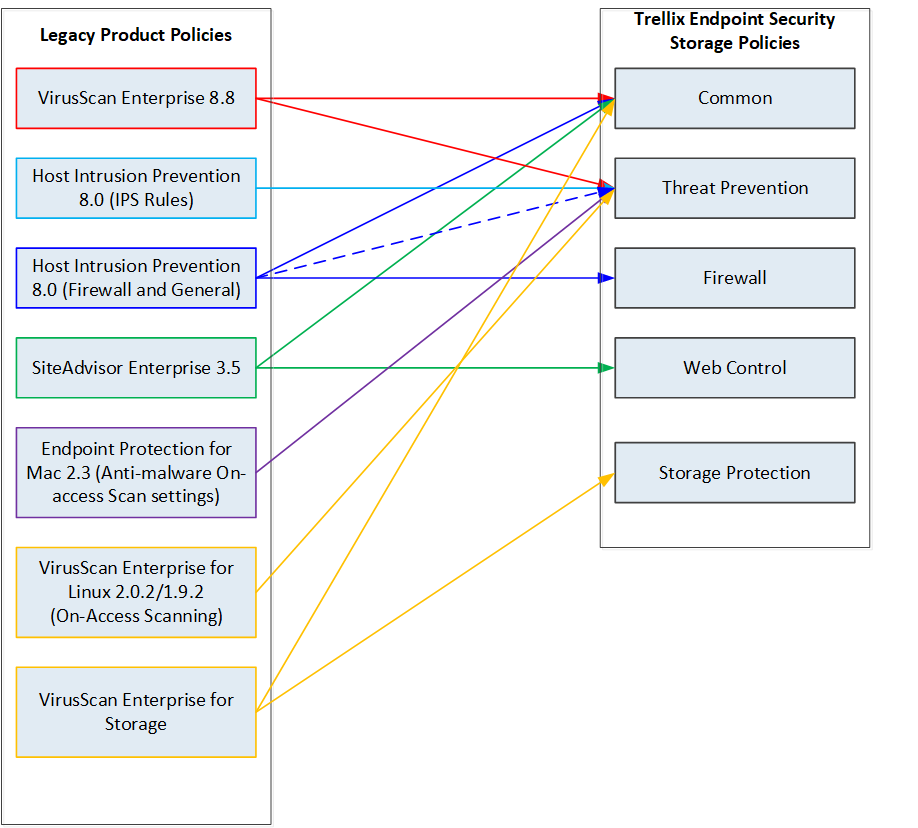
Trellix Endpoint Security Storage Protection consolidates legacy products in a single bundle. In addition to more advanced features and functionality that leverage the latest developments in security technology, a new Endpoint Security Platform (also known as Endpoint Security Common) module centralizes the shared protection features so they are easily accessible by all product modules.
The graphic below provides a mapping of the source functionality and policies between legacy and Endpoint Security solutions.
Before the installation:
Verify that the environment and managed systems where you want to install Trellix Endpoint Security Storage Protection meet all the requirements (KB94811).
Determine critical infrastructure servers, list of vendor recommended exclusions, and network traffic diagrams for critical applications (KB66909).
Check about the third-party security products which can be removed when installing Trellix Endpoint Security Storage Protection (KB94811).
Check in the product package files and the Trellix Agent package files to the Trellix ePO - On-prem server. Upgrade Trellix Agent, if required.
Manually update your Trellix ePO - On-prem server with the latest content files required for Trellix ENS: AMCore, and Exploit Prevention.
Migrate VirusScan Enterprise 8.8 to Trellix Endpoint Security (ENS) 10.7.x.
Migrate VirusScan Enterprise Storage 1.3.0 to Trellix Endpoint Security Storage Protection.
Migrate VirusScan Enterprise Storage 1.3.0 to Trellix Endpoint Security Storage Protection
You can use simple deployment method to upgrade VirusScan Enterprise for Storage 1.3.0 to Trellix Endpoint Security Storage Protection 2.4.x. If unsupported product versions are installed, upgrade them to supported versions before proceeding to migrate your Trellix Endpoint Security Storage Protection.
If you are using VirusScan Enterprise for Storage 1.2.0, then you have to upgrade to VirusScan Enterprise for Storage 1.3.0 before migrating to Trellix Endpoint Security Storage Protection 2.4.x.
To retain custom policies, you must upgrade VirusScan Enterprise for Storage using Trellix ePO - On‑prem. On self-managed systems, you cannot retain the policies when upgrading to Trellix Endpoint Security Storage Protection.
Note
Migration tool is not required to upgrade VirusScan Enterprise Storage 1.3.0 to Trellix Endpoint Security Storage Protection 2.4.x.
Use Trellix ePO - On‑prem 5.9.x or 5.10.x with custom policies and settings
You can upgrade your VirusScan Enterprise for Storage 1.3.0 to Endpoint Security Storage Protection 2.4.x using Trellix ePO - On‑prem 5.10.x or 5.9.x. When upgrading to Trellix Endpoint Security Storage Protection 2.4.x, the custom policies of VirusScan .Enterprise for Storage 1.3.0 are migrated automatically into Trellix Endpoint Security Storage Protection 2.4.x.
No specific migration tools are required to migrate the VirusScan Enterprise for Storage to Trellix Endpoint Security Storage Protection 2.4.x.
Task
Before migration:
Verify that all endpoints meet the minimum requirements (KB94811).
Verify that you're aware of compatibility requirements for other installed product (KB94811).
If you are using VirusScan Enterprise for Storage 1.2.0, then you have to upgrade to VirusScan Enterprise for Storage 1.3.0 before migrating to Trellix Endpoint Security Storage Protection 2.4.x.
Make sure that the custom policies of other legacy products (VirusScan Enterprise, Host Intrusion Prevention, and SiteAdvisor) are migrated before upgrading VirusScan Enterprise for Storage to Storage Protection.
Upgrade the product extensions and installation packages on Trellix ePO - On-prem.
Update content files on Trellix ePO - On-prem.
Deploy product software to endpoints.
The custom policies created in VirusScan Enterprise for Storage are migrated automatically into Trellix Endpoint Security Storage Protection 2.4.x. Verify the migrated policies.
Add Trellix Endpoint Security Storage Protection 2.4.x extensions and packages when migrating using Trellix ePO - On-prem 5.10.x or 5.9.x
When using Trellix ePO - On-prem 5.10.x or 5.9.x to upgrade VirusScan Enterprise for Storage 1.3.0 to Trellix Endpoint Security Storage Protection 2.4.x, you need to upgrade the product extensions and packages on the Trellix ePO - On-prem server.
The product extensions manage policies and tasks on the Trellix ePO - On-prem server and the installation packages upgrades VirusScan Enterprise for Storage to Trellix Endpoint Security Storage Protection on your endpoints. When you check in the installation packages, you need to choose the repository branch where to store them.
Best practice: Take a back-up of the VirusScan Enterprise for Storage 1.3.0 policies before migrating to Trellix Endpoint Security Storage Protection and make sure that the custom policies of other legacy products (VirusScan Enterprise, Host Intrusion Prevention, SiteAdvisor, and Threat Intelligence Exchange) are migrated.
Task
In Trellix ePO - On-prem, select Menu → Software → Software Catalog (Software Manager on version 5.9.x).
From the Category list, expand Endpoint Security Storage Protection, then click Bundles.
In the right pane, select Trellix Endpoint Security Storage Protection 2.4.
Endpoint Security Storage Protection includes Threat Prevention, Storage Protection, Web Control, Firewall, and Adaptive Threat Protection.
From the Actions column, click Check In All.
Select the checkbox to accept the license agreement.
Select the branch where to check in the installation packages, then select Check In.
Results
When check-in is complete, the product extensions are listed on the Extensions page and the installation packages are listed in the Main Repository. You can view the extensions and packages in these locations.
Extension | Navigation |
|---|---|
Endpoint Security Platform | Menu → Extension → Trellix → Endpoint Security |
Endpoint Security Threat Prevention | |
Endpoint Security Storage Protection | |
Endpoint Security Firewall | |
Endpoint Security Web Control | |
Endpoint Security Adaptive Threat Protection | |
Threat Detection Reporting | Menu → Extension → Trellix → Threat Detection Reporting |
Package | Navigation |
|---|---|
AMCore Content Package | Menu → Main Repository |
Endpoint Security Storage Protection | |
Endpoint Security Platform | |
Endpoint Security Exploit Prevention Content | |
Endpoint Security Threat Prevention | |
Endpoint Security Firewall | |
Endpoint Security Web Control | |
Endpoint Security Adaptive Threat Protection |
On Trellix ePO - On‑prem, to check whether the custom policies of VirusScan Enterprise for Storage 1.3.0 are migrated to Trellix Endpoint Security Storage Protection 2.4.x:
Click Menu → Policy → Policy Catalog → Endpoint Security Storage Protection → ICAP Policies.
or
Click Menu → Policy → Policy Catalog → Endpoint Security Storage Protection → NetApp Policies.
Update Trellix Endpoint Security Storage Protection 2.4.x content files on Trellix ePO - On‑prem 5.10.x or 5.9.x
Make sure that the latest content files for antimalware and exploit prevention are updated on the Trellix ePO - On‑prem.
Task
In Trellix ePO - On‑prem, select Menu → Automation → Server Tasks.
Edit the Update Main Repository server task.
Click the Actions tab.
For the Repository Pull action, make sure that the following are set:
Source site: TrellixHttp
Package types: All packages
Results
The Main Repository includes the AMCore Content Package and the Endpoint Security Exploit Prevention Content Package, which are required by Trellix Endpoint Security Storage Protection.
Deploy Trellix Endpoint Security Storage Protection 2.4.x when migrating using Trellix ePO - On-prem 5.10.x or 5.9.x
When upgrading from VirusScan Enterprise for Storage to Trellix Endpoint Security Storage Protection on multiple endpoints, you can use a product deployment task in Trellix ePO - On-prem 5.10.x or 5.9.x.
Product deployment tasks are the simplest type of task to set up.
Note: Before deploying Trellix Endpoint Security Storage Protection, you must verify whether the latest version of Trellix Endpoint Security (ENS) Threat Prevention and Trellix ENS platform packages are checked in Trellix ePO - On-prem.
Task
In Trellix ePO - On-prem, select Menu → Software → Product Deployment.
On the Product Deployment page, click New Deployment.
On the New Deployment page:
Enter a name for the deployment.
Select the Storage Protection module from the Package drop-down list.
Click + Add another package each time you want to select another one.
Select the endpoints to deploy to.
Configure any other settings, then click Save at the top of the page.
The Product Deployment page opens with your new project added to the list of deployments. Also, a client task is automatically created with the deployment settings.
Check the status of the deployment on the Product Deployment page.
From the list on the left side of the page, click the deployment task to display its details.
Note
Trellix Endpoint Security (ENS) Threat Prevention and Endpoint Security platform will be deployed on the endpoints along with Storage Protection module.
Results
To verify that Trellix Endpoint Security Storage Protection is upgraded on your endpoints:
Select Menu → Systems → System Tree → Systems, then click the system and in the Products tab check for Trellix Endpoint Security Storage Protection 2.4.x and its related Trellix ENS 10.7.x modules.
Note: The policy settings are not preserved on endpoints when you migrate from VirusScan Enterprise for Storage to Trellix Endpoint Security Storage Protection. You need to enforce the polices from Trellix ePO - On-prem.
Use Trellix ePO - SaaS with custom policies and settings
You can upgrade your VirusScan Enterprise for Storage 1.3.0 to Endpoint Security Storage Protection 2.4.x on Trellix ePO - On-prem and then migrate Endpoint Security Storage Protection 2.4.x to Trellix ePO - SaaS. When upgrading to Trellix Endpoint Security Storage Protection 2.4.x, the custom policies of VirusScan Enterprise for Storage 1.3.0 are migrated automatically into Trellix Endpoint Security Storage Protection 2.4.x.
Before you begin
Make sure you have an active Trellix ePO - SaaS account.
Make sure you have installed the Trellix ePO - SaaS Migration extension on your current Trellix ePO - On-prem server.
Make sure Trellix Smart Installer is installed on your endpoints.
Task
Verify that all endpoints meet the minimum requirements (KB94811).
Verify that you're aware of compatibility requirements for other installed product (KB94811).
Upgrade the Trellix Endpoint Security Storage Protection 2.4.x extensions and installation packages on Trellix ePO - On-prem.
Update content files on Trellix ePO - On-prem.
Deploy Trellix Endpoint Security Storage Protection to endpoints.
Back up and restore the policies and settings using Trellix ePO - SaaS Migration extension.
Log on to Trellix ePO - SaaS and verify the endpoints and policies appear as expected. For more information, refer Trellix ePO - SaaS Product guide.
After migrating Trellix Endpoint Security Storage Protection from Trellix ePO - On-prem to Trellix ePO - SaaS, you must update the NetApp filers username and password.
Results
The custom policies created in VirusScan Enterprise for Storage are migrated automatically into Trellix Endpoint Security Storage Protection 2.4.x on Trellix ePO - SaaS. Verify the migrated policies.
Add Trellix Endpoint Security Storage Protection 2.4.x extensions and packages when migrating using Trellix ePO - SaaS
Upgrade VirusScan Enterprise for Storage 1.3.0 to Trellix Endpoint Security Storage Protection 2.4.x on Trellix ePO - On-prem.
Later, migrate the Trellix Endpoint Security Storage Protection to Trellix ePO - SaaS.
The product extensions manage policies and tasks on the Trellix ePO - On-prem server and the installation packages upgrades VirusScan Enterprise for Storage to Trellix Endpoint Security Storage Protection on your endpoints. When you check in the installation packages, you need to choose the repository branch where to store them.
Best practice: Take a back-up of the VirusScan Enterprise for Storage 1.3.0 policies before migrating to Trellix Endpoint Security Storage Protection and make sure that the custom policies of other legacy products (VirusScan Enterprise, Host Intrusion Prevention, SiteAdvisor, and Threat Intelligence Exchange) are migrated.
Task
In Trellix ePO - On-prem, select Menu → Software → Software Catalog (Software Manager on version 5.9.x).
In the right pane, select Trellix Endpoint Security Storage Protection 2.4.
Endpoint Security Storage Protection includes Threat Prevention, Storage Protection, Web Control, Firewall, and Adaptive Threat Protection.
From the Category list, expand Endpoint Security Storage Protection, then click Bundles.
From the Actions column, click Check In All.
Select the checkbox to accept the license agreement.
Select the branch where to check in the installation packages, then select Check In.
Results
When check-in is complete, the product extensions are listed on the Extensions page and the installation packages are listed in the Main Repository. You can view the extensions and packages in these locations.
Extension | Navigation |
|---|---|
Endpoint Security Platform | Menu → Extension → Trellix → Endpoint Security |
Endpoint Security Threat Prevention | |
Endpoint Security Storage Protection | |
Endpoint Security Firewall | |
Endpoint Security Web Control | |
Endpoint Security Adaptive Threat Protection | |
Threat Detection Reporting | Menu → Extension → Trellix → Threat Detection Reporting |
Package | Navigation |
|---|---|
AMCore Content Package | Menu → Main Repository |
Endpoint Security Storage Protection | |
Endpoint Security Platform | |
Endpoint Security Exploit Prevention Content | |
Endpoint Security Threat Prevention | |
Endpoint Security Firewall | |
Endpoint Security Web Control | |
Endpoint Security Adaptive Threat Protection |
On Trellix ePO - On-prem, to check whether the custom policies of VirusScan Enterprise for Storage 1.3.0 are migrated to Trellix Endpoint Security Storage Protection 2.4.x:
Click Menu → Policy → Policy Catalog → Endpoint Security Storage Protection → ICAP Policies.
or
Click Menu → Policy → Policy Catalog → Endpoint Security Storage Protection → NetApp Policies.
Update Trellix Endpoint Security Storage Protection 2.4.x content files on Trellix ePO - On-prem 5.10.x or 5.9.x
Make sure that the latest content files for antimalware and exploit prevention are updated on the Trellix ePO - On-prem.
Task
In Trellix ePO - On-prem, select Menu → Automation → Server Tasks.
Edit the Update Main Repository server task.
Click the Actions tab.
For the Repository Pull action, make sure that the following are set:
Source site: TrellixHttp
Package types: All packages
Results
The Main Repository includes the AMCore Content Package and the Endpoint Security Exploit Prevention Content Package, which are required by Trellix Endpoint Security Storage Protection.
Deploy Trellix Endpoint Security Storage Protection 2.4.x when migrating using Trellix ePO - On-prem 5.10.x or 5.9.x
When upgrading from Virtual Scan Enterprise Storage to Trellix Endpoint Security Storage Protection on multiple endpoints, you can use a product deployment task in Trellix ePO - On-prem 5.10.x or 5.9.x.
Product deployment tasks are the simplest type of task to set up.
Note: Before deploying Trellix Endpoint Security Storage Protection, you must verify whether the latest version of Trellix Endpoint Security (ENS) Threat Prevention and Trellix ENS platform packages are checked in Trellix ePO - On-prem.
Task
In Trellix ePO - On-prem, select Menu → Software → Product Deployment.
On the Product Deployment page, click New Deployment.
On the New Deployment page:
Enter a name for the deployment.
Select the Storage Protection module from the Package drop-down list.
Click + Add another package each time you want to select another one.
Note: Trellix Endpoint Security (ENS) Threat Prevention and Endpoint Security platform will be deployed on the endpoints along with Storage Protection module.
Select the endpoints to deploy to.
Configure any other settings, then click Save at the top of the page.
The Product Deployment page opens with your new project added to the list of deployments. Also, a client task is automatically created with the deployment settings.
Check the status of the deployment on the Product Deployment page.
From the list on the left side of the page, click the deployment task to display its details.
Results
To verify that Trellix Endpoint Security Storage Protection is upgraded on your endpoints:
Select Menu → Systems → System Tree → Systems, then click the system and in the Products tab check for Trellix Endpoint Security Storage Protection 2.4.x and its related Trellix ENS 10.7.x modules.
Note: The policy settings are not preserved on endpoints when you migrate from VirusScan Enterprise for Storage to Trellix Endpoint Security Storage Protection. You need to enforce the policies from Trellix ePO - On-prem.
What is installed with Trellix Endpoint Security Storage Protection 2.4.x
Trellix Endpoint Security Storage Protection 2.4.x is made up of multiple product modules that are installed by default when you install the product bundle.
Trellix Endpoint Security Storage Protection includes these modules:
Trellix Endpoint Security (ENS) Threat Prevention
Trellix Endpoint Security Storage Protection (Requires Threat Prevention)
Trellix Endpoint Security (ENS) Firewall
Trellix Endpoint Security (ENS) Web Control
Trellix Endpoint Security (ENS) Adaptive Threat Protection (Requires Threat Prevention)
Trellix Endpoint Security Storage Protection includes these additional components:
Trellix Endpoint Security Platform — Installed on the Trellix ePO - On-prem server and the endpoint before Threat Prevention, Storage Protection, Firewall, Web Control or Adaptive Threat Protection (previously named the Common module).
Trellix Threat Detection Reporting — Installed on the Trellix ePO - On-prem server for use with Adaptive Threat Protection.
Note: Trellix Endpoint Security Storage Protection depends on Endpoint Security Platform and Threat Prevention modules. The other Trellix ENS modules can be installed as optional modules.
On Trellix ePO - On-prem, you can find the Trellix Endpoint Security Storage Protection 2.4.x extensions and packages in this bundle.
Bundle name | Details |
|---|---|
Trellix Endpoint Security Storage Protection |
|
To install Trellix Endpoint Security Storage Protection manually on Trellix ePO - On-prem, download these extensions and packages as required from the Download portal.
Product name | Extensions | Packages |
|---|---|---|
Trellix Endpoint |
|
|
On Trellix ePO - SaaS, these modules are installed with Trellix Endpoint Security Storage Protection.
Product name | Modules |
|---|---|
Trellix Endpoint Security |
|
For self-managed environment, you can download the standalone installer from the Download portal.
Product name | Installer |
|---|---|
Trellix Endpoint Security | Trellix_Endpoint_Security_Storage_Version_standalone_client_install |
Supported upgrade paths for Trellix Endpoint Security Storage Protection 2.4.x
When upgrading to Trellix Endpoint Security Storage Protection version 2.4.x or from legacy products like VirusScan Enterprise Storage Protection 1.3.0, the installer saves your custom settings (if that option is selected), removes the existing product software, and installs Trellix Endpoint Security Storage Protection.
Important: Using Trellix ePO - On-prem allows you to retain policies when upgrading from VirusScan Enterprise for Storage to Trellix Endpoint Security Storage Protection. This is done automatically after checking in the Trellix Endpoint Security Storage Protection extension. No migration tools are needed.
You can upgrade these products to Trellix Endpoint Security Storage Protection 2.4.x:
VirusScan Enterprise for Storage 1.3.x
Note: When using VirusScan Enterprise for Storage 1.2.0, if you would like to retain your configured policies, you must first upgrade your Trellix ePO - On-prem extensions and policies to VirusScan Enterprise for Storage 1.3.0.149 before migrating to Trellix Endpoint Security Storage Protection 2.4.x.
VirusScan Enterprise 8.8.0 or later
Manually install Trellix Endpoint Security Storage Protection 2.4.x extensions and packages on Trellix ePO - On-prem 5.10.x or 5.9.x
If you can't get the Trellix ENS Storage Protection extensions and installation packages from the Software Catalog (Software Manager on Trellix ePO - On-prem 5.9.x), you can download them from the Trellix Product Downloads site, then install them on the Trellix ePO - On-prem server.
Task
Go to Trellix Product Downloads.
Enter the grant number and email address associated with the product, then click Submit.
In the Find Products section under Filters → Category select Endpoint Security.
A table displays your licensed Trellix ENS products.
To download the extensions and packages of Trellix ENS Storage Protection do the following:
Navigate through the table to locate and select Trellix Endpoint Security (ENS) Storage Protection.
A table displays all product files that are available to download.
In the Available Downloads section under Filters, select Extension for the Type, then click the product extension for each product module to download to your default downloads folder.
Endpoint Security Platform extension version 10.7.x.xxxxx (Required for Threat prevention)
Trellix Endpoint Security (ENS) Threat Prevention extension version 10.7.x.xxxxx (Required for Storage Protection)
Trellix Endpoint Security (ENS) Storage Protection extension version 2.4.x
Trellix Endpoint Security (ENS) Web Control extension version 10.7.x.xxxxx
Trellix Endpoint Security (ENS) Firewall extension version 10.7.x.xxxx
Trellix Endpoint Security (ENS) Adaptive Threat Protection extension version 10.7.x.xxxx (Requires Threat Prevention)
Threat Detection Reporting extension Version 1.0.x.xxxx
In the Available Downloads section under Filters, select Package for the Type, then click the installation package for each product module that you want to download to your default downloads folder.
Note: Make sure you download the latest Trellix Endpoint Security (ENS) Platform and Threat Prevention package.
Trellix Endpoint Security (ENS) Platform package version 10.7.x.xxxx (Required for Threat prevention)
Trellix Endpoint Security (ENS) Threat Prevention package version 10.7.x.xxxx (Required for Storage Protection)
Trellix Endpoint Security (ENS) Storage Protection package version 2.4.x.xxxx (Requires Threat Prevention)
Trellix Endpoint Security (ENS) Web Control package version 10.7.x.xxxx
Trellix Endpoint Security (ENS) Firewall package version 10.7.x.xxxx
Trellix Endpoint Security (ENS) Adaptive Threat Protection package version 10.7.x.xxxx (Requires Threat Prevention)
The installation packages are now ready to install on the Trellix ePO - On-prem Main Repository.
To install the downloaded Trellix ENS Storage Protection extensions on Trellix ePO - On-prem:
Click Menu → Software → Extension and click Install Extensions.
Browse the extension in the order mentioned in the step 4b and click OK.
The Install Extension table displays the extension details.Click OK.
Repeat the steps to install other extensions.
When the installation is complete, the product extensions are listed on the Extensions page.
To check in the downloaded Trellix ENS Storage Protection packages on Trellix ePO - On-prem:
Click Menu → Software → Main Repository.
Click Check In Package and in the Package tab, browse the client package in the order mentioned in step 4c.
Click Next.
In the Package Options tab, select the required option in the Branch and click Save.
Repeat the steps to check-in the other packages.
When the check-in is complete, you can view the installed Trellix ENS Storage Protection packages in the Main Repository.
Deploy the Trellix Endpoint Security Storage Protection 2.4.x using Trellix ePO - On-prem.
Installation command-line interface for Trellix Endpoint Security Storage Protection 2.4.x
Use the command-line interface to customize installation of Trellix Endpoint Security Storage Protection. You can specify commands when creating Trellix ePO - On-prem deployment tasks. You can also run setupEPSTP.exe using the Windows command prompt on the endpoint.
Syntax: Deployment task options
When creating a deployment task in Trellix ePO - On-prem, in the Command-line box, you can enter the commands listed in the Deployment task and setupEPSTP.exe command-line options table.
When using the setupEPSTP.exe command line on the endpoint the command-line syntax for installation is:
installation_path\setupEPSTP.exe [ADDLOCAL="tp,dsp,fw,wc,atp"] [command_args setupEPSTP_command_args]installation_path — The folder where you extracted the installation package.
command_args — Commands in the Deployment task and setupEPSTP.exe command-line options table.
setupEPSTP_command_args — Commands in the setupEPSTP.exe command-line options table.
These options are available when installing with a deployment task in Trellix ePO - On-prem or by running setupEPSTP.exe from the command line on the endpoint.
Options are not case sensitive.
Deployment task and setupEPSTP.exe command-line options
Option | Parameters | Description | Notes |
|---|---|---|---|
| thread_count — | (Only for Threat Prevention) Installs Trellix ENS Storage Protection with support for the Common AntiVirus Agent (CAVA). Requires Threat Prevention. |
This option disables the blocking cache in the on-access scanner, increases the number of on-access scanning threads to 200, and enables network scanning, to ensure that all files from CAVA are scanned. You can also specify a different number of scanning threads. See How to install Endpoint Security with support for CAVA (KB88973) for more information. |
Option | Parameters | Description | Notes |
|---|---|---|---|
INSTALLDIR="path" | path | Specifies where to install the product files on the endpoint. | The installer creates an Endpoint folder at the specified location and installs the product to this folder. By default, product files are installed in the folder C:\Program Files\McAfee\Endpoint Security. |
/log"path" | path | Specifies where to save the installation log files for tracking installation events. | The installer creates an Endpoint folder at the specified location and saves the log files to this folder. By default, log files are saved in the Windows System TEMP folder C:\windows\Temp\McAfeeLogs. |
/l*v"path" | path | Specifies where to save the installation log files and verbose (more descriptive) logging entries. | The installer creates an Endpoint folder at the specified location and saves the log files to this folder. By default, log files are saved in the Windows System TEMP folder C:\windows\Temp\McAfeeLogs. |
/nocontentupdate | Does not automatically update product content files on the endpoint as part of the installation process. | Content files include the latest AMCore, Exploit Prevention, and Adaptive Threat Protection content files required for Trellix ENS. |
Option | Parameters | Description | Notes |
|---|---|---|---|
Storage Protection.
| |||
| noinstalltelemetry | Disables the AMCore install telemetry. | This command-line option is applicable only for the Threat Prevention installer. |
| hips — Host Intrusion Prevention | Overrides and removes the specified conflicting product. | |
| path | Specifies the location of the Quarantine folder where detected threats are placed. The folder path is limited to 190 characters. | By default, the Quarantine folder is located in the folder <SYSTEM_DRIVE>\Quarantine. |
setupEPSTP.exe command-line options
Option | Parameters | Description |
|---|---|---|
ADDLOCAL="tp,dsp,fw,wc,atp" or |
| Specifies individual product modules to install in silent mode. Before you install dsp, tp must be installed. |
Option | Parameters | Description |
|---|---|---|
|
| also installed automatically when any product module is installed.
|
| installtelemetry | Disables the AMCore install telemetry. This command line option is applicable only for the Threat Prevention installer. |
|
| Specifies how the users can interact with the installation wizard. |
| file | Imports settings from the |
Option | Parameters | Description |
|---|---|---|
|
| Applies imported settings to the specified product modules. |
| Does not save your product settings when upgrading to Trellix ENS Storage Protection. By default, settings are preserved only for Threat Prevention, and Resources shared by product modules (ESP). | |
| name | Assigns the specified settings to endpoints where the product is installed. |
| password | Unlocks the client interface using the specified password. |
Examples: Deployment task and setupEPSTP command-line options
To run these example commands:
In Trellix ePO - On-prem — On the Create Deployment Task page, type options in the Command line box.
On the endpoint — Open a command prompt in Windows, then change to the location where you extracted the installation package.
To... | Add these options in the deployment task | Run this command from the command line |
|---|---|---|
Install Threat Prevention and Dynamic Storage Protection. |
|
|
Install the product modules under D:\Installed Programs\ Mcafee\Endpoint Security instead of the default location (C:\Program Files\McAfee\ Endpoint Security). |
|
|
Save product log files under D:\Log Files instead of the default location (C:\Windows\Temp\ McAfeeLogs). |
|
|
Save product log files under D:\Log Files and specify verbose logging. |
|
|
Remove Host Intusion prevention automatically during installation. |
|
|
Create a Quarantine folder at D:\reports\Quarantine instead of the default location (<SYSTEM_DRIVE>\Quarantine). |
|
|
Install Threat Prevention with support for CAVA and increase the number of on-access scanning threads to 220. |
|
|
Install Dynamic Storage Protection (and Threat Prevention and Common) automatically without updating the product content files during installation. |
|
|
Import settings from the file called mysettings. | setupEPSTP.exe /import mysettings | |
Import settings from the file called mysettings to Threat Prevention and Dynamic Storage Protection. | setupEPSTP.exe /import mysettings |
Remove Trellix Endpoint Security Storage Protection
You can uninstall the Trellix Endpoint Security Storage Protection in different environments.
The method you choose for uninstalling the product software in endpoints depends on your environment.
Remove Trellix Endpoint Security Storage Protection 2.4.x using a new Trellix ePO - On-prem 5.10.x or 5.9.x deployment task
To remove Trellix Endpoint Security Storage Protection 2.4.x from a group of Trellix ePO - On-prem endpoints, you can schedule a new deployment task in Trellix ePO - On-prem 5.10.x or 5.9.x.
This might be useful for testing or before reinstalling the client software.
Caution: Reinstall the client software as soon as possible. When it is uninstalled, the endpoint is not protected against threats.
Best practice: Duplicate the task you used to install the product, then change the Action to Remove.
Task
On Trellix ePO - On-prem, select Menu → Software → Product Deployment.
On the Product Deployment page, click New Deployment.
On the New Deployment page:
Enter a name for the task.
Select each module you want to remove from the Package drop-down list, clicking + each time you want to select another one. Trellix ENS Platform, also called the Common module, is removed automatically with the last module.
Change the Action to Remove.
Select the endpoints to remove the product from.
Configure any other settings, then click Save at the top of the page.
The Product Deployment page opens with your new project added to the list of deployments. Also, a client task is automatically created with the settings.
Results
To verify that Trellix Endpoint Security Storage Protection is removed on your endpoints:
Select Menu → Systems → System Tree → Systems, then click the system and in the Products tab check whether Trellix Endpoint Security Storage Protection 2.4.x and its related Trellix ENS 10.7.x modules are removed.
Remove Trellix Endpoint Security Storage Protection 2.4.x using your original Trellix ePO - On-prem 5.10.x or 5.9.x deployment task
If you've saved the Trellix ePO - On-prem 5.10.x or 5.9.x deployment task that you used to install Trellix Endpoint Security (ENS) 2.4.x, you can use it to remove the product from a group of Trellix ePO - On-prem endpoints.
Before you begin
You must know the group name of the endpoints where the product software is installed to use the uninstall feature in Product Deployment.
If there are any endpoints you don't want to uninstall the product software from, move them to a different group before starting this process.
This product software uninstallation process uses the product deployment task created during your initial software installation. When the uninstallation task is complete, all endpoints in the System Tree group specified at installation have all product software removed.
Task
On Trellix ePO - On-prem, select Menu → Software → Product Deployment.
From Advanced Options, select Advanced Product Deployment.
In the System Tree list, select the deployment task that you used to initially create the installation URL.
With the product deployment task selected, in the Action list, click Remove.
Click OK.
The configured product software is removed from all endpoints in the selected System Tree group. When the removal is finished, the message Uninstall Successful appears with the number of updated endpoints shown in parentheses.
Results
To verify that Trellix Endpoint Security Storage Protection is removed on your endpoints:
Select Menu → Systems → System Tree → Systems, then click the system and in the Products tab check whether Trellix Endpoint Security Storage Protection 2.4.x and its related Trellix ENS 10.7.x modules are removed.
Remove Trellix Endpoint Security Storage Protection 2.4.x using Trellix ePO - SaaS deployment task
To remove Trellix Endpoint Security Storage Protection 2.4.x from a group of Trellix ePO - SaaS endpoints, you can schedule a new deployment task in Trellix ePO - SaaS.
This might be useful for testing or before reinstalling the client software.
⚠️ Caution
Reinstall the client software as soon as possible. When it is uninstalled, the endpoint is not protected against threats.
Best practice: Duplicate the task you used to install the product, then change the Action to Uninstall.
Task
On Trellix ePO - SaaS, select Menu → Software → Product Deployment.
On the Product Deployment page, click New Deployment.
On the New Deployment page:
Enter a name for the task.
Select each module you want to remove from the Package drop-down list, clicking + each time you want to select another one. Trellix ENS Platform, also called the Common module, is removed automatically with the last module.
Change the Action to Uninstall.
Select the endpoints to remove the product from.
Configure any other settings, then click Save at the top of the page.
The Product Deployment page opens with your new project added to the list of deployments. Also, a client task is automatically created with the settings.
Results
To verify that Trellix Endpoint Security Storage Protection is removed on your endpoints:
Select Menu → Systems → System Tree → Systems, then click the system and in the Products tab check whether Trellix Endpoint Security Storage Protection 2.4.x and its related Trellix ENS 10.7.x modules are removed.
Remove Trellix Endpoint Security Storage Protection 2.4.x using your original Trellix ePO - SaaS deployment task
If you have saved the Trellix ePO - SaaS deployment task that you used to install Trellix Endpoint Security (ENS) 2.4.x, you can use it to remove the product from a group of Trellix ePO - SaaS managed endpoints.
Before you begin
You must know the group name of the endpoints where the product software is installed to use the uninstall feature in Product Deployment.
If there are any endpoints you don't want to uninstall the product software from, move them to a different group before starting this process.
This product software uninstallation process uses the product deployment task created during your initial software installation. When the uninstallation task is complete, all endpoints in the System Tree group specified at installation have all product software removed.
Task
On Trellix ePO - SaaS, select Menu → Software → Product Deployment.
From Advanced Options, select Advanced Product Deployment.
In the System Tree list, select the deployment task that you used to initially create the installation URL.
With the product deployment task selected, in the Action list, click Uninstall.
Click OK.
The configured product software is removed from all endpoints in the selected System Tree group. When the removal is finished, the message Uninstall Successful appears with the number of updated endpoints shown in parentheses.
Results
To verify that Trellix Endpoint Security Storage Protection is removed on your endpoints:
Select Menu → Systems → System Tree → Systems, then click the system and in the Products tab check whether Trellix Endpoint Security Storage Protection 2.4.x and its related Trellix ENS 10.7.x modules are removed.
Remove Trellix Endpoint Security Storage Protection 2.4.x using Windows Control Panel
You can remove Trellix Endpoint Security (ENS) Storage Protection 2.4.x by using the Windows Control Panel on the endpoint. You might do this for testing or before reinstalling the product on a single endpoint.
Caution: Reinstall the client software as soon as possible. When it is uninstalled, the endpoint is not protected against threats.
Task
On the endpoint, open the Windows Control Panel, then go to the Uninstall Programs screen.
From the list of programs, select each installed product module, then click Uninstall.
Trellix Endpoint Security Storage Protection — Must be uninstalled before uninstalling Threat Prevention.
Trellix Endpoint Security Adaptive Threat Protection — Must be uninstalled before uninstalling Threat Prevention.
Trellix Endpoint Security Firewall
Trellix Endpoint Security Threat Prevention
Trellix Endpoint Security Web Control
Trellix Endpoint Security Platform (Common module) is uninstalled automatically with the last product module. You can't uninstall it while other product modules are installed.
If prompted, enter a password. By default, no password is required.
Wait for the installer to report that it has removed the support components. If you do not see a notification, check the Event Log to verify that Trellix ENS Platform was removed successfully.
If no other Trellix products are installed, select Trellix Agent in the Uninstall Programs screen of the Windows Control Panel, then click Uninstall.