The Protocol Connections chart allows you to analyze and refine your search results by providing a granular view of all host communication connections associated with your query. The chart features search and filtering tools along with timestamp information for the first and last recorded connection event.
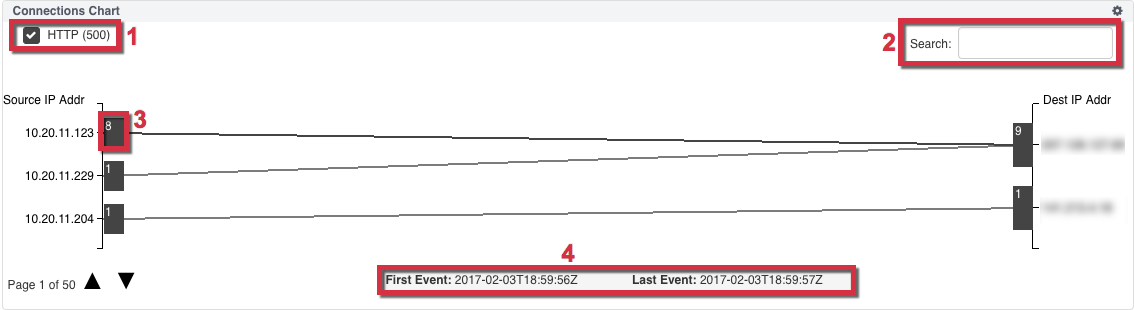
1) Filters | 3) Count of the documents transferred |
2) Search Field | 4) Timestamp for the first and last connection event |
Each source IP to destination IP connection shows the number of documents transferred between the hosts. Hover over this number to view additional metadata, attachments, the JSON file, and download and reconstruct the PCAP associated with the host connection. If multiple events are associated with the host connection, use the scroll bar within the box to view additional data about each event. You can display a maximum of 5000 connection events and a maximum of ten events per page. See Performing Forensic Analysis with NDR for instructions on using the Protocol Connections chart to reconstruct PCAP.
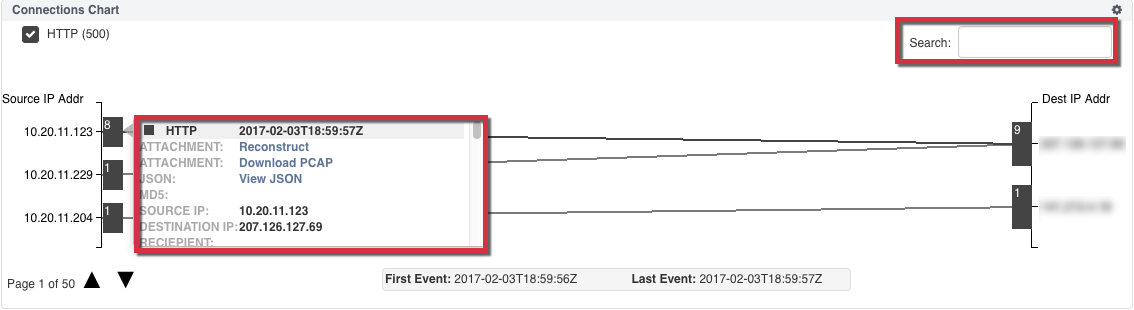
The Protocol Connections chart also provides a search field and dynamic filters based on the document types captured for all events within your host connections. Use the search field to refine your session results by entering a specific term or value or clicking on a specific source or destination IP address to automatically enter it in the search field. Use the checkbox filters to refine your session results by file types. For more details, see Filtering with the Protocol Connections Chart [PROBLEM LINK].
To add a Protocol Connections chart to your dashboard:
From the selected dashboard, click the Add Component button and select Protocol Connections.
Name the widget and click Add Component to save the widget to your dashboard.
Click the search icon in the Query Bar to run your query and display the results.
(Optional) Use the Settings icon in the Protocol Connections panel to configure your chart size. You can display 1-5000 connection events in the chart.
Note
Graphical views that exceed 500 records may slow down your browser performance.