You can enter date and time taxonomy in the search bar to refine the selected calendar range or specify a range that exceeds what the calendar accepts. The criteria in the search bar take precedence over the criteria in the calendar.
Important
The date and time you type in the search bar must be enclosed in single or double quotation marks (for example,
eventtime>"2022-04-07T01:10"). However, if you use a pivot option from a parsed field to add a date and time to the search, quotation marks are not needed. For details about pivot options, see Pivoting from event data.
Commonly searched timestamp fields include eventtime and meta_ts. The eventtime timestamp is created when a log event (such as a user opening a PDF file) occurs in your network. The meta_ts timestamp is created when a log ingestion device or service receives that log event from your environment and sends it to Helix Enterprise. The meta_ts timestamp tracks the event through the Helix Enterprise lifecycle. Both timestamps include the date and time to the millisecond.
The meta_ts timestamp is displayed in the UTC field at the top left of the event details section in search results. This is the timestamp used to evaluate a search query and evaluate start and end expressions. Search results are displayed in meta_ts timestamp order by default.
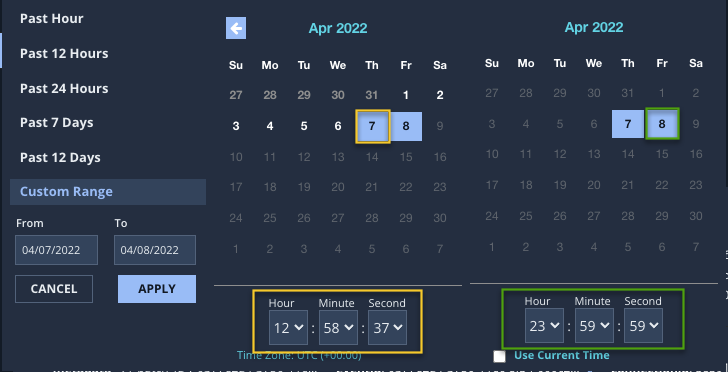
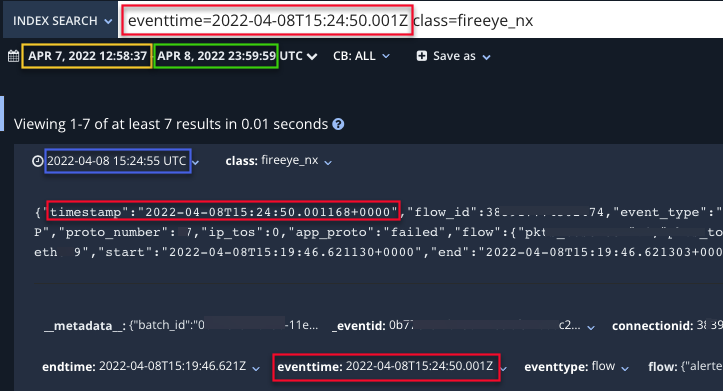
The following example illustrates the relationship between timestamps in the calendar and in event details in search results. In this example, the custom date range for the search begins with April 7, 2022 at 12:58:37 p.m. and ends with April 8, 2022 at 23:59:59 p.m. The original search query was class=Trellix_nx, which returned all events of that class within the custom date range. To refine the search, eventtime=2022-04-08T15:24:50:001Z was added to the query.
The timestamps highlighted in yellow represent the start date for the query, and the timestamps highlighted in green represent the end date. The timestamp highlighted in blue is the meta_ts timestamp, the time Helix Enterprise received the event. The timestamps highlighted in red represent the timestamp that was added to the original query to refine the query results.
Note
For details about the TQL syntax and additional examples, see the TQL Reference Guide.