You can configure the EDR Telemetry Store node roles during the initial installation or modify them later to expand the cluster. Before configuring node roles, review the following requirements to ensure cluster stability and data integrity.
Cluster-Manager: For a production setup, configure exactly 3 dedicated cluster-manager nodes. We recommend that you keep this number fixed at 3 when adding data nodes.
Caution
Do not configure exactly 2 cluster-manager nodes. A two-node configuration creates a high risk of a split-brain scenario.
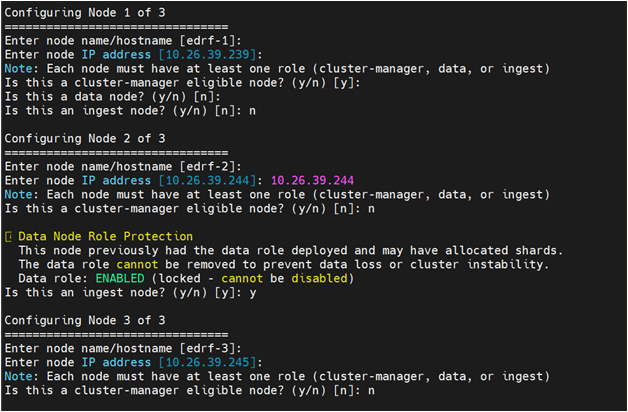
Data Lock: Once a node is configured with the data role, you cannot remove that role. The appliance enforces a data lock mechanism to prevent data leakage.
For example, if you start with a single node (which acts as a data node by default), it retains the data role even if you add new nodes later.
Configure node roles during initial setup
Follow these steps to configure node roles on a new EDR Telemetry Store appliance:
Log on to the EDR Telemetry Store appliance using SSH.
ssh admin@<IP_address>
Start the setup wizard:
enable configure opensearch cluster setup
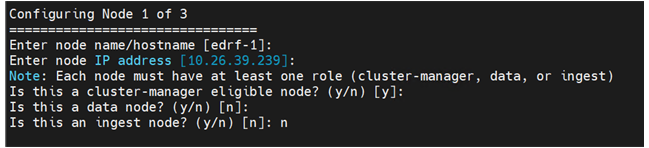
When prompted for the node configuration (Step 2), configure the following settings for each node in your cluster:
Node name/hostname: Enter a name for the node.
Node IP address: Enter the IP address of this appliance (noted in Step 4).
Node roles: Type
yornto assign or decline the specific roles (cluster_manager, data, or ingest).
After the configuration is generated, deploy the cluster:
opensearch cluster deploy
Modify node roles
Follow these steps to change roles for existing nodes or add new nodes to the cluster configuration:
Follow the steps 1 - 2.
From the main menu, type
3to select Node Configuration.Update the configuration for each node:
Node name/hostname: Enter the node name.
Node IP address: Enter the IP address.
Node roles: Type
yornto modify the cluster_manager, data, or ingest roles.Note
You cannot disable the data role on an existing data node.
When the Configuration Menu appears, type
5to regenerate the configuration file.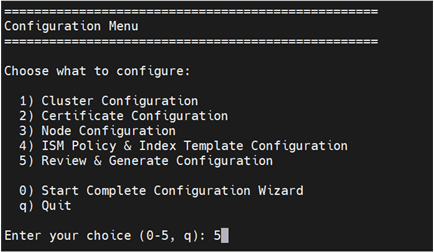
After the configuration is regenerated, deploy the cluster:
opensearch cluster deploy