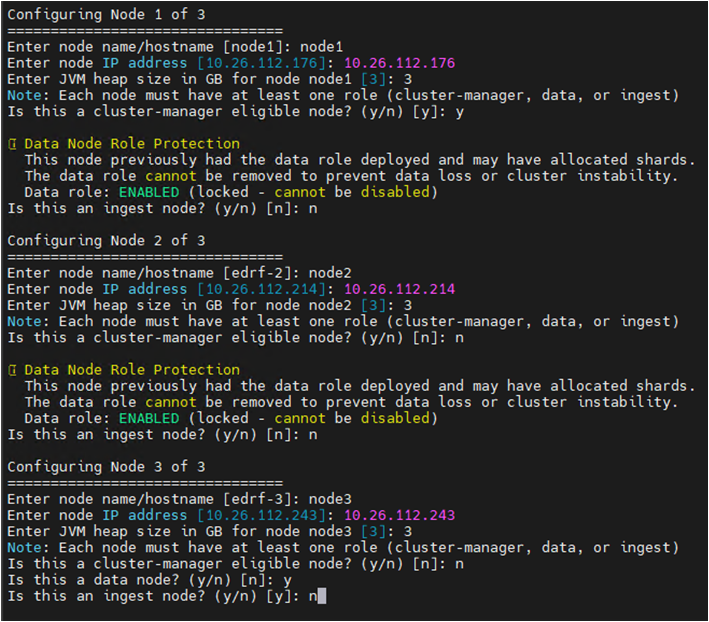
In this section, you configure the details for the node you defined in Step 2.
Node name/hostname: Enter a name for the node.
Default value:
edrf-1Node IP address: Enter the IP address of this appliance (noted in Step 4).
JVM heap size: Enter the JVM heap size.
Default value:
1 GBNote
Set this value to approximately 50% of the total appliance memory and up to a maximum of 31 GB.
For multi-node clusters, the wizard prompts you to enter a JVM heap size for each node individually based on the total number of nodes configured. These values are assigned to all nodes: cluster manager, data, and ingest.
Node roles: Type
yornto assign the node role. Ensure at least one role is assigned to each node. For more information, see Configure EDR Telemetry Store node roles.
ISM Policy Configuration and Index Template Configuration: Press Enter to accept the default setting. These settings can be adjusted later if needed.
When prompted with Do you want to modify these ISM and Index template settings?, type
nto accept the default configuration.Press Enter to continue (or q to quit).
Note
The default ISM policy sets a data retention period of 30 days. To prevent the disk from filling up, the appliance automatically purges the oldest data when disk usage reaches 78%. The minimum value for Delete Index Age is 14 days.
DNS Validation: At the DNS Validation screen, type
yand press Enter to continue.This step validates DNS resolution for the ingestion and search nodes (for example,
ingestion.domain.comandsearch.domain.com). If you access the EDR Telemetry Store using DNS, ensure this validation is successful.Note
For an IP-based configuration, the wizard displays a DNS resolution warning as the connection does not rely on DNS name resolution.
Configuration Summary and Confirmation: Review the configuration summary. To approve and create the configuration file, type
yand press Enter.ePO server credentials: Enter your ePO server credentials when prompted to collect the CA certificates.
The wizard completes the setup and generates a configuration file.
Run the following command to deploy the EDR Telemetry Store cluster:
opensearch cluster deploy
For more information, see Deploy the EDR Telemetry Store cluster.
Note
If you need to modify the configuration, you can run the wizard again to create a new configuration before you deploy the cluster. To do this, run the command:
opensearch cluster setup.